5.7 Set Standby Value
Before the Standby function can be activated, the user must rst congure
the settings. The values set with this procedure are only for Standby
temperature and must be individually set for every zone. When Standby is
activated, those zones with any Standby value congured will reduce their
temperature.
The default or factory Standby setting is 100°C or 180°F. If your controller is
set in Celsius at 300ºC, temperature will lower to 200ºC. If your controller is
set in Fahrenheit at 580ºF, temperature will lower to 400ºF.
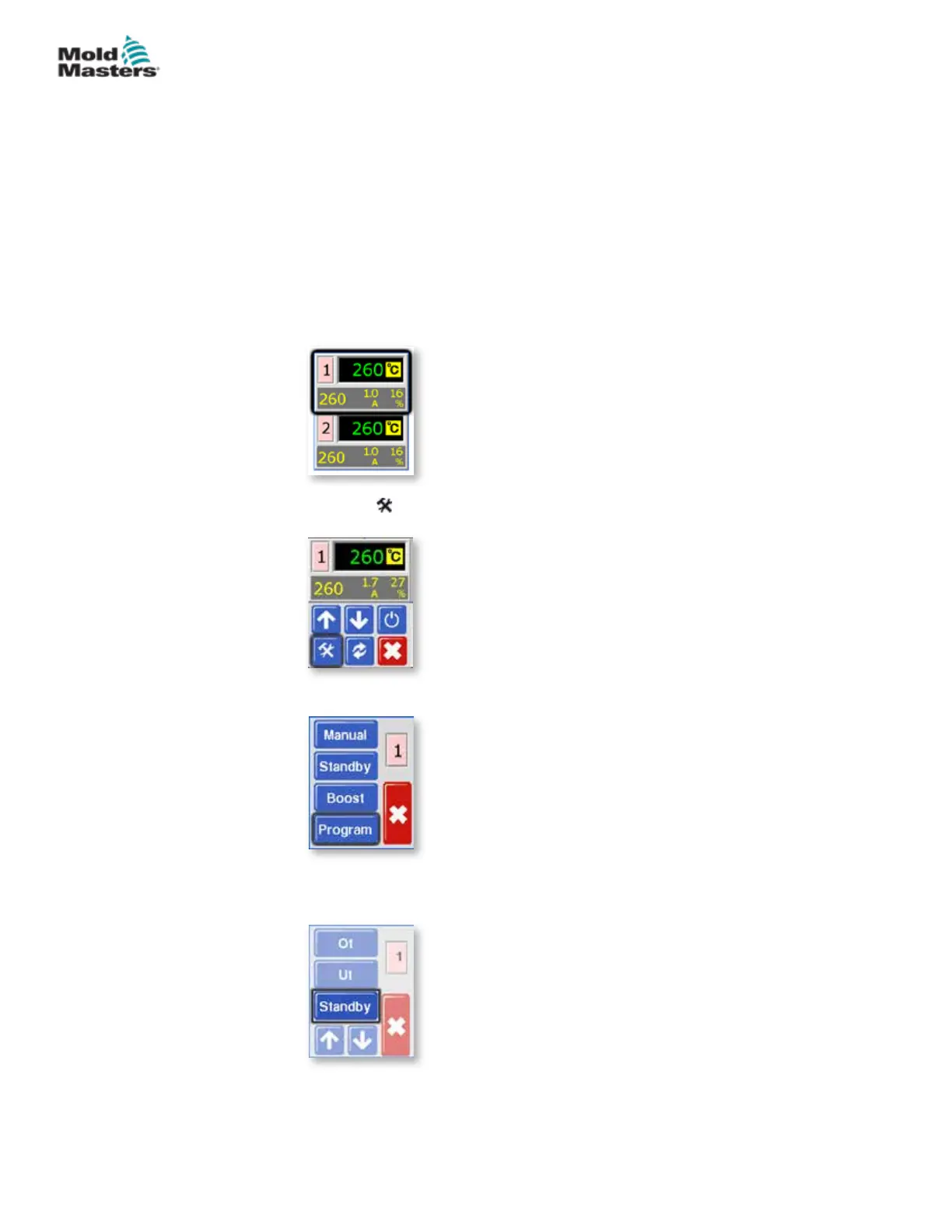
1. From the Temperature Display screen, choose either zone to obtain the
initial menu.
2. Choose [ ] to obtain the Function menu.
3. Choose [Program] to obtain the Program menu.
4. Choose [] or [] to nd the page containing a Standby option. Choose
the [Standby] button to open the value setting option.
5-13
© 2020 Mold-Masters (2007) Limited. All Rights Reserved.
SETUP
MT Controller User Manual



 To Next Page