User’s Guide ValueJet 1304
Product overview
18 AP-75780 - Revision 1.3
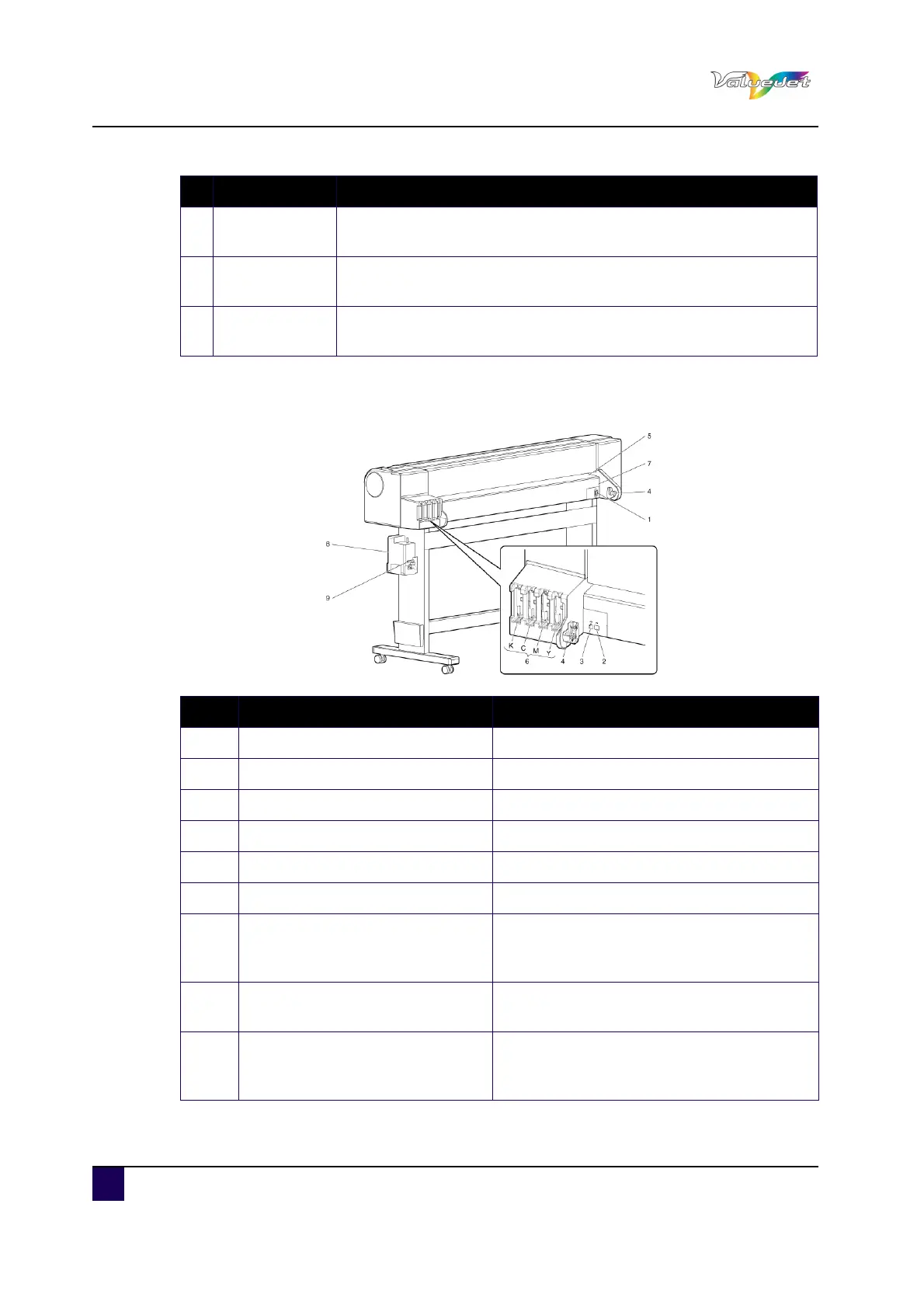
2.1.2 Rear section
7
Media cut
groove
Installed inside of the front cover. Used to cut media straight.
8 Pressure rollers
Installed inside of the front cover. Press and hold the media when
printing.
9 Platen
Installed inside of the front cover. The heater (platen heater) to dry
ink is installed.
N° Description Function
N° Description Function
1 AC inlet Used to connect the power cables
2 Network interface connector Connects a network interface cable
3 USB connector Not used in this printer
4 Scroller receiver Set the scroller when roll media is used.
5 Media feed slot Used to feed media
6 Ink cassette slot Insert the ink cassette
7 Media guide
Used to feed the media smoothly through.
The heater (pre heater) to warm media is
installed
8 Waste fluid tank
Used to collect waste ink discharged from the
printer.
9 Waste fluid valve
Open and close when discharging the waste
fluid from the waste fluid tank. the default
position is closed.















 To Next Page