VJ-1624X/1624WX/1924WX OPERATION MANUAL 7 Troubleshooting
7.1 Malfunctions and failures 329
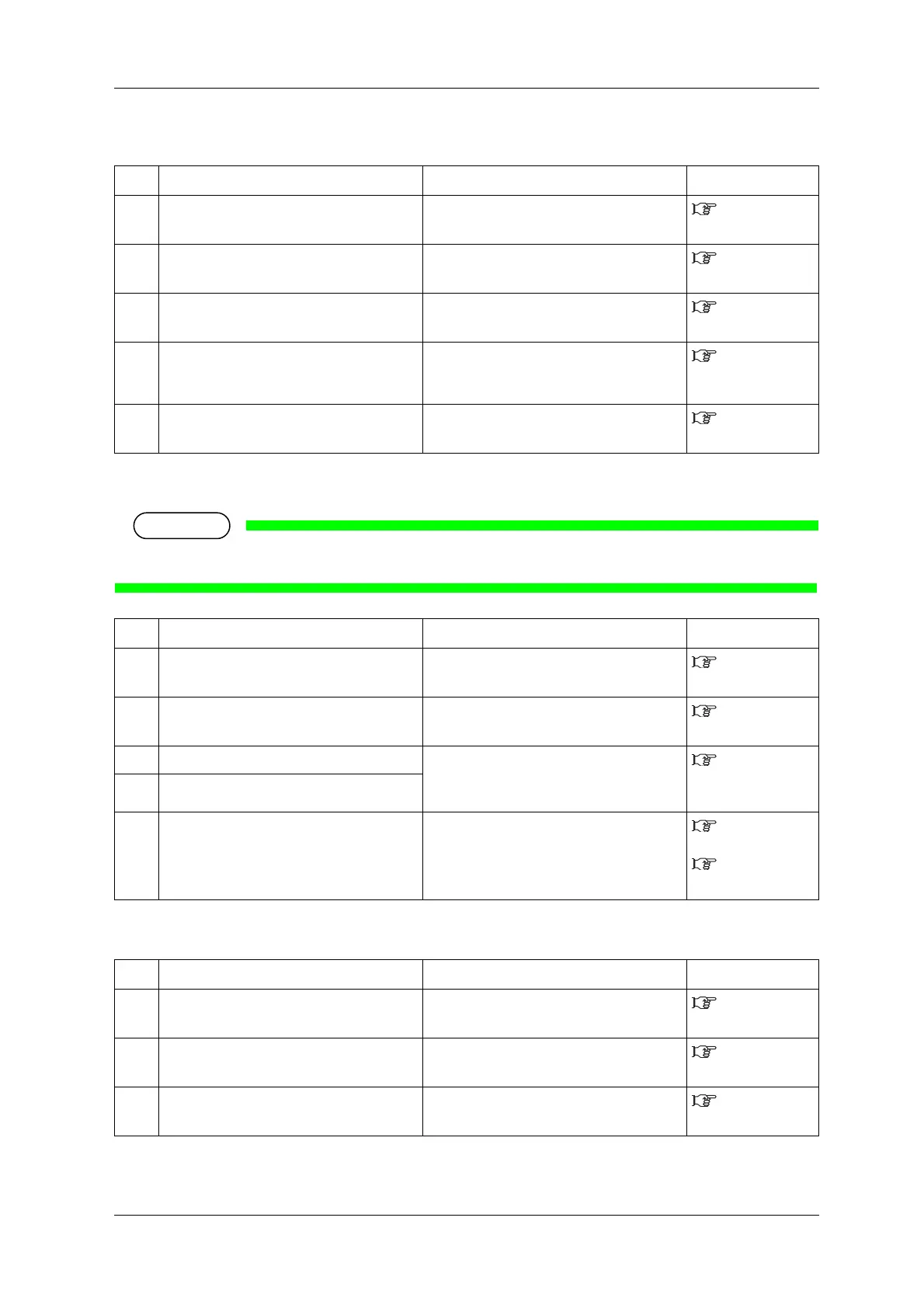
(3) The wrong media size is set during initialization
(4) Media jams frequently occur
If media other than the recommended one is used, correct media feeding cannot be assured.
(5) The media veers during printing
No. Possible cause Remedy Reference
1 Are you using the recommended media? Use the recommended media.
4.2.1 Media
type
2 Is the media loaded at an angle? Set the media straight.
3.4.2 Setting
Roll Media
3 When the media is set, does it curl upward? Straighten the media or set a new media.
3.4.2 Setting
Roll Media
4 Is the printer used in an environment other
than the one specified, such as near an air
conditioner?
Only use the printer in an environment that is
specified for use.
4.2.1 Media
type
5 Are you using media that has been printed on
already?
Use a new media.
4.2.1 Media
type
No. Possible cause Remedy Reference
1 Are you using the recommended media? Use the recommended media.
4.2.1 Media
type
2 Is the media used in an environment other
than the one specified?
Use the media in the specified environment.
4.2.2 Cautions
on handling media
3 Are you using the old media? Replace it with the new media.
6.1.2
Replacing Roll
Media
4 Are you using the creased or wrinkled media?
5 Does the media bend? Use the recommended media.
When using media other than the
recommended one, set the Vacuum Fan menu.
4.2.1 Media
type
5.1.1.1.7
Vacuum Fan menu
No. Possible cause Remedy Reference
1 Are you using the recommended media? Use the recommended media.
4.2.1 Media
type
2 Is the loading position of the media correct? Load the media correctly.
3.4.2 Setting
Roll Media
3 Is the roll media loaded correctly? Load the roll media correctly.
3.4.1 Loading
roll media






 To Next Page