529
C
The Photo Shooting Menu: Shooting Options
[Overlay mode]
•
[Add]: The exposures are overlaid without
modification; gain is not adjusted.
•
[Average]: Gain is adjusted before the exposures are
overlaid. The gain for each exposure is equal to 1
divided by the total number of exposures taken. For
example, in a photo made by combining two
exposures, the gain for each exposure will be set to
1
/
2
,
while in a photo combining three exposures, gain will
be set to
1
/
3
.
•
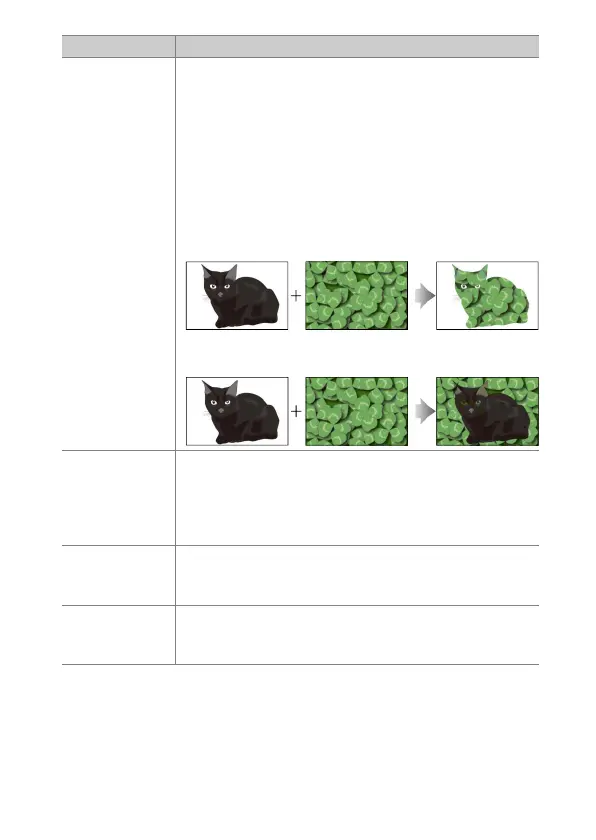
[Lighten]: The camera compares the pixels in each
picture and uses only the brightest.
•
[Darken]: The camera compares the pixels in each
picture and uses only the darkest.
[Save
individual
pictures (RAW)]
•
[ON]: Save both the multiple exposure and the shots
that make it up; the pictures are saved in NEF (RAW)
format.
•
[OFF]: Discard the individual shots and save only the
multiple exposure.
[Overlay
shooting]
If [ON] is selected, earlier exposures will be
superimposed on the view through the lens. The earlier
exposures aid composition of the next shot.
[Select first
exposure
(RAW)]
Choose the first exposure from the NEF (RAW) pictures
on the memory card.
Option Description


 To Next Page