The Intelligent Surveillance Solution
NUUO NVR/DVR/Hybrid NDVR System
- 103 -
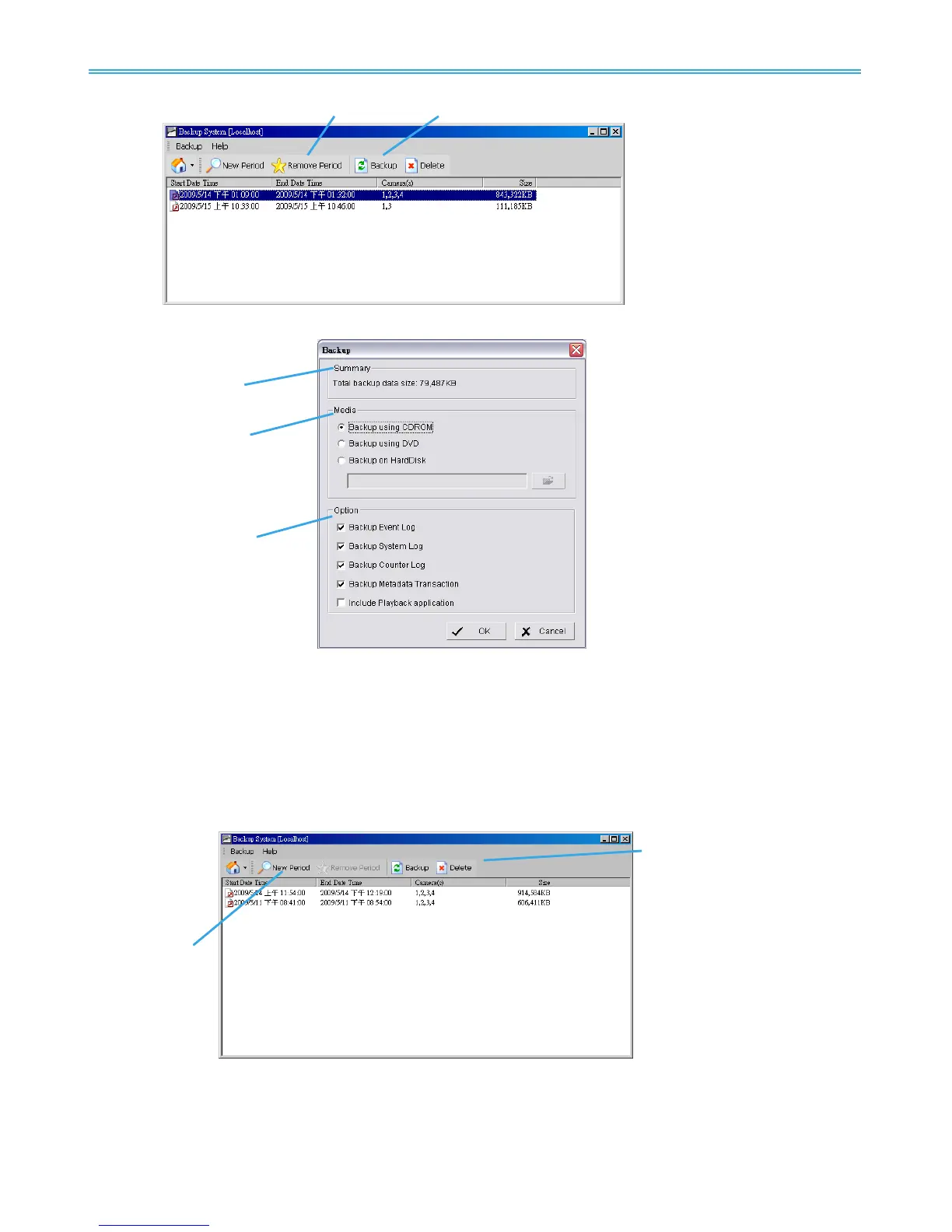
Step 9: Click the Backup icon to obtain Backup panel.
Step 10: Summary: Check the summary section to see the size of the file(s).
Step 11: Media: Choose the path you want to save the file or burn the file into a CD (direct CD burning for
Windows XP only), DVD or on Hard Disk.
Step 12: Option: Select the log information you would like to backup (Event Log, System Log, Counter Log
and Metadata Transaction), and then click OK.
8.2 Delete Recorded files
Step 1: Click on “New Period” to obtain the Select Date Time Period panel.
Step 2: Follow steps 3-7 above from the backup section to select data period which you want to delete.
Step 3: Click on the Delete icon and delete all the data in the backup list from the database.
Note: Deleted video cannot be recovered.



 To Next Page