The Intelligent Surveillance Solution
NUUO NVR/DVR/Hybrid NDVR System
- 46 -
3.1 Day / week Mode
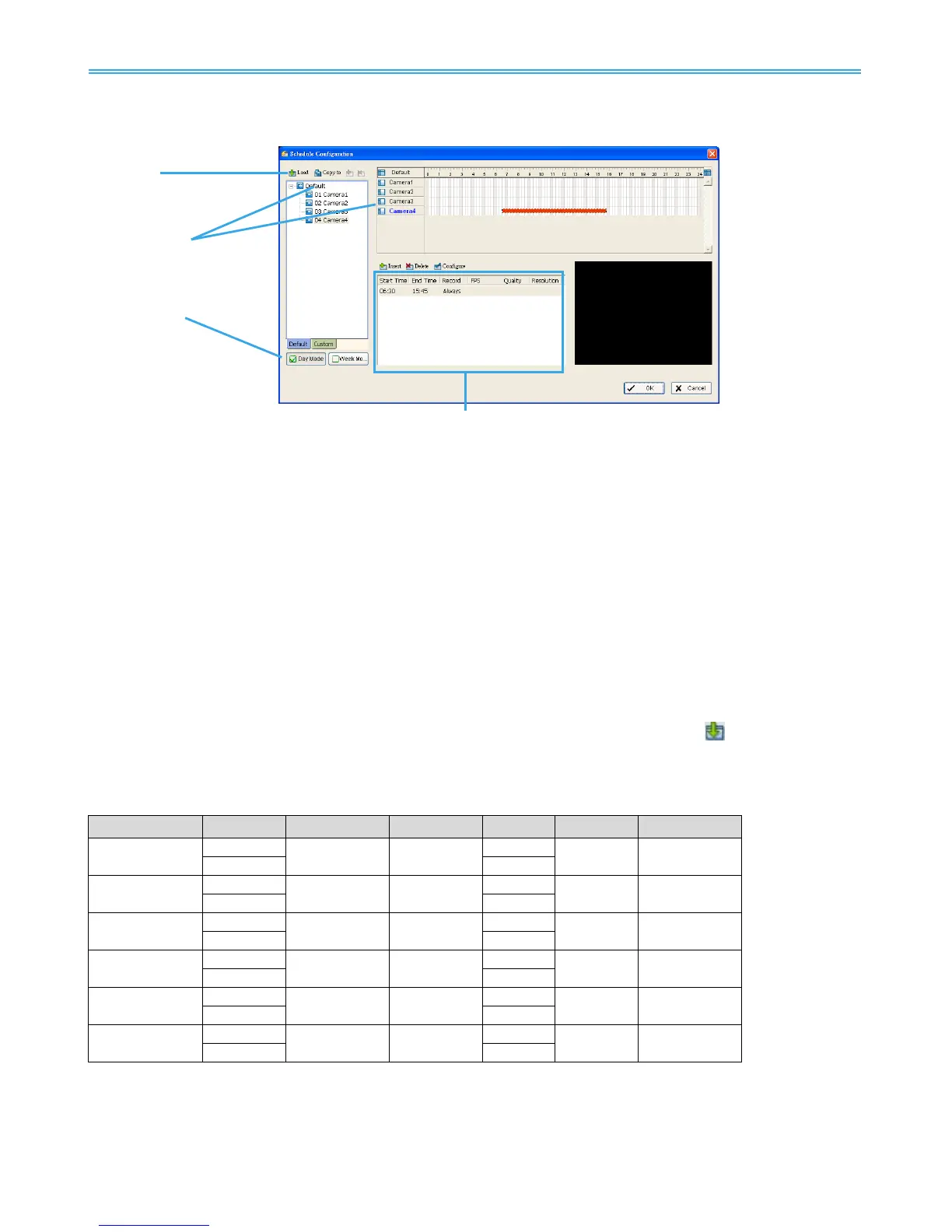
Load
Camera /
Channel
Day /Week Mode
Day Mode: Schedule the cameras to turn the recorder on and off at the same time every day
according to your setting.
Week Mode: Allows you to schedule each camera for a different day of the week, additionally, you
may assign extra holidays in the “Week” mode
Schedule Details: An outline of start time, end time, Record mode, frame rate, quality and resolution.
Please note these values refer to configured settings. Actual performance may vary according to
camera and hardware settings.
To setup the time schedule for each camera, you may
1. “Load” the preset modes or
2. “Insert” a new schedule manually or
3. “Copy to” other cameras after manual setup.
3.1.1 Load Preset Modes
The system provides six modes to quickly setup recording schedule. Simply click on the
Load for the
drop-down menu.
Refer to the below tables for the definitions of each mode in each series.
IP+ series (IP camera)



 To Next Page