The Intelligent Surveillance Solution
NUUO NVR/DVR/Hybrid NDVR System
- 62 -
4.2.5 Action Type - Phone Call
The system will call a given phone number when an unusual event is detected.
* Note: This function is not available under NUUO NVR Lite License.
Step 1: Select the Phone Call action and then click OK.
Step 2: The responding window will popup to Select Contactor and key-in the message which want to
append on SMS content. (You can choose one more contact at once).
Note: To setup the phone number and make an audio record for the phone call, go to Config - Setup
- Hotline. See Configuration on page 74l.
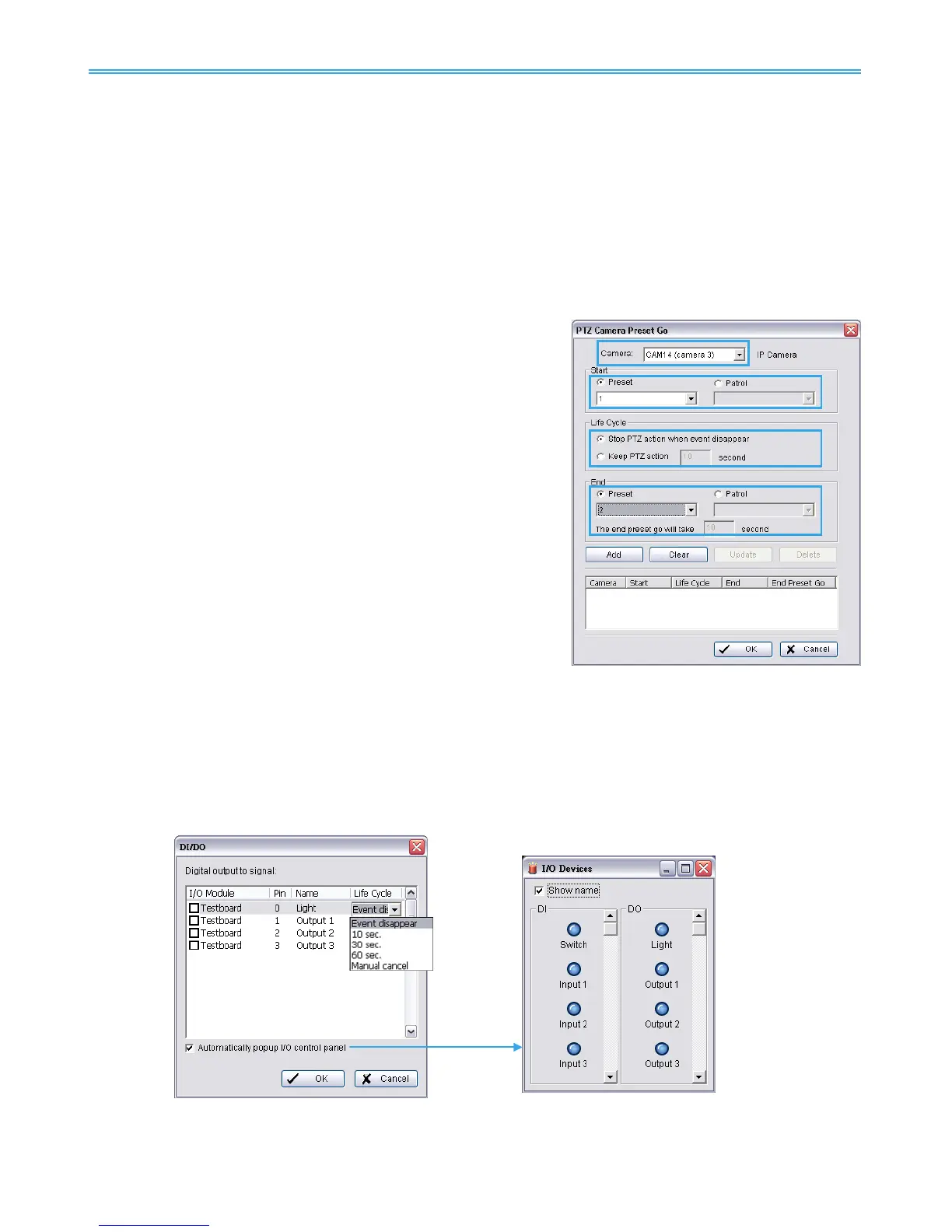
4.2.6 Action Type - PTZ Preset Go
The PTZ (pan/tilt/zoom) camera will go to a preset point or auto patrol when an unusual event is
detected.
* Note: This function is not available under NUUO NVR Lite license.
Step 1: Select the “PTZ Preset Go” action and then click OK.
Step 2: The responding window will pop up to PTZ Camera Preset Go. Click the “PTZ Preset Go” indicator to
modify the setting.
Step 3: Set the action of cameras which you want to trigger by events.
For example: Please follow below steps to setup this function.
Set the action of camera 1:
1. Choose camera 1.
2. Set the start, end preset points.
3. Select the Life Cycle.
4. Click on Add.
Set the action of camera 2:
5. Choose camera 2.
6. Set the start patrol and end patrol.
7. Select the Life cycle
8. Click on Add.
9. Finally click on Ok to save all setting of cameras.
Note: Configure your PTZ camera before using this function. See Config on page 72 for PTZ camera
configuration.
4.2.7 Action Type – DI/DO
To trigger Digital input/output devices connected to the system, such as alarm lights and sirens.
Step 1: Select the “DI/DO” action and then click OK.



 To Next Page