The Intelligent Surveillance Solution
NUUO NVR/DVR/Hybrid NDVR System
- 70 -
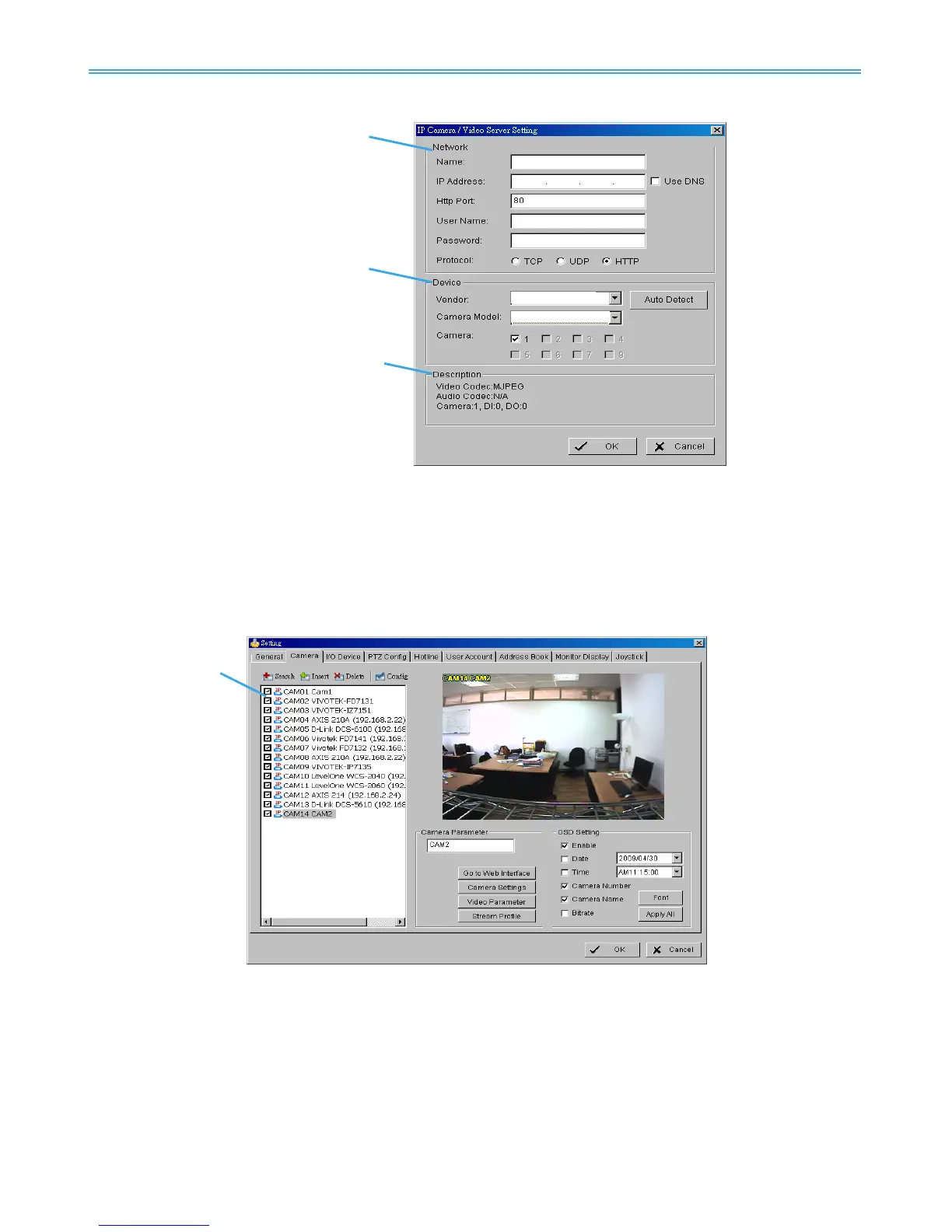
5.2.2 IP Camera / Video Server Setting panel
Network: Fill in required info of the Network field (including Name, IP Address, Http Port, User Name, Password
and Protocol) referring to the instruction provided by the camera manufacturer. Check “Use DNS”
to use domain name instead of IP address.
Device: Choose the IP camera manufacturer from the drop-down menu. Alternatively click on “Auto
Detect” and the detected vendor /model name will show in the box.
Description: Shows information for the IP camera.
5.2.3 Camera Parameter
Camera List: The camera(s) connected to the system will show on the panel, click the name of the camera
to adjust the setting.
Camera Parameter:
Camera Name: Name the camera.
Go to Web Interface: Go to vendor’s website interface to configure the camera setting (optional).
Camera Settings: Set the camera parameter offered by camera vendor.
Video Parameter: Adjusts the video’s brightness, contrast, saturation, and color hue values.
Lens Setting: ImmerVision Lens is currently supported. Click to enable lens or setup configurations, such
as camera position.
Stream Profile: Stream profiles are pre-defined to preferred settings which will respond from the query



 To Next Page