The Intelligent Surveillance Solution
NUUO NVR/DVR/Hybrid NDVR System
- 43 -
2.10 Setting
Click on the General Setting button
and go to Setting
for system configurations.
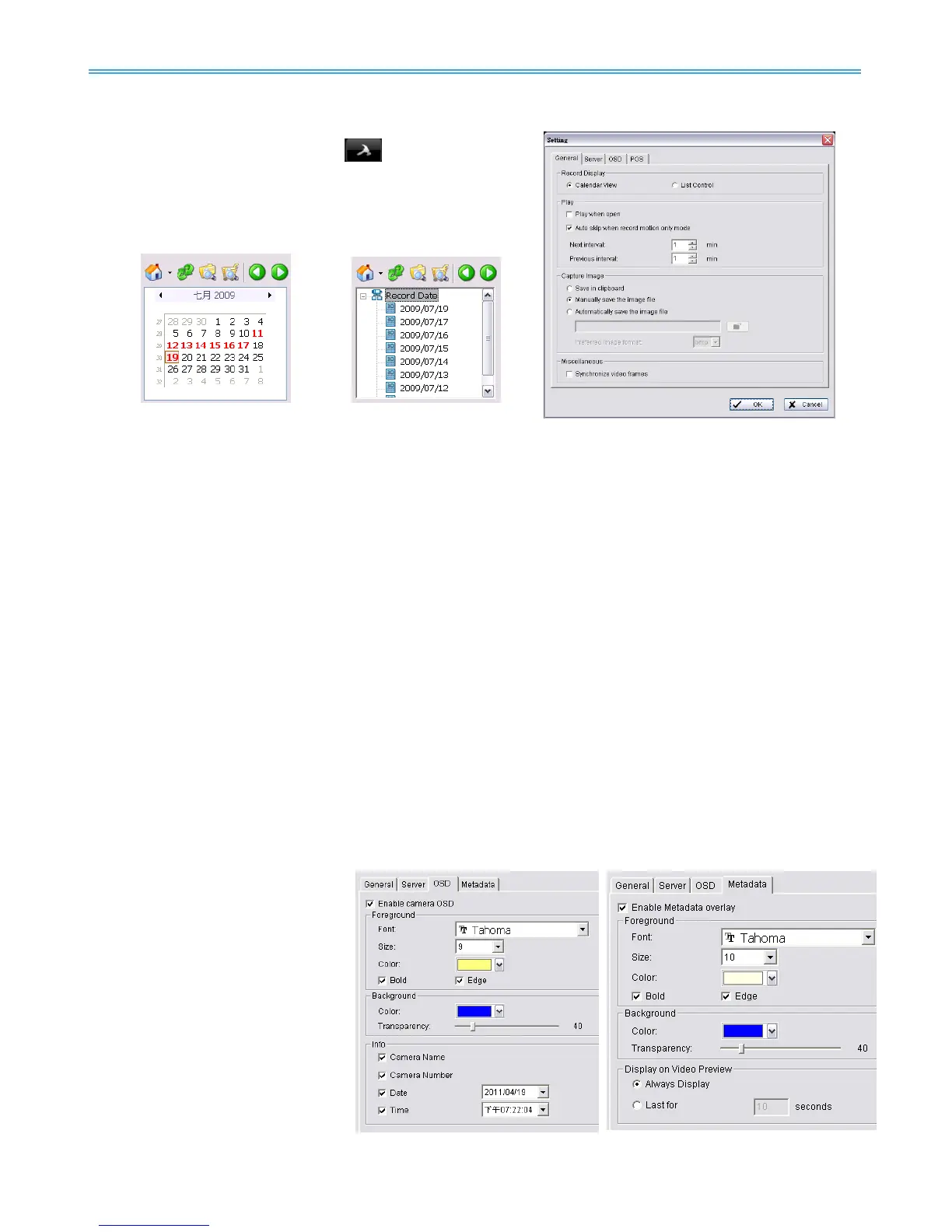
Record Display setting:
Calendar View: Choose to display records under
calendar view.
List Control: Choose to display records under checklist.
Play setting:
Play when open: Check the option and set the system to start playing the video clip every time a
record is withdrawn.
Auto skip when record motion only mode: Check the option to set up the system to automatically skip
to the points where there were motions recorded.
Next interval: Set the interval with which the video goes forward when you click on the “Next” icon on
the control panel.
Previous interval: Set the interval with which the video goes backward when you click on the “Previous”
icon on the control panel.
Capture Image setting: Sets how you want to save the image.
Save in clipboard: The image will be saved in the clipboard; image will be available to paste elsewhere.
Manually save the image file: You can manually select where you want to save the image. Name the
saved file, and choose the file format you want to save as.
Automatically save the image file: By pre-setting a path/URL and the image format, the system will
automatically save the image accordingly when you click the Save button in the control panel.
Miscellaneous
Synchronize video frames: Select this option to avoid display problems that may occur under
high CPU loading.
Server Setting
Remote Playback Site Management. Please refer to page 44 for details.
OSD Setting
Enable Camera OSD to display
video information on recorded
video. Information includes
camera name, camera number,
date and time. User can also set up
OSD font; include the font, size, font
color and any font effects desired.
Metadata Overlay Setting
* not available under NUUO NVR
Lite License
Enable metadata overlay to adjust
Font, Size, Color, Bold, Edge in
“Foreground” section, color and
transparency in “Background” section, and then adjust display settings in “Display on Video Preview”.



 To Next Page