The Intelligent Surveillance Solution
NUUO NVR/DVR/Hybrid NDVR System
- 80 -
5.10 Auto Backup Setting
Configure your system to automatically backup video data on a daily or weekly basis.
* Note: This function is not available under NUUO NVR Lite license.
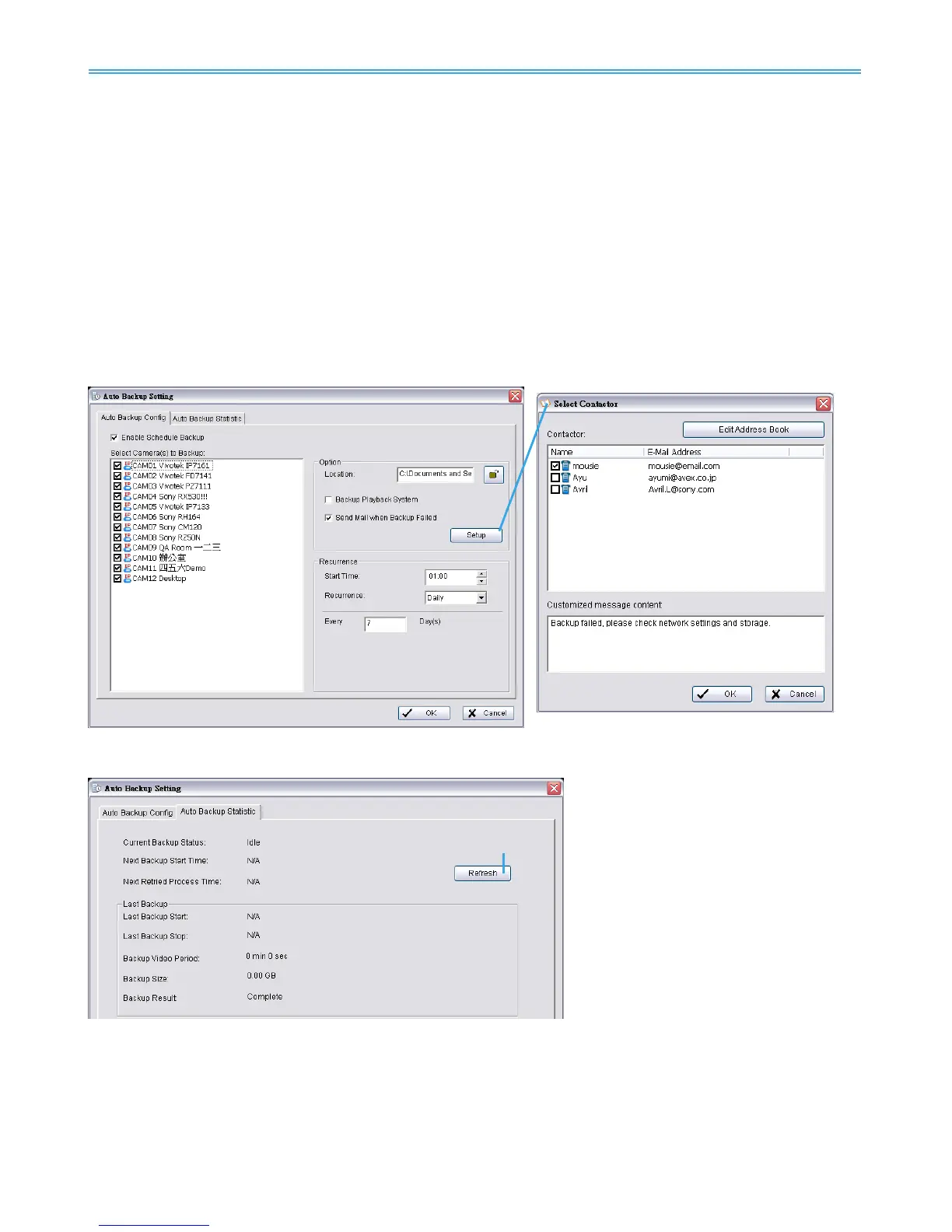
Auto Backup Config: Configure auto backup settings on this page.
Enable Schedule Backup: Check to enable backup process.
Select Camera(s) to Backup: Choose all channels to backup.
Option
Location: Define backup route.
Backup Playback System: Check to backup the playback application with each process.
Send Mail when Backup Failed: Check to receive an email notification when backup fails. Click Setup
for email configuration. Select one or more contacts from the address book and configure customized
message content.
Recurrence: Choose start time and Recurrence: Daily or Weekly modes.
Auto Backup Statistic: Shows statistics on current or latest backup status. Click Refresh to update.
Current Backup Status:
Idle: not active or awaiting next backup process
Backup…: Backup under process
Retry…: Previous backup failed, awaiting retry
Next Backup Start Time: Scheduled time for next backup process
Next Retried Process Time: Scheduled time for next backup retry process. N/A when status is Idle or
under Backup.



 To Next Page