The Intelligent Surveillance Solution
NUUO NVR/DVR/Hybrid NDVR System
- 127 -
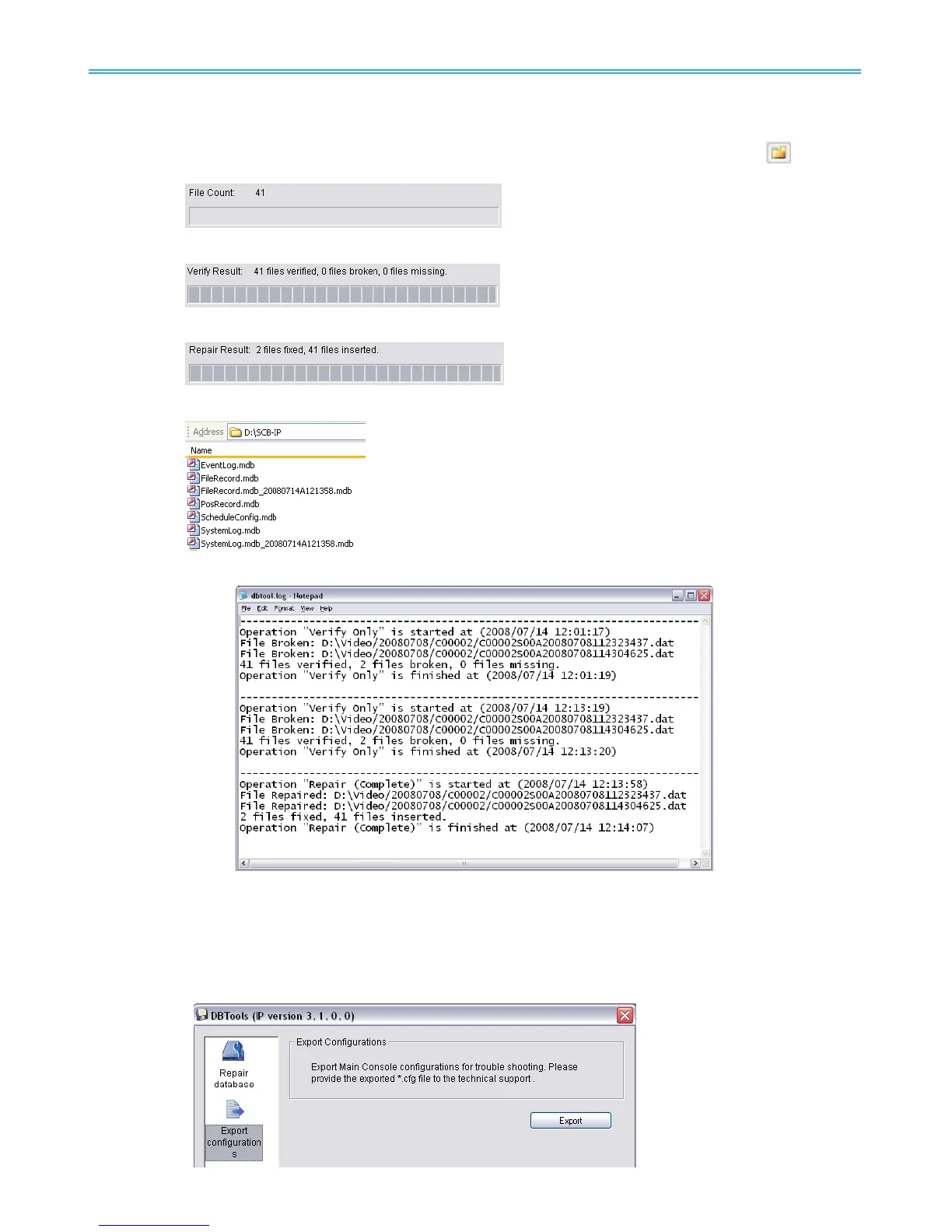
Step 3: Check the video location windows.
The system will list all video locations in table, but if there are any omit, please use
to insert.
Note: After inserting location, the system will show files count below table.
Step 4: Choose the method of “Verify Only”, and click “verify”. This method will only check the files
without modify. Verify result will show how many files broken or missing.
Step 5: Choose the method of “Repair (Complete)”, and click “Repair”. The Repair Result will show how
many files are fixed and inserted.
Step 6: The repaired new database will replace the old one and the original database will change file
names with extended repair date and time as below.
Note: Open Log is a tool to record the repaired database. It will record repair method, file operation,
start time and end time.
1.2 Export Configurations
This tool is used when user wants to export all system configurations to backup, take to another PC for
NUUO technical trouble shooting.
Step 1: Press “Export”.



 To Next Page