The Intelligent Surveillance Solution
NUUO NVR/DVR/Hybrid NDVR System
- 19 -
Add IP camera(s)
Step 1: Execute Main Console.
Step 2: Type in user name and password and log in to the system.
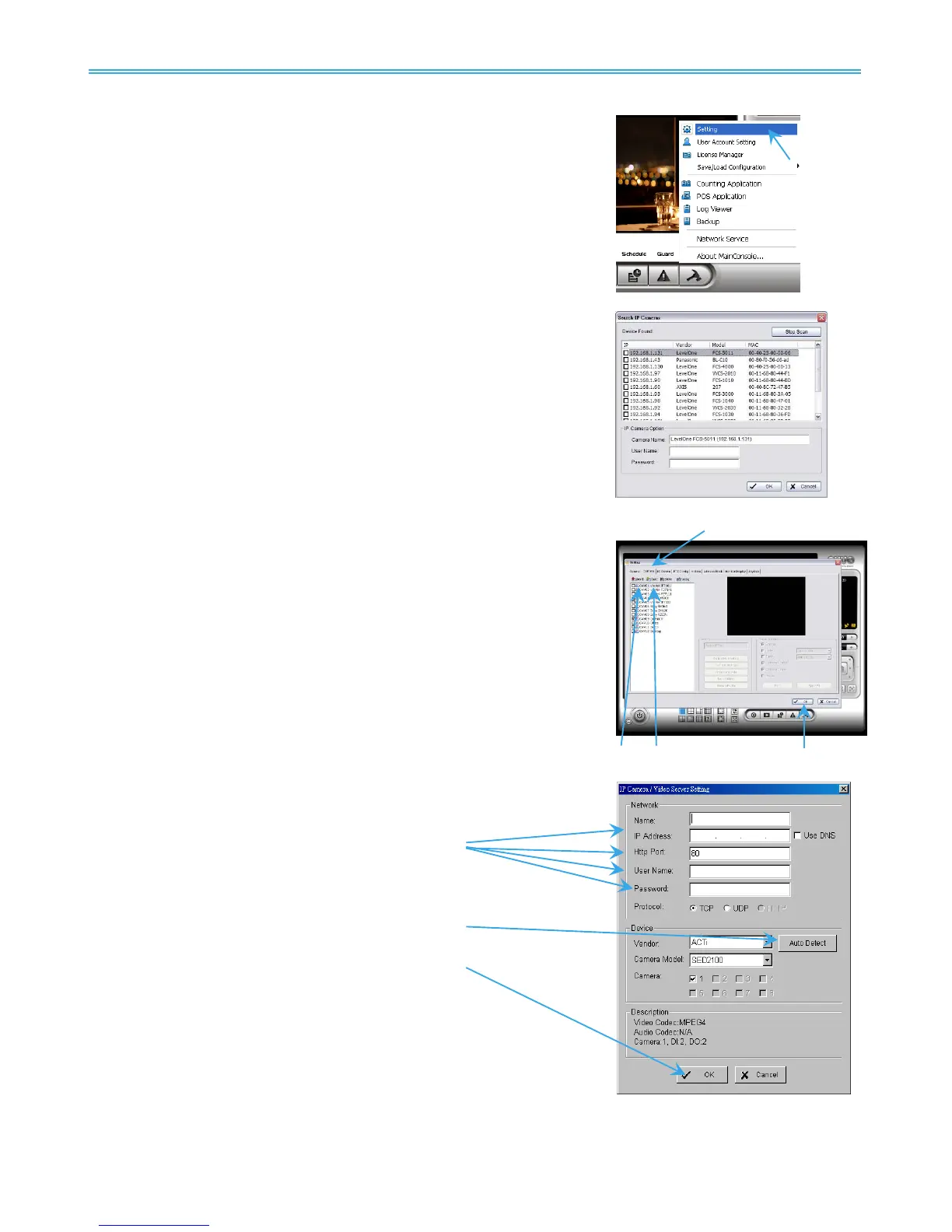
Step 3: In Main Console, go to Config and select Setting to obtain the
Setting panel.
Step 4: Go to Camera tab.
Note: If the IP camera supports UPnP, follow step 5. Otherwise, follow
step 8.
Step 5: Click on Search to detect IP cameras under this local area
network (LAN).
Note: The Search function is available only when the IP cameras
support UPnP.
Step 6: Select one of the IP cameras that are available and enter the
username and password.
Step 7: Click OK to add the camera.
Step 8: Click Insert to insert the IP cameras.
Step 9: Enter the IP address or domain name (check the Use DNS option),
Http
Port, Username, and Password.
Step 10: Select Auto Detect.
Step 11: Select OK to add the camera.
Step 12:
Select OK to exit.



 To Next Page