The Intelligent Surveillance Solution
NUUO NVR/DVR/Hybrid NDVR System
- 118 -
B. License Management Tool
The license of the software should be registered before you start using the Intelligent Surveillance System.
Additional to essential camera licenses, you may also purchase licenses for the metadata application,
including those for POS, LPR and access control.
Execute the License Management Tool to activate the license from dongle or serial number included with
the software package, or de-activate the license then bring it to another PC to activate it again.
Please note different level licenses cannot coexist under one license server.
Upgrade licenses will replace lower level licenses into higher level ones.
Both “Online” and “Offline” status of PC environments are available on executing the tool to “activate” or
“transfer” the license. The following is a total of 4 types of license management process:
- To activate the license with PC connected to network, follow the Activation Online process.
- To activate the license with PC not connected to network, follow the Activation Offline process.
- To de-activate/transfer the license with PC connected to network, follow the Transfer Online process.
- To de-activate/transfer the license with PC not connected to network, follow the Transfer Offline process.
1.1 License Management Tool Overview
1.1.1 Execute License Management Tool
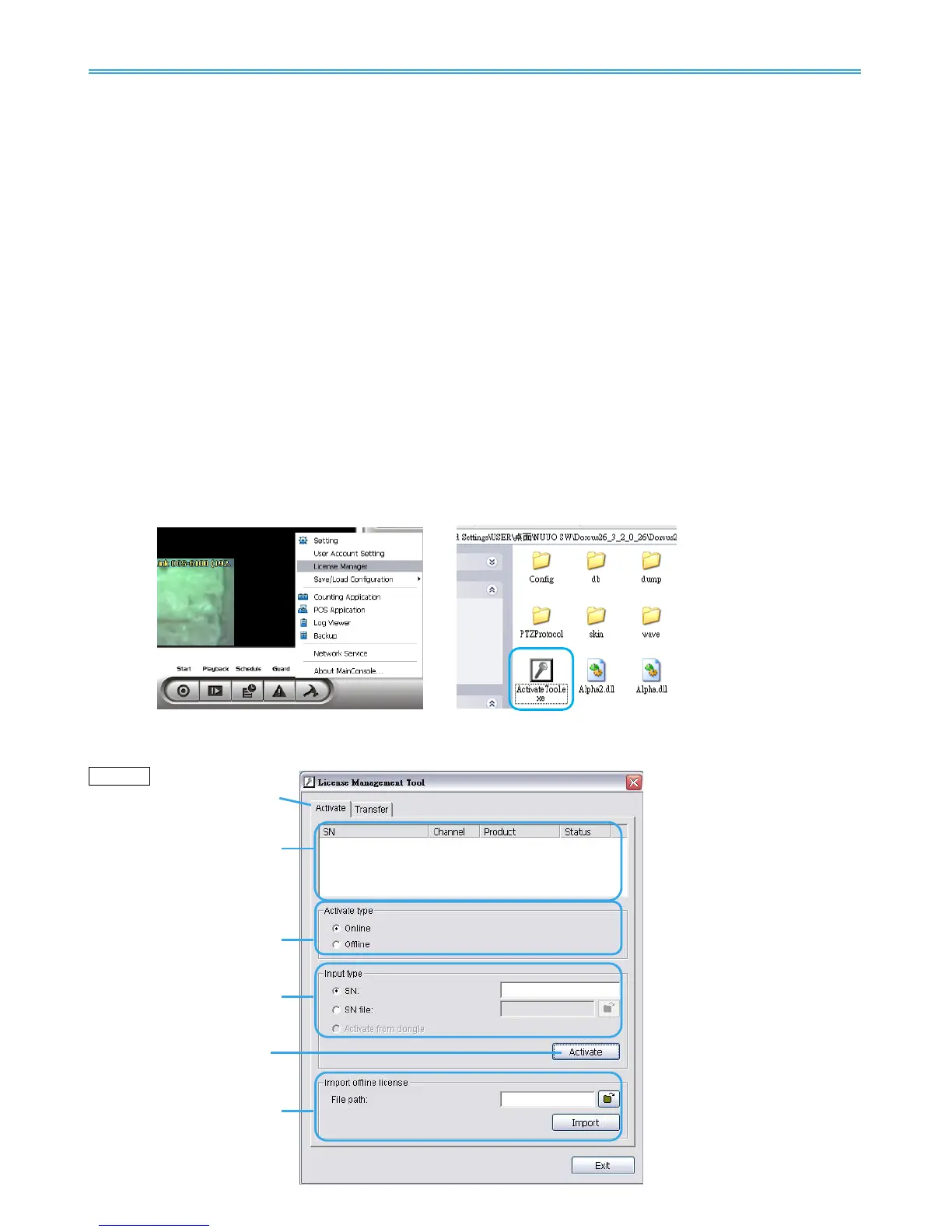
Step 1: Execute License Manager Tool in config menu or installation
folders.
Step 2: The “License Management Tool” will appear. Please refer below for the tool overview.
1.1.2 License Management Tool Overview
Activate



 To Next Page