The Intelligent Surveillance Solution
NUUO NVR/DVR/Hybrid NDVR System
- 136 -
Appendix C – iPhone Browser
NUUO Live Streaming service can handle requests from iPhone’s Safari browser. This section will guide you
how to use this feature with iPhone devices.
1.1 Configuration from NUUO server
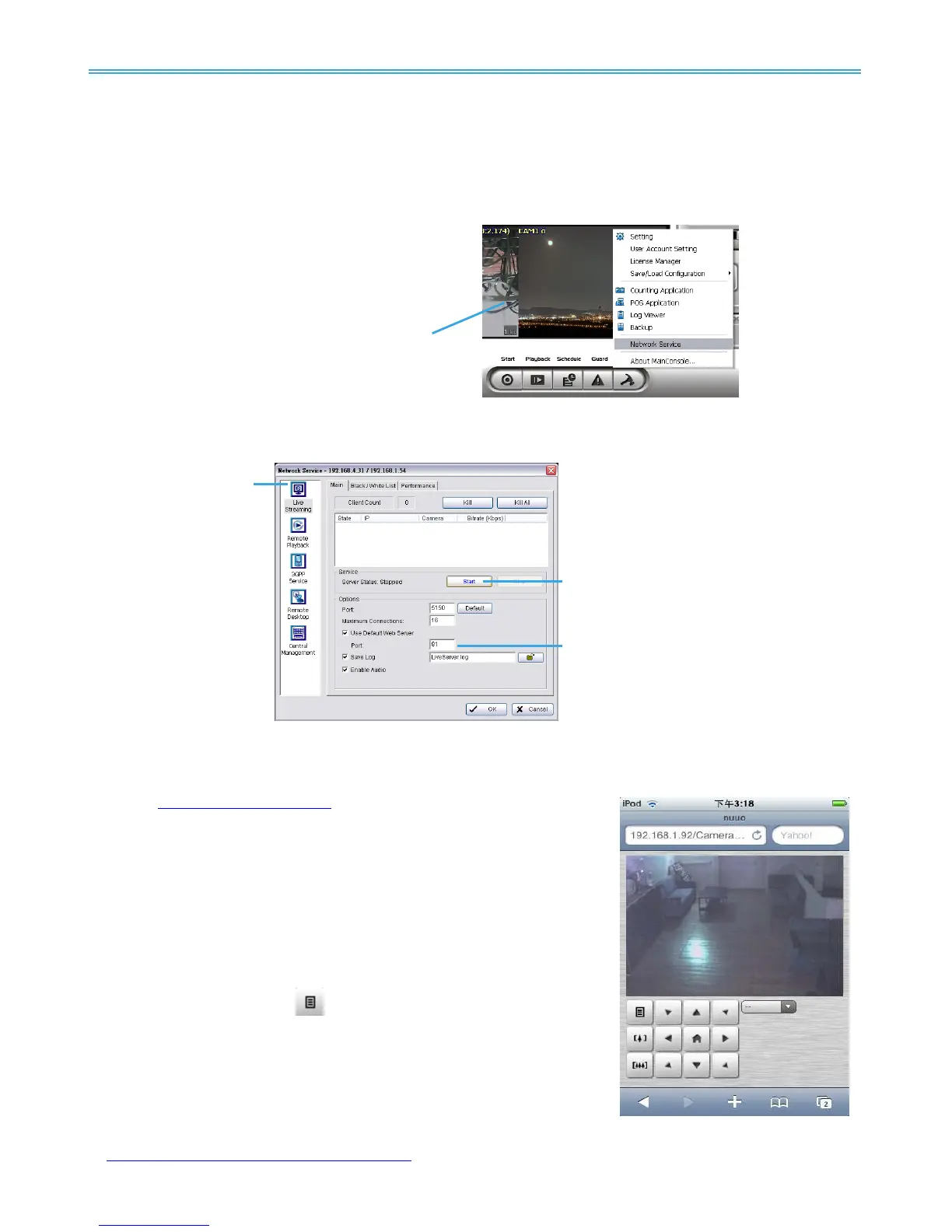
Step 1: Go to “Config” and select “Network Service”
Step 2: Select “Live Streaming”, and then click “Start”.
Note: The “Port” selected here will be the same as the web live view and web playback
.
1.2 Connect to NUUO server
Step 1: Make sure the I-phone is connected to the internet. Open Safari browser and enter the IP address or
DDNS “name” of the server followed by the connecting port.
Example:
http://192.168.1.16:8080/
Note: 192.168.1.16 is the IP address of the server.
8080 is the port specified in “Use Default Web Server” in Network
Service.
Step 2: Enter user name and password to login NUUO MainConsole
Server, select camera to view live video.
1.3 Live Display
To view live video, select camera from list, use touch panel to zoom in
the video.
To switch video, please click
to back to list and select another
camera to view the video.
1.4 PTZ Control
With cameras that support PTZ function, the PTZ panel will show as picture.
User can control camera to pan, tile and zoom in/zoom out manually, or
move to pre-set location by select PTZ preset point from drop down list.
For NUUO’s latest release of iPhone / iPad application based client NUUO iViewer, please log on
to
http://www.nuuo.com/faq.php?node=1315 for more information and product demo videos.



 To Next Page