The Intelligent Surveillance Solution
NUUO NVR/DVR/Hybrid NDVR System
- 18 -
Quick Start
Execute Main Console
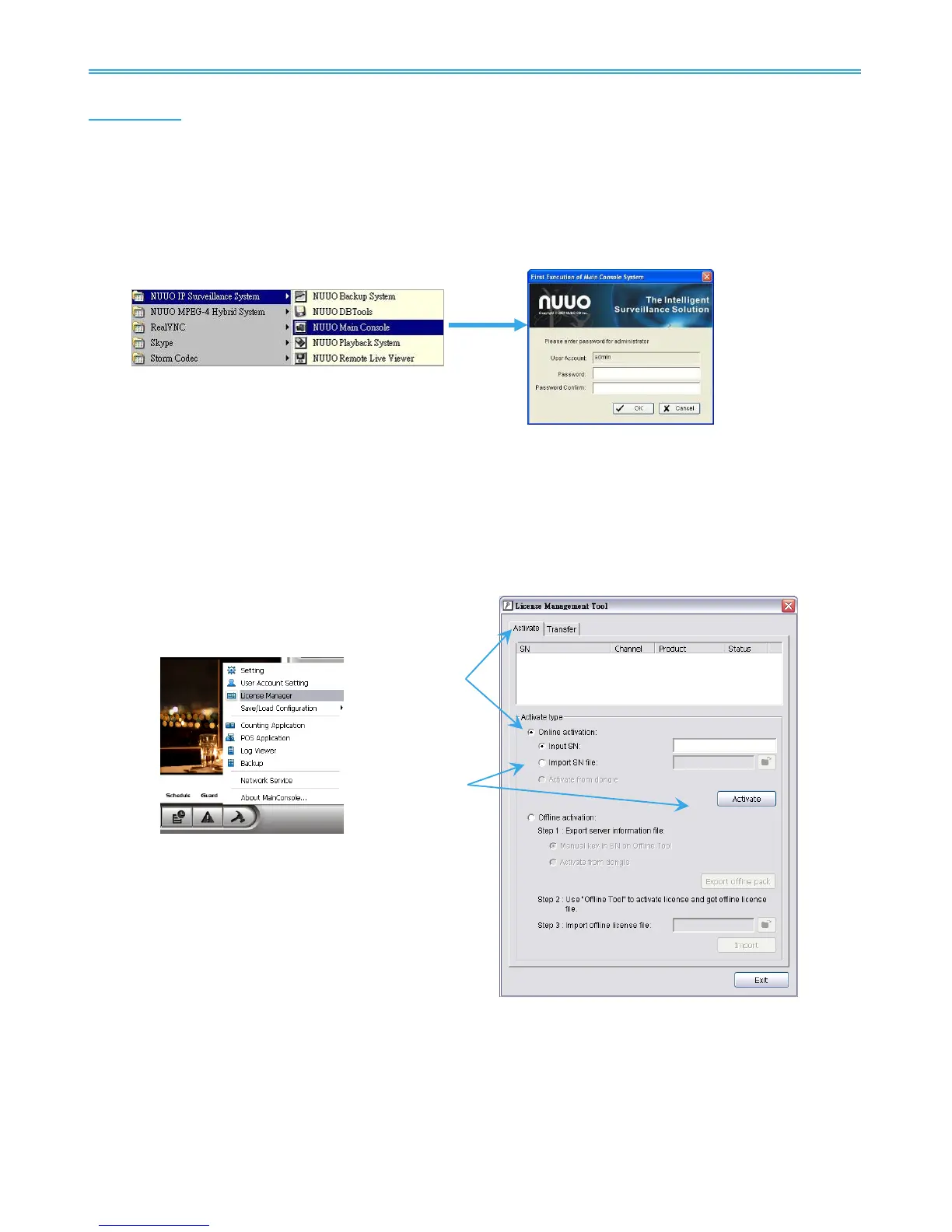
Step 1: Go to Start > All Programs > NUUO Surveillance System > NUUO Main Console to execute Main
Console.
Step 2: Enter your own password into the edit box, enter it again for double confirm and then click on OK.
Activate IP Camera License(s)
Step 1: Open License Manager Tool in Config menu.
Step 2: Select Activate tab, check the PC in Online network environment.
Step 3: Insert the SN, SN file or dongle to activate license.
Step 4: After software license is activated successfully, please restart Main Console.
Note: Please refer to page 118 for advanced settings.
Install IP camera(s)
Step 1: Setup the IP camera(s) by referring to the user manual provided by the IP camera manufacturer.
Step 2: Make sure you can access this camera through IE browser.
Step 3: Add the IP camera(s) to the system by following the steps below.



 To Next Page