The Intelligent Surveillance Solution
NUUO NVR/DVR/Hybrid NDVR System
- 64 -
4.2.11 Action Type – Popup E-Map on Event
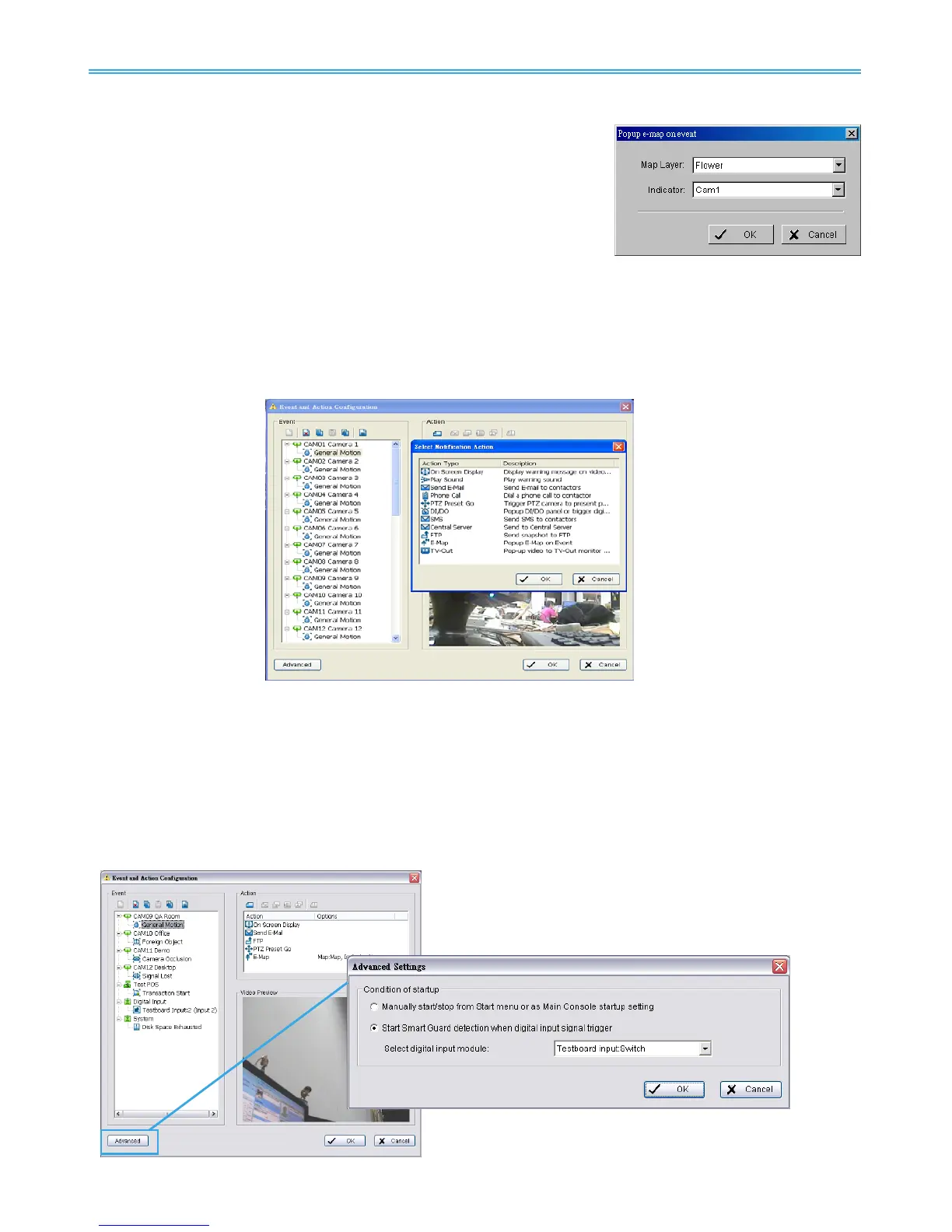
The system will auto popup E-Map window and show the
assigned map and indicator.
* Note: This function is not available under NUUO NVR Lite License.
Step 1: Select the “Popup E-Map on Event” action and then click OK.
Step 2: The responding window will popup to Popup e-map on event.
Click the “Popup E-Map on Event” indicator to modify the setting.
Step 3: Select the Map Layer and Indicator, and then click OK.
Note: To edit E-Map, see Configuration at page 92.
4.2.12 Action Type – TV-Out
Pop-up video to TV-Out monitor on event.
* Note: This function is not available if there is no SCB-7108/7116 card installed.
4.3 Advanced Settings
Click on the Advanced button on the bottom of the Event and Action Configuration dialog for advanced
settings.
Condition of startup – Smart Guard can be started under the follow modes:
1. Manually start/stop from Start menu or as Main Console startup setting (default)
2. Started by defined D/I trigger. Select D/I from dropdown list and click OK.



 To Next Page