The Intelligent Surveillance Solution
NUUO NVR/DVR/Hybrid NDVR System
- 83 -
TV-Out Monitor: Display all SCB-6000/7000/7100 series cards installed in this computer, choosing SCB-7100
series one to click on for TV-out function then users can start to edit the right parts.
Camera: Displays a list of all cameras.
Monitor Display: Modify the cameras shown on Monitor Display in the right window. Show the video cameras
which are playing in sequence. Choose the cameras in Camera (Multiple choice), then click
, the system
will have the selected cameras show below Monitor Display. If user wants to remove the cameras, select the
cameras then click
, the system will remove from the list.
Auto Scan: Set “Layout”, “Primary channel”, the form of “Secondary channel” and the interval time of
“Auto-scan interval”.
TV Adjustment: Users can adjust the position of TV-out screen by this function. Click
to apply all
the settings back to default value.
Miscellaneous: "Enable OSD display" and "Enable manual TV-Out pop-up" settings.
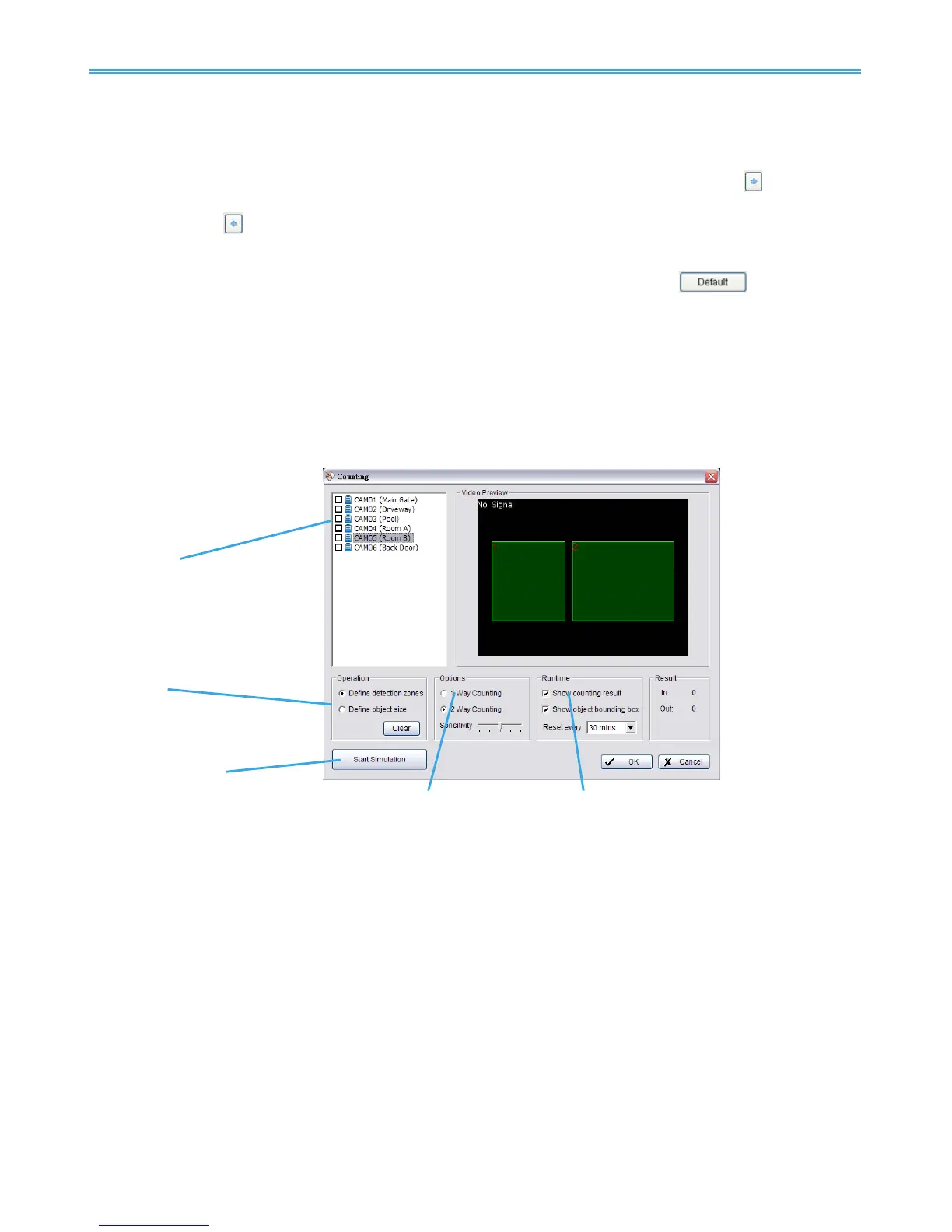
5.14 Video Analytics - Counting Application
Count objects, people or vehicles passing through pre-defined detection zones.
To access this page, login with admin account or user account with privilege of configuring main system.
* Note: This function is not available under NUUO NVR Lite license.
Camera List
Operation
Start Simulation
Options Runtime
Camera List: Select which camera would enable counting application.
Operation:
Define detection zones: Defined the detection zona.
Define object size: Defined the size of the object to count.
Options: 1Way Counting will take objects going from Region 1 to Region 2 as one count. In 2 Way Counting
mode, it counts either going from Region 1 to Region 2 or from Region 2 to Region 1.
Runtime: Check the boxes to show the counting result on the screen and/ or show object bounding box,
which draws the shape of the object that the system detects in red squares. You can choose from the
drop-down menu of how long you want to reset the counting number.
Start Simulation: Click to test the setting.



 To Next Page