The Intelligent Surveillance Solution
NUUO NVR/DVR/Hybrid NDVR System
- 86 -
Options: Adjust the setting only when the server is stopped.
Port: Assign a port for the clients to connect to your system via Remote Live Viewer. Default port is 5150.
Maximum Connections: Number of connections that are allowed to connect to the system. Default is 16
channels and maximum is 128, one camera video counts as one connection.
Use Default Web Server: Activate the Web server by checking the box; clients will be able to watch live
video via Internet Explorer. The port for live streaming server is set to 80 by default.
Note: This must be checked in order to access system via IE*.
Save Log: Save the log information at appointed folder.
Enable Audio: Select this option to enable the audio transmission along with video stream.
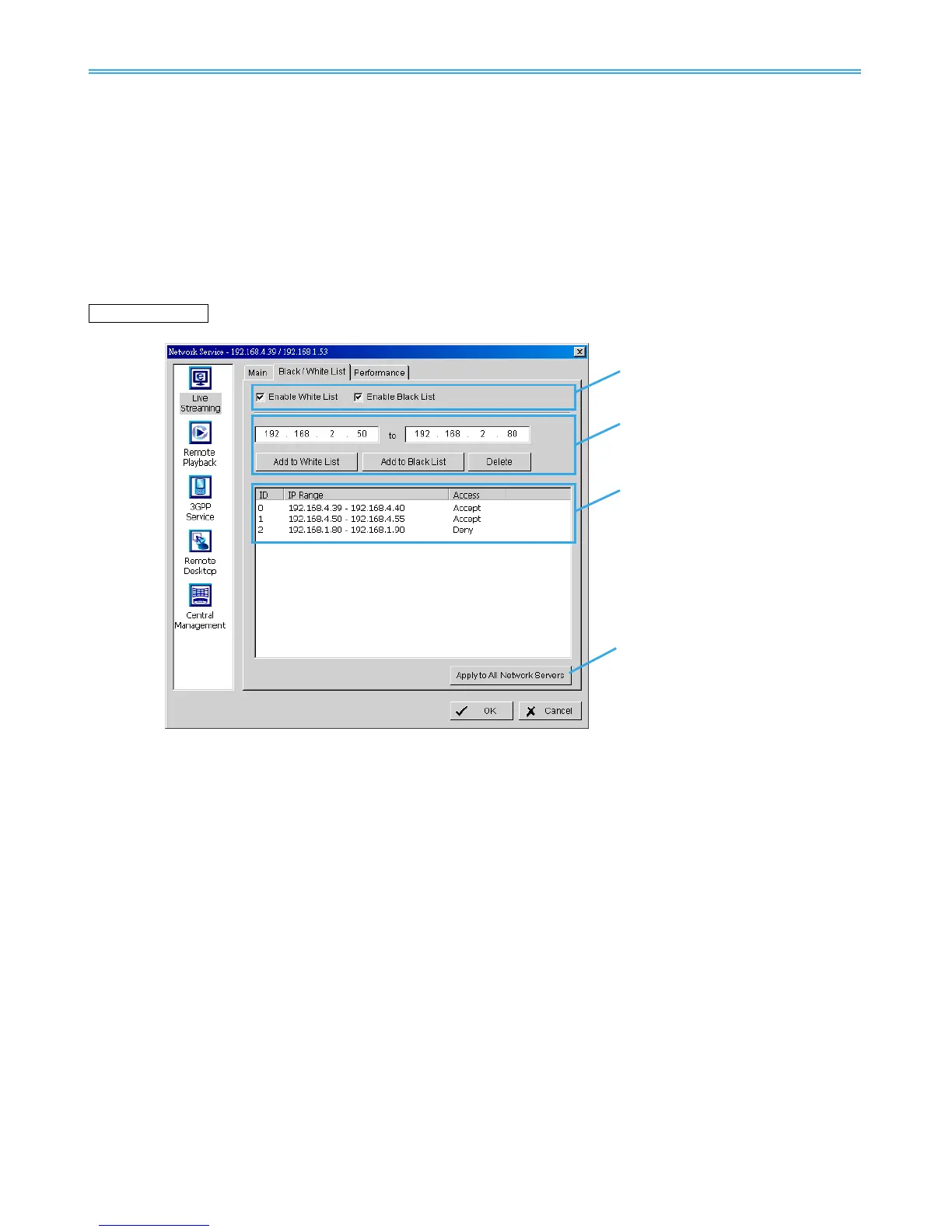
Black / White List
White List: Check the “Enable White List” box to activate the white list filter. Only IP from the white list is
allowed to log in.
Black List: Check the “Enable Black List” box to activate the black list filter. IP from the black list will be
blocked.
IP Address: Enter an IP address into the IP address field on the left. To add an IP address range to the
system, enter 2 sets of IP address to indicate a series of IP(s).
Add/Delete:
Add the IP(s) onto the list or remove it from the list.
Apply to All Network Servers: Apply the settings to both the live streaming
server and the remote
playback server.



 To Next Page