45584901TH Rev.1
5-52 /
Oki Data CONFIDENTIAL
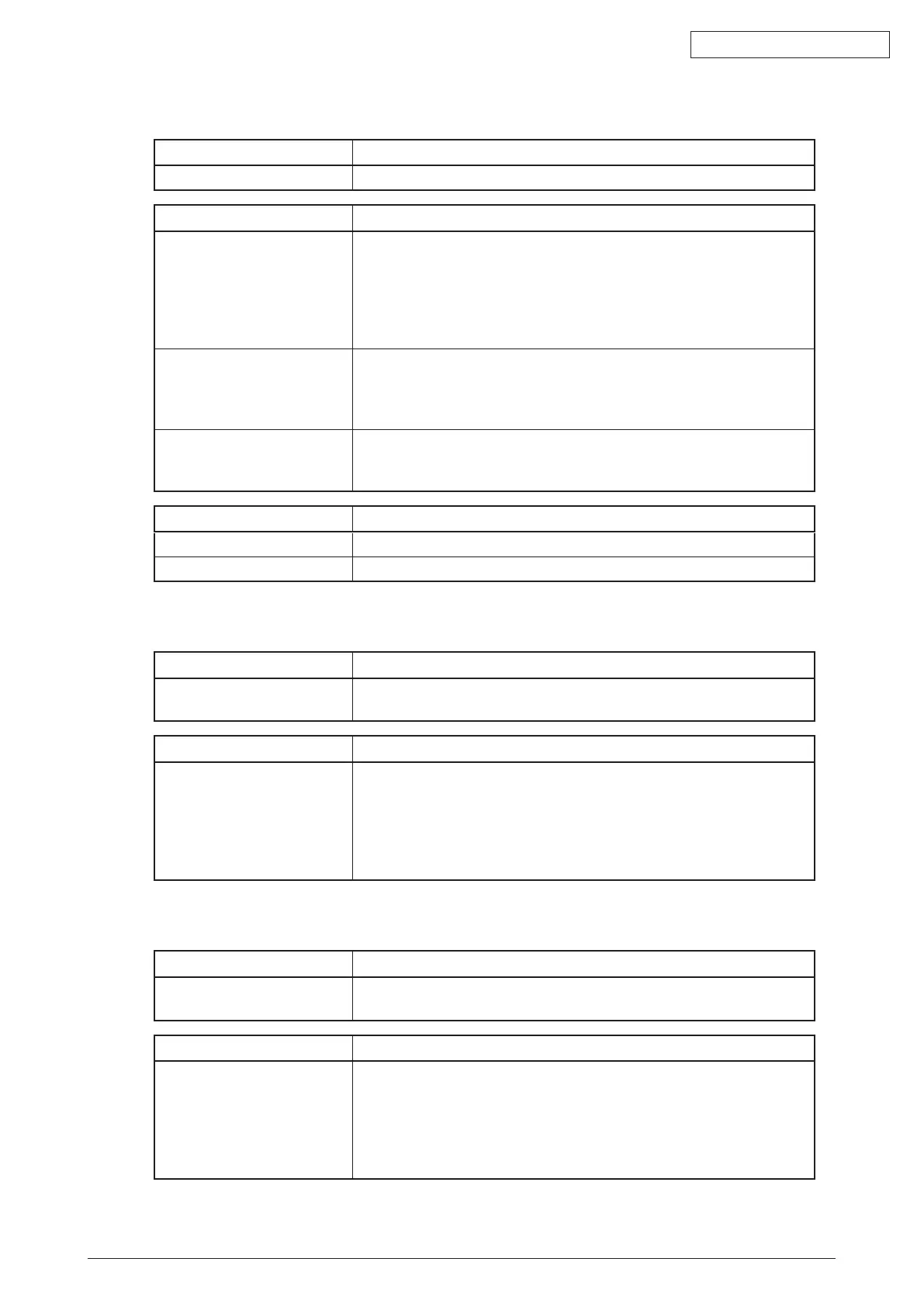
[F109_0] Key consistency error (Consistency check operation error)
Classification Contents
Other service call Keyconsistencyerror-Keyconsistencycheckoneachkeydatafails.
Check item Measures
Setting Reboottheequipment.
Ifitcannotberecovered,reinstallthesoftwareinthefollowingprocedure.
1. Install the system firmware.
2.Iftheerrorcannotbesolvedafterinstallingthesystemrmware,
reinstall the system software and application program.
P. 8-15 "8.3.2 Update procedure"([A]Update procedure)
SRAM board (for CU board) Iftheerrorisnotclearedafterthesoftwarereinstallation,replacethe
SRAM board.
P. 6-20 "6.2.5 Precautions and procedure when replacing the SRAM
board (for the CU board)"
CU board Iftheerrorisnotclearedafterthis(seeabove),replacetheCUboard.
P. 6-16 "6.2.4 Precautions and Procedures when replacing the CU
board"
Replacement part Measure
SRAM board
CU board
[F109_1] Key consistency error (SRAM encryption AES key data damage)
Classification Contents
Other service call Keyconsistencyerror-AESkeydatausedforSRAMencryptionare
damaged.
Check item Measures
Setting Reboottheequipment.
Ifitcannotberecovered,reinstallthesoftwareinthefollowingprocedure.
1. Install the system firmware.
2.Iftheerrorcannotbesolvedafterinstallingthesystemrmware,
reinstall the system software and application program.
P. 8-15 "8.3.2 Update procedure"([A]Update procedure)
[F109_2] Key consistency error (Signature Check public key damage)
Classification Contents
Other service call Keyconsistencyerror-PublickeydatausedforIntegrityCheckare
damaged.
Check item Measures
Setting Reboottheequipment.
Ifitcannotberecovered,reinstallthesoftwareinthefollowingprocedure.
1. Install the system firmware.
2.Iftheerrorcannotbesolvedafterinstallingthesystemrmware,
reinstall the system software and application program.
P. 8-15 "8.3.2 Update procedure"([A]Update procedure)



 To Next Page