Service ManualY100250-4 9-3
9.2 DISASSEMBLY/REASSEMBLY OF THE BASIC MACHINE
9.2.1 CASE DISASSEMBLY/REASSEMBLY
- Open the printer's top cover.
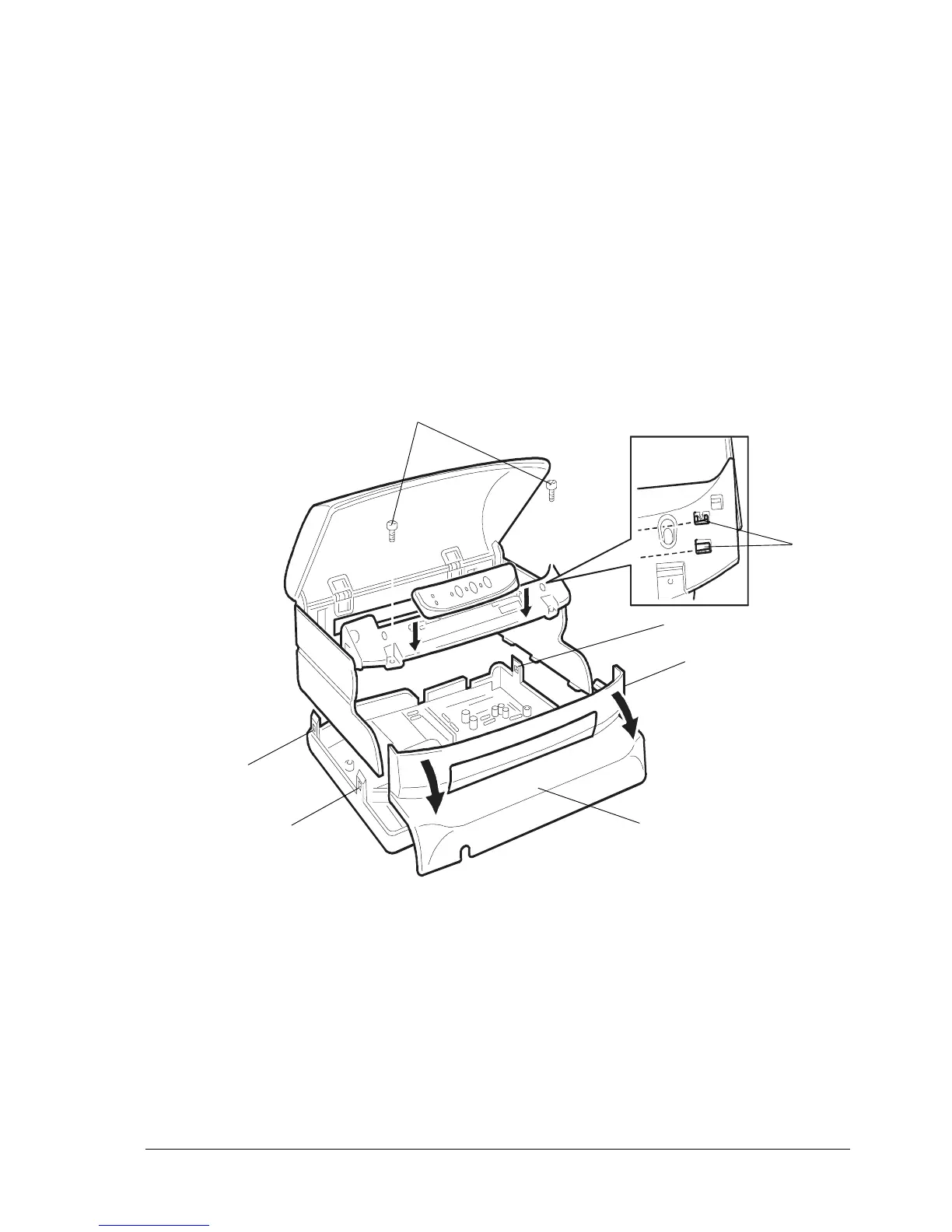
- Remove the two securing screws (1) from the front of the case (2). Remove this front part of the case
from the machine by pulling it in the direction of the arrows in the figure below.
- Using a flat-blade screwdriver, release the case's two front snap features (3).
- Insert a pointed object in the holes at the rear right and left sides of the case and then release the
two rear snap features (4); partly lift the case off the base.
- Release the console from the case by pressing gently in the points indicated by the arrows in the
figure below and lifting it upward.
- Pass the console through the flat cable passage slot and remove the case from the machine.
Fig. 9-1
3
1
3
4
4
5
Note: During the reassembly of the case, secure the console flat cable with the guide tabs (5) located
at the rear of the console panel.
2



 To Next Page