– 137 –
Chapter 8 System Menu — Setting the external connection
f Select [Select] to lter the port list in the left column. You can select [All], [GPI In1‑6], [GPI In7‑12], or [GPI In13‑18].
4
Select the function to assign from the function list in the right column.
f The input signal type can be selected from the right column function list by selecting [Type]. Type is limited by the function.
- [LowEdge]: Rising edge
- [HighEdge]: Falling edge
- [LowLevel]: Low level
- [HighLevel]: High level
f Select [Group Select] to switch the group of the function list in the right column.
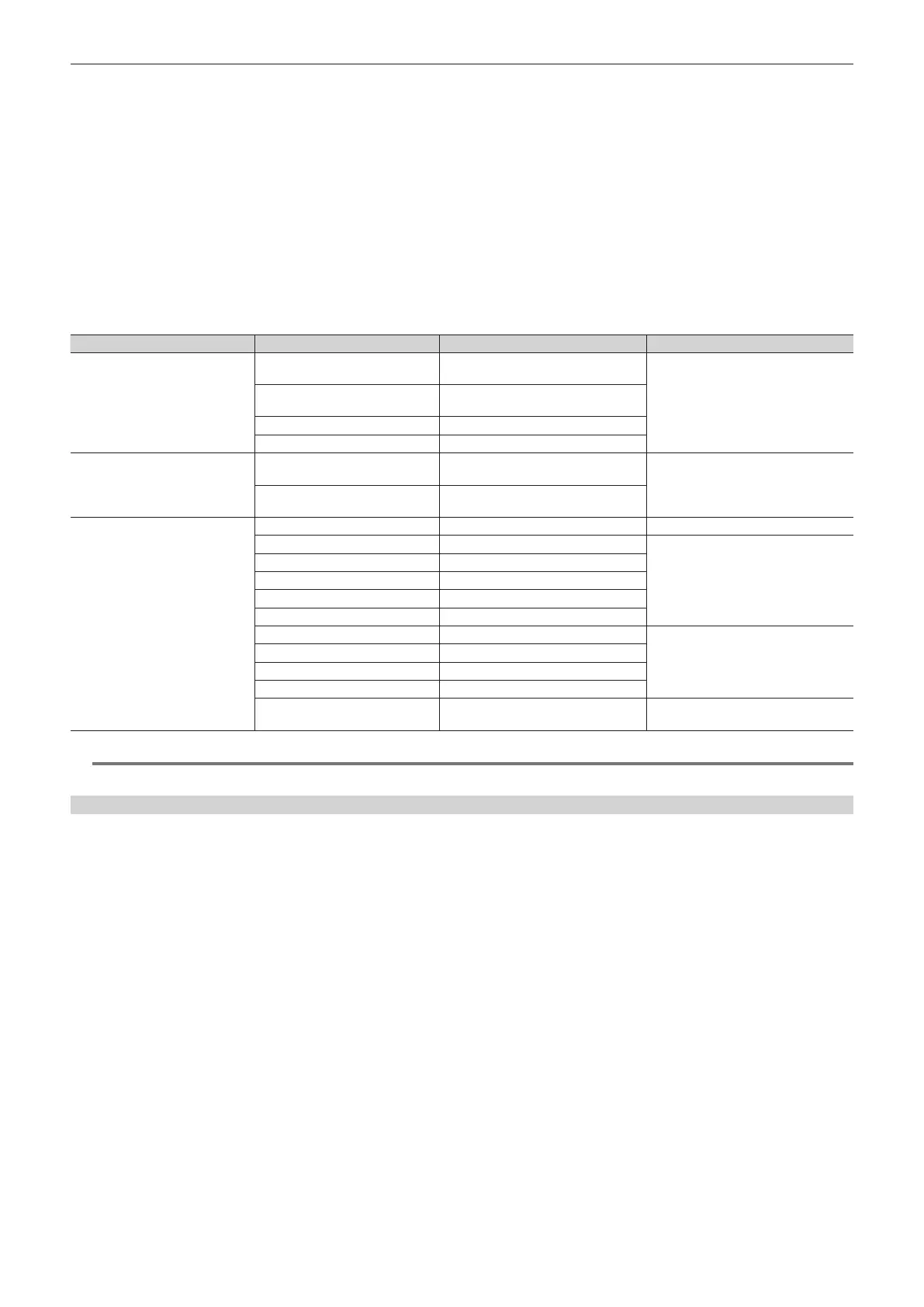
For details, refer to “GPI input function list” (page 137).
5
Select [Assign].
f The function is assigned to the button selected in the step 2.
f Select [Test Fire] to test the signal input operation of the set GPI port.
r GPI input function list
[Group Select] Signal name Description [Type]
[ME1], [ME2]
KEY1 ON to KEY4 ON
Buttons from <KEY1 TRNS> to <KEY4
TRNS> of the KEY operation area
[LowEdge] or [HighEdge]
KEY1 CUT to KEY4 CUT
Buttons from <KEY1 ON> to <KEY4
ON> of the KEY operation area
AUTO <AUTO> button in the transition area
CUT <CUT> button in the transition area
[DSK]
KEY1 ON to KEY4 ON
Buttons from <DSK1 TRNS> to <DSK4
TRNS> of the DSK operation area
[LowEdge] or [HighEdge]
KEY1 CUT to KEY4 CUT
Buttons from <DSK1 ON> to <DSK4
ON> of the DSK operation area
[OTHER]
No Assign No function assigned ―
REC Still1 to REC Still4 Still recording
[LowEdge] or [HighEdge]
REC Clip1 to REC Clip4 Clip recording start
PLAY Clip1 to PLAY Clip4 Clip playback start
STOP Clip1 to STOP Clip4 Clip recording stop or playback stop
FTB FTB transition start
Tally G1 DSBL [Tally Group1] tally signal is not output
[LowLevel] or [HighLevel]
Tally G2 DSBL [Tally Group2] tally signal is not output
Tally G3 DSBL [Tally Group3] tally signal is not output
Tally G4 DSBL [Tally Group4] tally signal is not output
EMEM Take(Pause)
Register memory playback or stop of an
event memory during standby
[LowEdge] or [HighEdge]
@@
NOTE
t When a plug-in software application is introduced, there are cases where functions inherent to that application are added as functions to be assigned.
Setting the GPI output port
GPI output functions and tally outputs can be assigned and externally output through the GPI output port.
f The GPI output ports are the pins 1 to 48 of the <GPI OUT1>/<GPI OUT2> terminal on the Main Frame AV-HS60U1/AV-HS60U2, and the pins 1 to 10
of the <GPI I/O> terminal on the Control Panel AV-HS60C1/AV-HS60C2. (page 145)
1
Select the <SYS> button → [PERIPHERAL] → [GPI OUT] tab.
2
Select [ID] and select an item.
f Select [Mainframe], [MainPanel], [SubPanel1], or [SubPanel2] as the setting target.
3
Select the port where you want to assign a function from the port list in the left column.
f Select [Select] to lter the port list in the left column. Select a color from [All], [GPI Out1‑6], [GPI Out7‑12], [GPI Out13‑18], [GPI Out19‑24], [GPI
Out25-30], [GPI Out31-36], [GPI Out37-42], and [GPI Out43-48].
4
Select the function to assign from the function list in the right column.
f Select [Type] to select the output signal type from the function list in the right column. Type is limited by the function.
- [LowEdge]: Rising edge
- [HighEdge]: Falling edge
- [LowLevel]: Low level
- [HighLevel]: High level
f Select [Group Select] to switch the group of the function list in the right column.
For details, refer to “GPI output function list” (page 138).
f For tally output assignment, select [Tally Select] to set the tally group.
f For details, refer to “Tally output function list” (page 138).
5
Select [Assign].
f The function is assigned to the button selected in the step 2.













 To Next Page