– 22 –
Chapter 3 Part Names and Functions — Control Panel AV‑HS60C1/AV‑HS60C2
3 Source name display panels
(This function will be available in V2.00.00 or higher.)
Displays applications of the crosspoint buttons. The display settings of the source name display panels can be made from the <CONF> button on the
top menu → [SOURCE NAME] → [Panel Name] tab. (page 119)
When operating other than macro bus: “crosspoint number” on the upper line, “input source name” on the lower line
When operating macro bus: “macro name” on the upper line, “input source name” on the lower line
4 PGM/A bus crosspoint buttons (1 to 24), PST/B bus crosspoint buttons (1 to 24)
Selects the video signals of the PGM/A bus and PST/B bus.
Use the <2nd PAGE>/<3rd PAGE> button to select 1 to 96. (page 22)
f Bus mode can be selected from the <CONF> button on the top menu → [OPERATE] → [Transition] tab → [Bus Mode] column → [Bus Mode].
(page 46)
5 <BUS SHFT> button
Press the <AUX 1/2> to <AUX 15/16>/<KEY1 F/S> to <KEY4 F/S>/<VMEM F/S>/<UTIL 1/2>/<DSK1 F/S> to <DSK4 F/S> buttons while holding
down the <BUS SHFT> button to switch the bus selection applications.
Example) <AUX 1/2> button
When only the <AUX 1/2> button is pressed, the KEY bus crosspoint buttons are switched to the source selector buttons of the AUX1 bus. When
the <AUX 1/2> button is pressed while the <BUS SHFT> button is held down, the KEY bus crosspoint buttons are switched to the source selector
buttons of the AUX2 bus.
6 <2nd PAGE>/<3rd PAGE> buttons
Enables the KEY bus crosspoint buttons, PGM/A bus crosspoint buttons, and PST/B bus crosspoint buttons to be used from 1 through 96.
f The pages of the buses included in the corresponding ME can be switched at once. To switch pages at individual buses, assign the <2nd
PAGE>/<3rd PAGE> button to the KEY bus crosspoint buttons, PGM/A bus crosspoint buttons, and the PST/B bus crosspoint buttons. (page 118)
Button status
Displayed page
<2nd PAGE> button <3rd PAGE> button
Off Off First page (1-24)
Lit Off Second page (25-48)
Off Lit Third page (49-72)
Lit Lit Fourth page (73-96)
7 <IMAG> button
(This function will be available in V2.00.00 or higher.)
Enables/disables image effects (paint, mono colors, mosaics, defocusing, etc.) to be added to images selected at the PGM/A bus and PST/B bus.
f The setting to enable/disable image effects to be added to images selected at the KEY bus can be made from the <ME1>/<ME2> button on the top
menu → [IMAGE] → [Key1]/[Key2]/[BKGD] tab → [Paint]/[Mono]/[Mozaic/Defocus] column. (page 73)
8 Bus tally
Indicates the output status of the buses. The buses that comprise the on-air tallies will light up.
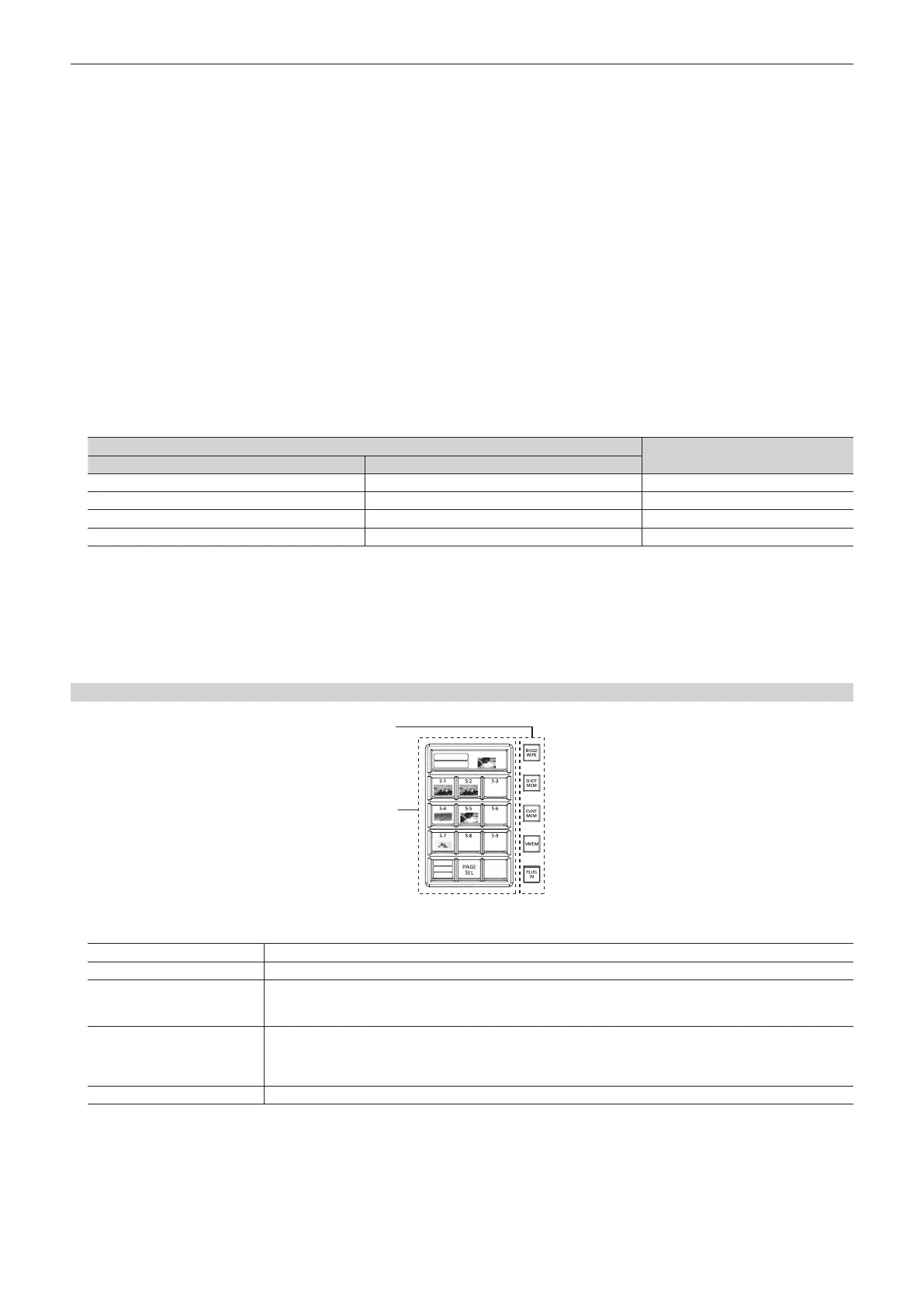
Multi‑selection panel area
RECALL
CLIP1
REGISTER
STORE
DEL
1
2
1 Mode selection button
Switches functions that can be operated on the multi-selection panel.
<BKGD WIPE> button*
1
Selects background wipe preset.
<SHOT MEM> button Registers/recalls/deletes register memories of the shot memory.
<EVNT MEM> button*
2
Recalls register memories of the event memory. This button is also used to select register memories during EMEM-LINK
transition.
f Registration/editing are performed using the menu.
<VMEM> button
Records [CLIP1] through [CLIP4] (video memory) and [STILL1] through [STILL4] (still image memory) to the current
frame memories and plays them back.
f When using the Storage Module AV-HS60D1 (optional), register memories can be registered/recalled/deleted on SSD
installed in the Main Frame AV-HS60U1/AV-HS60U2.
<PLUG IN> button*
2
Used as a plug-in software menu.
*1 Operations are limited in the version below V2.00.00.
*2 This function will be available in V2.00.00 or higher.
2 Multi‑selection menu panel
When the mode selection button is pressed, the menu to be displayed is switched.
For details, refer to “Basic operations for the multi-selection panel area” (page 36).













 To Next Page