– 23 –
Chapter 3 Part Names and Functions — Control Panel AV‑HS60C1/AV‑HS60C2
Transition area
CHR
LIN PinP PinP
MIX
0s15f
WIPE
1s00f
WIPE
1s00f
WIPE
1s00f
MIX
ME1
2s00f
2
1
4
8
5
6
3
1
7
10
9
3
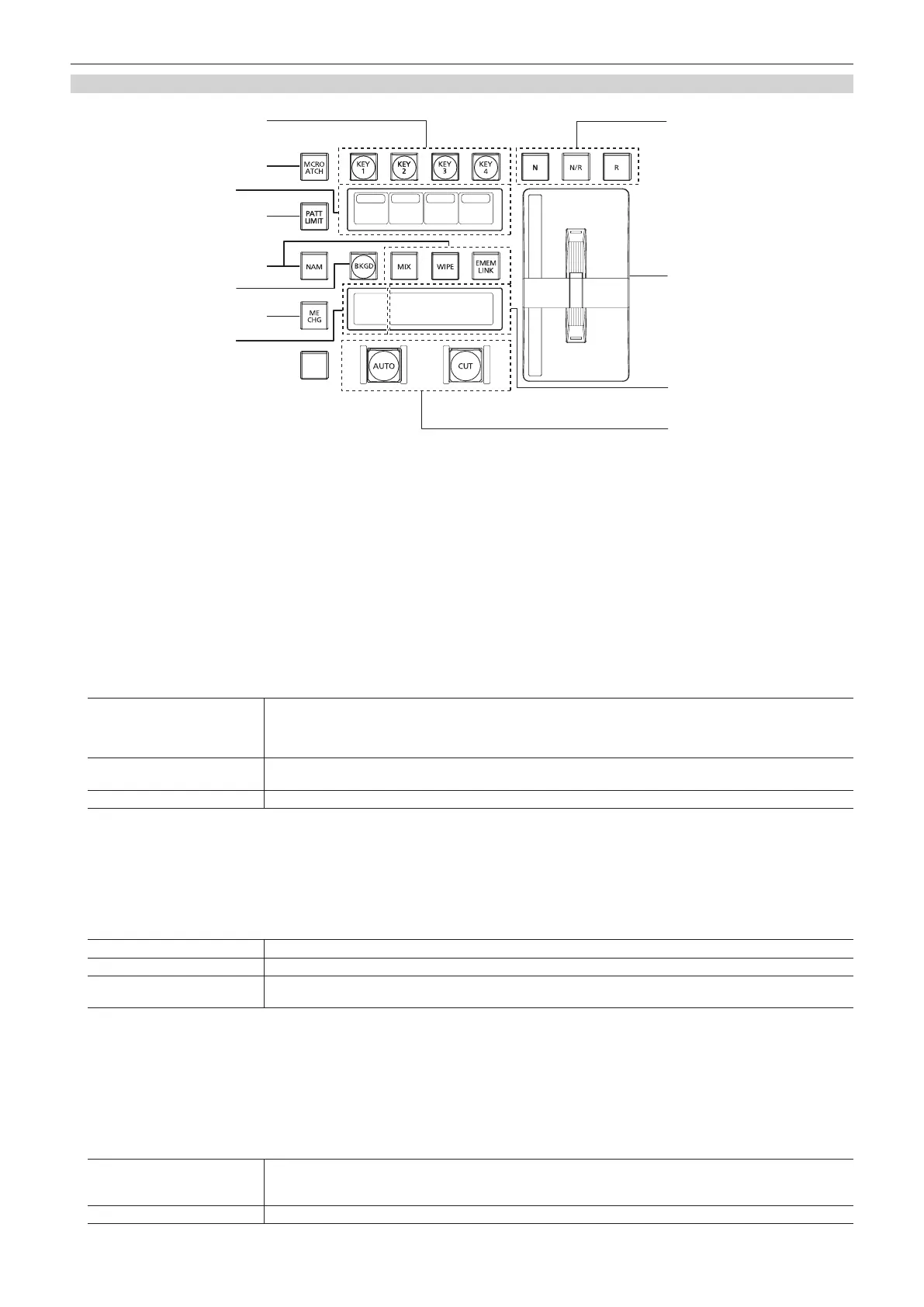
1 Transition target selection buttons (<BKGD>/<KEY1>/<KEY2>/<KEY3>/<KEY4>)
Sets the operation target for the next transition to be executed when the fader lever or <AUTO>/<CUT> button is operated.
2 <MCRO ATCH> button
(This function will be available in V2.00.00 or higher.)
Switches between enabling/disabling macro attach functions assigned to the button of the corresponding ME.
f When set to on, the macro attach function is enabled.
f When pressed and held, the button to which the macro attach function is applied will blink.
3 Status display
Displays the key type (KEY only)/transition type/transition time.
4 <PATT LIMIT> button
Restricts the amount of the background wipe transition for the corresponding ME.
f When set to on, the pattern limit function is enabled.
f Set pattern limit details from the <ME1>/<ME2> button on the top menu → [BKGD] → [Position] tab → [Pattern Limit] column. (page 49)
5 Transition type selection buttons (<NAM>/<MIX>/<WIPE>/<EMEM LINK>)
<MIX> button
Switches images while overlapping. During the transition, the output total of the A bus and B bus is kept at 100%.
In background transition, the above operation is applied when the <NAM> button is off. If the <NAM> button is on,
images are switched between the A bus and the B bus with non-additive mixing. High luminance images with the A bus
100% and the B bus 100% are output when the fader lever is positioned midway.
<WIPE> button
Performs transition according to the patterns set in the menu or selected at the wipe preset on the multi-selection panel
area.
<EMEM LINK> button Performs transition according to the patterns registered in the event memory. (page 81)
6 <ME CHG> button
(This function will be available in V2.00.00 or higher.)
Switches ME of the operation target. (page 122)
When pressed and held, switchable ME is displayed on the ME status display area. When the <MIX> button is pressed while the <ME CHG> is held
down, the operation target will be switched.
7 Wipe direction selection buttons
Selects the wipe direction when executing the background transition. The operation is not performed when the transition is a key.
<N> button Wiping proceeds in the normal direction.
<R> button Wiping proceeds in the reverse direction.
<N/R> button
The normal direction is replaced with the reverse direction (or vice versa) when the transition is completed.
f On/off of the <N>/<R> button is also switched according to the wipe direction.
8 Fader lever/transition status
Used to execute background or key transitions. When the lever is moved as far as it will go, the transition is completed. If the fader lever has been
operated during auto transition, auto transition will be switched to manual operation as soon as the fader lever position overtakes the amount of the
transition being executed.
For details on the transition status display, refer to “Transition status display” (page 24).
9 ME status area
Displays the ME of the operations target. Use the <ME CHG> button to switch the ME of the operation target.
10 transition execution button
<AUTO> button
Automatically executes transition. (Auto transition)
f To set the transition time, select the <ME1>/<ME2> button on the top menu → [BKGD] → [Transition] tab →
[Transition] column → [Time]. (page 47)
<CUT> button Executes transition instantly.













 To Next Page