– 24 –
Chapter 3 Part Names and Functions — Control Panel AV‑HS60C1/AV‑HS60C2
r Transition status display
Fig. 1 Fig. 2 Fig. 3 Fig. 4
The transition status display at the left side of the fader lever indicates not the lever position but the amount of transition, and also works during auto
transition.
During pattern limitation, the amount of limitation will also be displayed. (Fig. 1)
If the fader lever position and the amount of images do not match after memory playback or auto transition execution, every other display will be
displayed. When displayed at one side (Fig. 2, Fig. 3), push the lever towards the displayed side to make the lever position recognize.
If multiple operations of BKGD and KEY1 to KEY4 are performed in the next transition, both sides may become unmatched. In such a case, the display
will be like Fig. 4, so move the fader lever back and forth to make the lever position recognize.
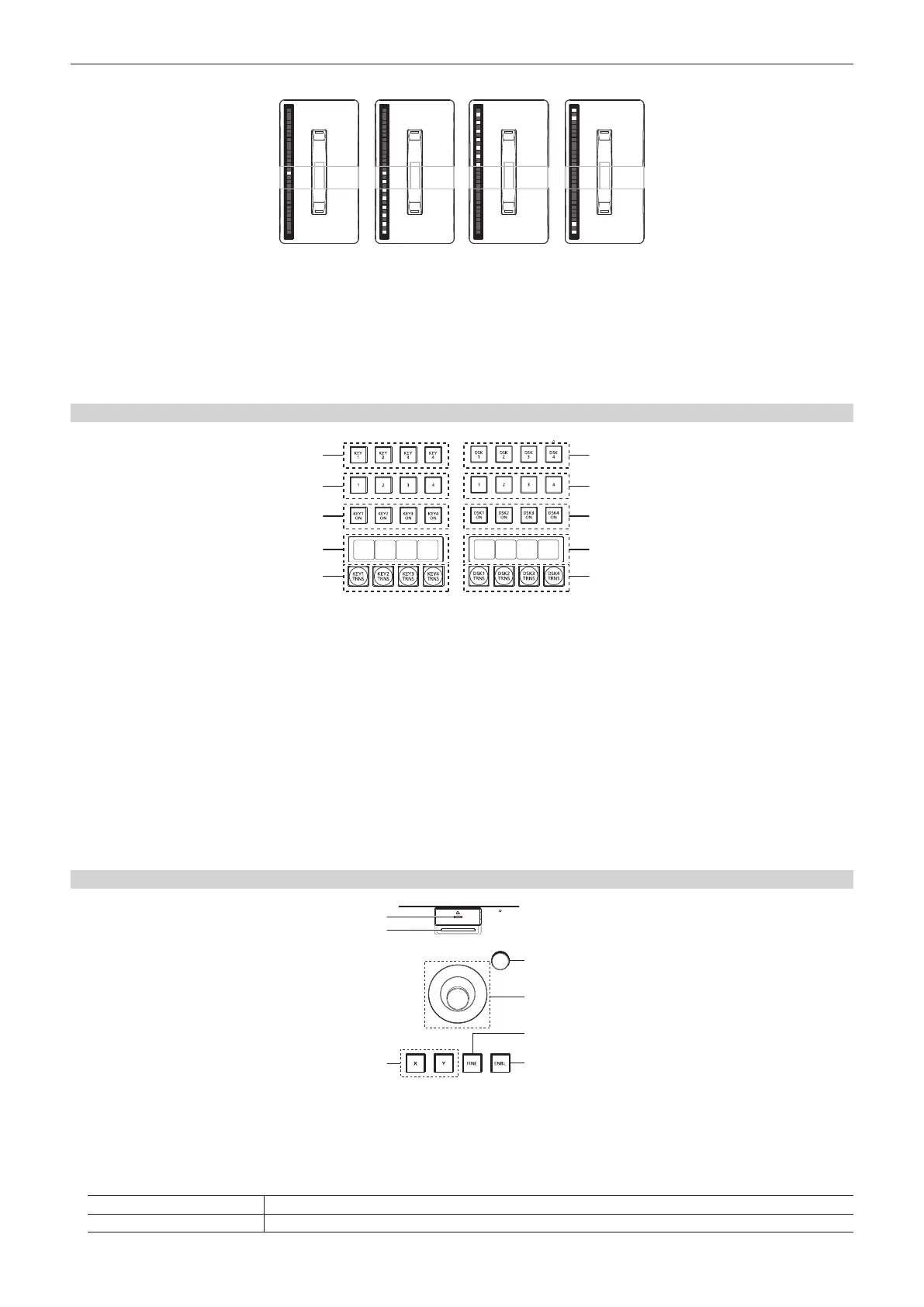
KEY/DSK operation areas
CG5V CG6V CAM1 CAM2
CG1V CG2V CG3V CG4V
1
2
3
4
5
1
2
3
4
5
KEY operation area DSK operation area
1 Operation target selection buttons (<KEY1>/<KEY2>/<KEY3>/<KEY4>/<DSK1>/<DSK2>/<DSK3>/<DSK4>)
Selects the operation target for key/DSK preset memory.
Switches target to be displayed in the SEL KEYPVW output. (page 133)
2 Key/DSK preset memory buttons (<1>/<2>/<3>/<4>)
(This function will be available in V2.00.00 or higher.)
Recalls/registers the key preset memory.
f Short press: Recalls data saved to the corresponding button. (Recall)
f Long press: Stores the current key settings to the corresponding button. (Store)
3 <KEY1 ON>/<KEY2 ON>/<KEY3 ON>/<KEY4 ON>/<DSK1 ON>/<DSK2 ON>/<DSK3 ON>/<DSK4 ON> buttons
Executes/cancels each key with a cut transition.
4 Source name display panels
Displays the source name selected for each key.
5 <KEY1 TRNS>/<KEY2 TRNS>/<KEY3 TRNS>/<KEY4 TRNS>/<DSK1 TRNS>/<DSK2 TRNS>/<DSK3 TRNS>/<DSK4 TRNS> buttons
Executes transition with the transition type and transition time for each key set in the menu. (pages 53, 66)
Positioner area
2
1
3
4
5
6
7
1 Memory card access LED
Lights up while accessing the memory card.
Do not turn off the power of the unit or eject the memory card while lit. The memory card or data in the memory card may be damaged.
2 Memory card slot
Insert an SD memory card (optional) or an SDHC memory card (optional).
3 Positioner buttons (<X>/<Y>)
<X> button Enables the X-axis operation of the positioner (horizontal direction).
<Y> button Enables the Y-axis operation of the positioner (vertical direction).













 To Next Page