Page 5-25
SETTING PRODUCTION
MATERIALS
5
How to Supply Cleaning Paper
Paper tube
1B4C-047E
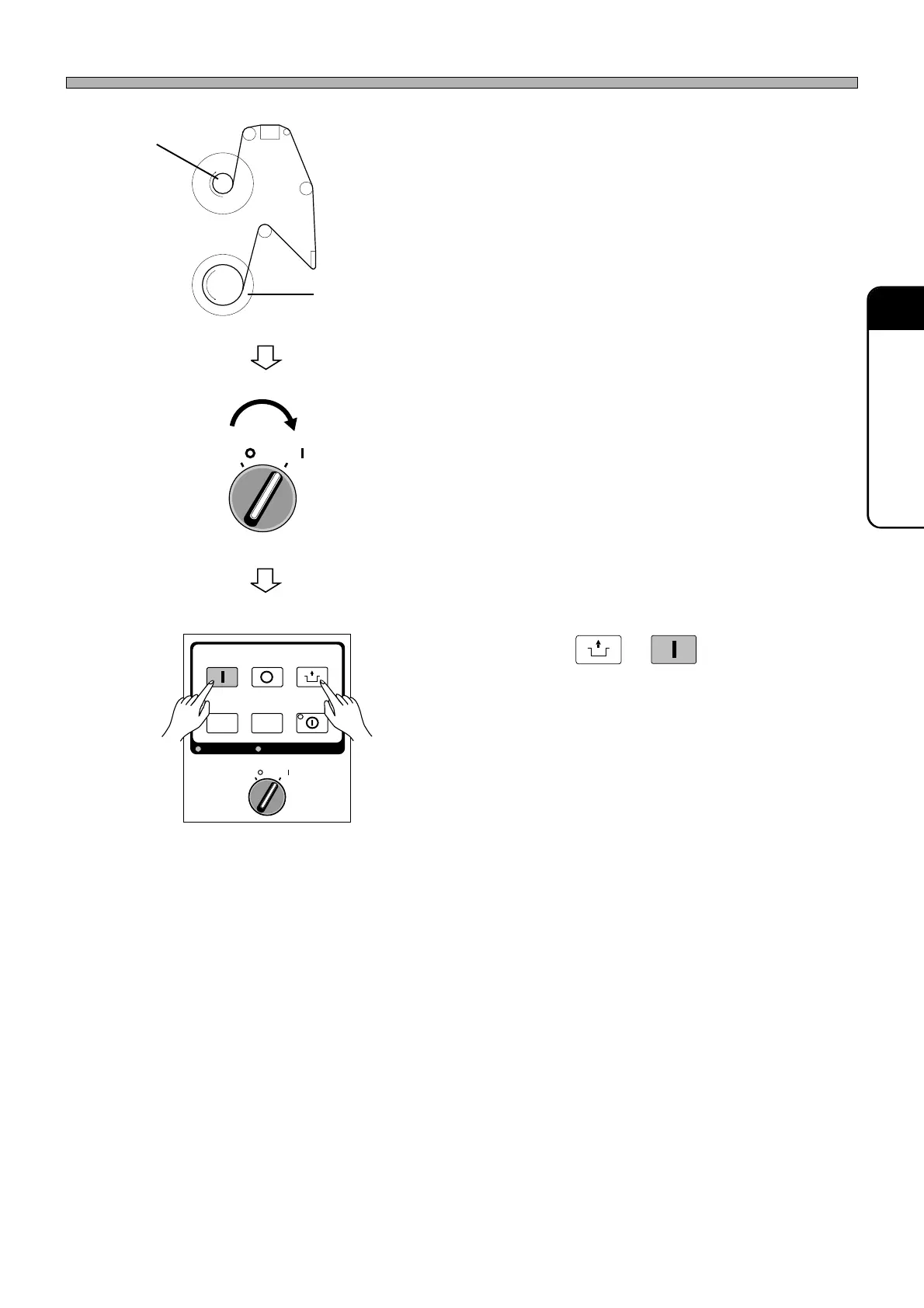
9. Route the cleaning paper as shown
on the left, and then wind it around
the paper tube on the take-up side
two or three times.
∗ Before winding the cleaning paper, attach the
end of it to the paper tube with masking tape,
etc. so that it will not come off.
10. Return the cleaning unit into the main
body.
11. Close the front and center safety
covers.
12. Turn ON the servo switch on the
operating panel.
13. Press
UNLOCK
→→
→→
→
START
on the operating
panel.
∗ If the paper ran out during cleaning, perform
cleaning again, then resume production.
OFF ( )
ON ( )
SERVO
New paper
1E4C-E-OMA05-A02-00
OFF ( )
ON ( )
SERVO
STOP
UNLOCK
STEP
START
LIGHT ON
SELECT
KEY LOCK BACK LIGHT OFF












 To Next Page