User’s Manual of IGS-20040MT
4.6.8 VLAN setting example:
Separate VLAN
802.1Q VLAN Trunk
Port Isolate
4.6.8.1 Two Separate 802.1Q VLANs
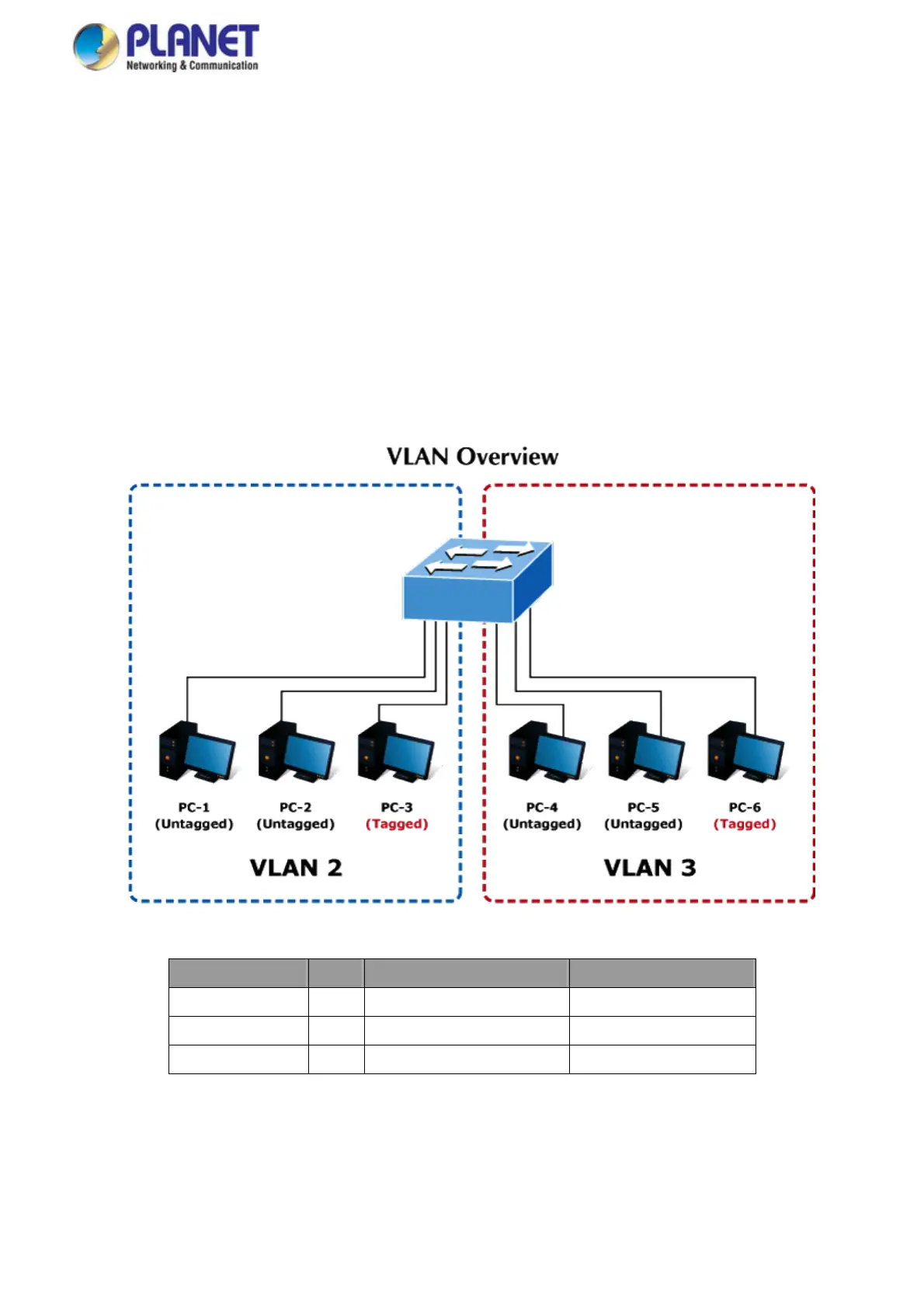
The diagram shows how the Industrial Managed Switch handle Tagged and Untagged traffic flow for two VLANs. VLAN Group 2
and VLAN Group 3 are separated VLAN. Each VLAN isolate network traffic so only members of the VLAN receive traffic from
the same VLAN members. The screen in Figure 4-6-8 appears and Table 4-6-9 describes the port configuration of the Industrial
Managed Switches.
Figure 4-6-8: Two Separate VLANs Diagram
VLAN Group VID Untagged Members Tagged Members
VLAN Group 1 1 Port-7 ~ Port-24 N/A
VLAN Group 2 2 Port-1,Port-2 Port-3
VLAN Group 3 3 Port-4,Port-5 Port-6
Table 4-1: VLAN and Port Configuration
The scenario is described as follows:
Untagged packet entering VLAN 2
132














 To Next Page