User’s Manual of IGS-20040MT
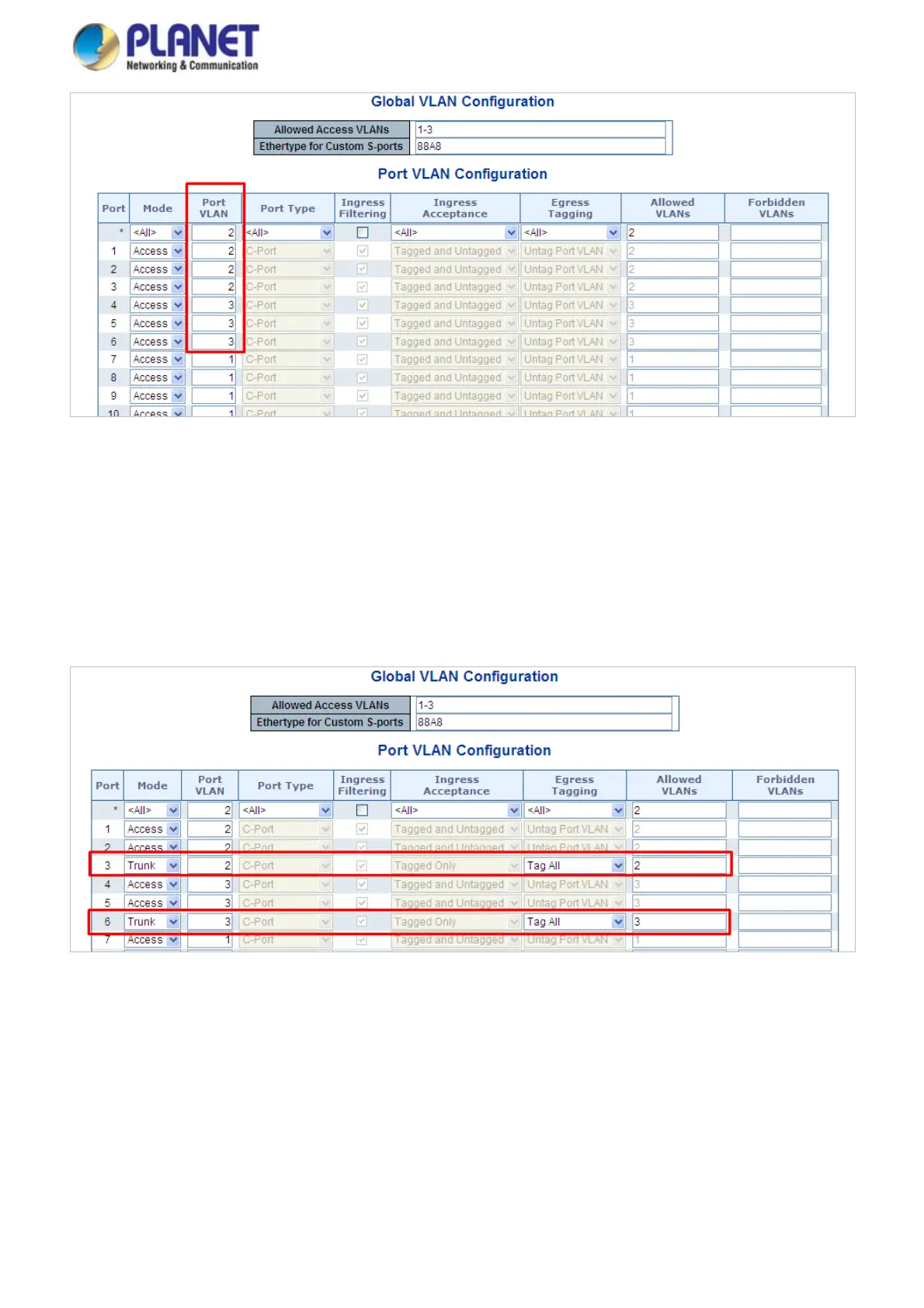
Figure 4-6-10: Change Port VLAN of Port 1~3 to be VLAN2 and Port VLAN of Port 4~6 to be VLAN3
3. Enable VLAN Tag for specific ports
Link Type: Port-3 (VLAN-2) and Port-6 (VLAN-3)
Change Port 3 Mode as Trunk and select Egress Tagging as Tag All and Type 2 in the Allowed VLANs column.
Change Port 6 Mode as Trunk and select Egress Tagging as Tag All and Type 3 in the Allowed VLANs column.
The Per Port VLAN configuration in Figure 4-6-11 appears.
Figure 4-6-11: Check VLAN 2 and 3 Members on VLAN Membership Page
4.6.8.2 VLAN Trunking between two 802.1Q aware switches
In most cases, they are used for “Uplink” to other switches. VLANs are separated at different switches, but they need to access
to other switches within the same VLAN group. The screen in Figure 4-6-12 appears.
134














 To Next Page