351
CAUTION
The paper stacker assembly mounts to the rear upper frame cross-
member and the cabinet floor. It is a snug fit. During installation, take
care to avoid scratching painted surfaces or damaging the stacker.
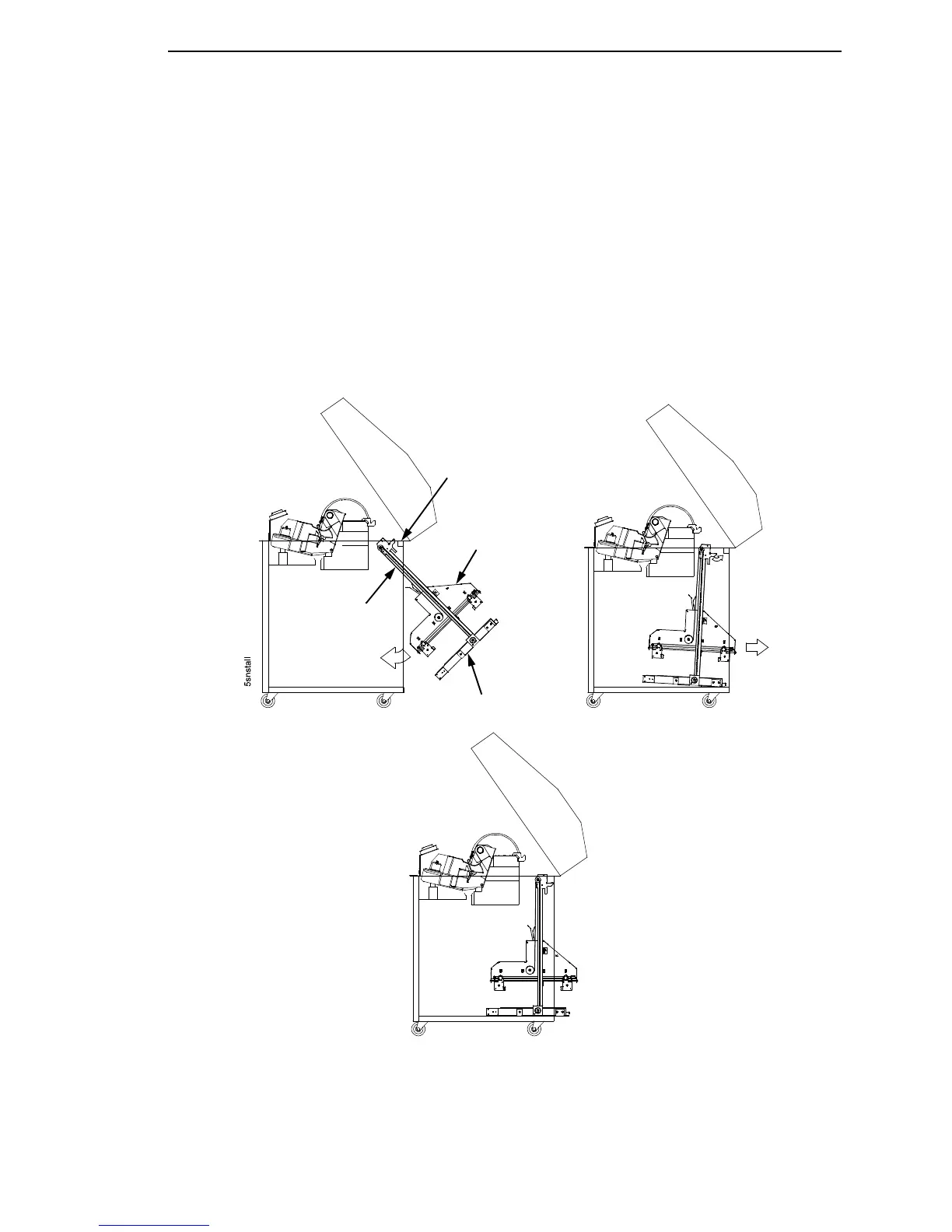
18. Position the stacker assembly slightly to the right in order to clear the air
exhaust duct, insert the vertical rails inside and under the upper frame
cross-member, then slowly swing the base of the stacker assembly into
the cabinet. (Figure 78a.)
19. Work the stacker base rearward and engage the upper brackets of the
vertical rails under the upper frame cross-member. (Figure 78b.)
20. Align the holes in the vertical rail brackets with the holes in the upper
frame cross-member. (Figure 78c and Figure 79.)
Figure 78. Stacker Installation
21. Align the holes in the stacker base with the holes in the cabinet floor.
(Figure 78c and Figure 79)
a
b
c
Upper Frame
Cross-Member
Elevator
Assembly
Stacker Base
Vertical Rail













 To Next Page