352
Appendix E Installing The Power Stacker
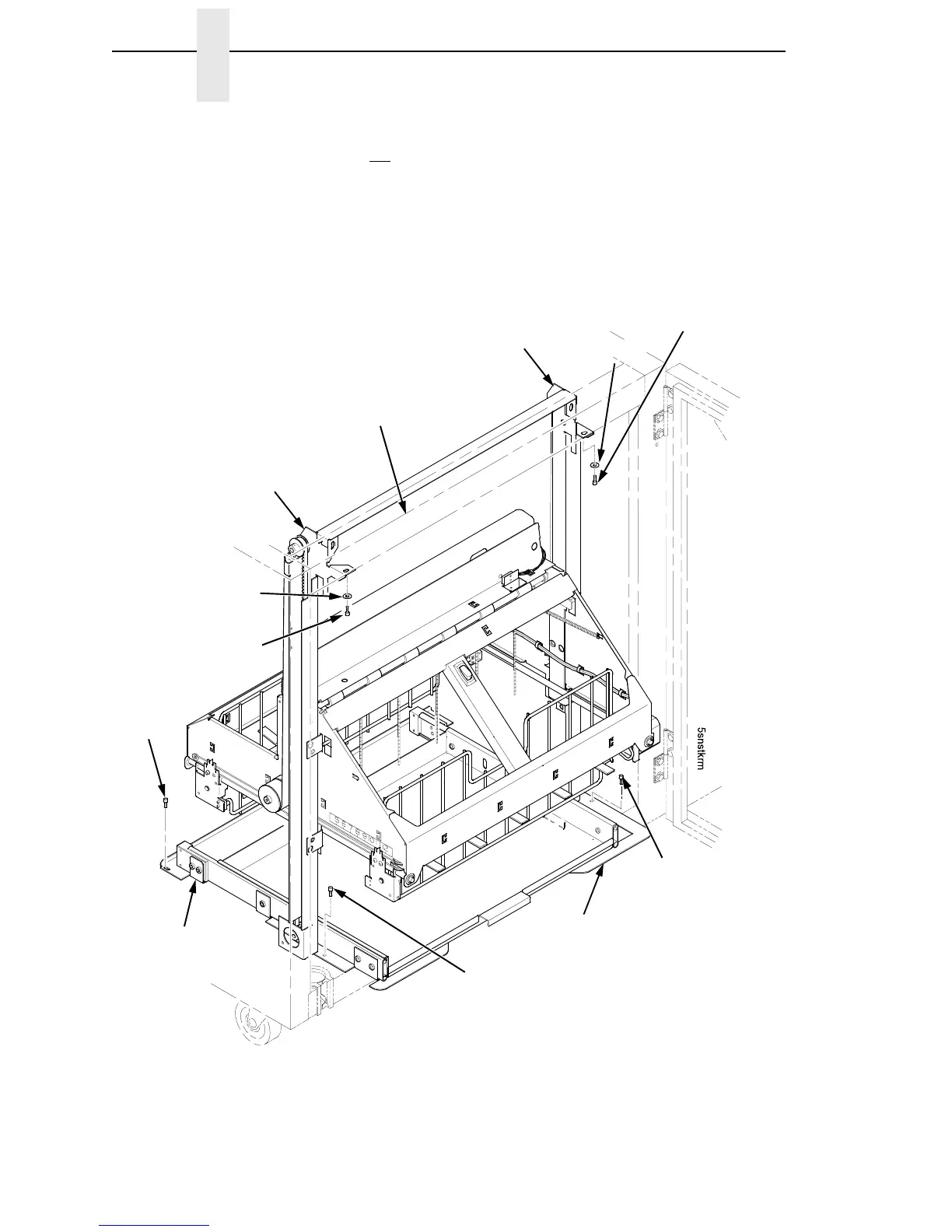
22. Install finger tight the 10-32 x 5/32 inch buttonhead screw and washer
securing the left
vertical rail to the upper frame cross-member. (Do not
install the right hand screw yet.) (Figure 79.)
23. Install and tighten the two Torx T-10 screws securing the stacker base to
the cabinet floor. (Figure 79.)
24. Install and tighten the two Torx T-10 screws that secure the rail bracket to
the cabinet floor. (Figure 79.)
Figure 79. Stacker Fasteners
Washer
Right Screw, 10-32 x 5/32 inch
Stacker Base
Screw,
Torx T-10
Right Vertical Rail
Upper Frame
Cross-Member
Rail Bracket
Screw,
Torx T-10
(2 places)
Screw,
Torx T-10
Washer
Left Screw, 10-32
x 5/32 inch
Left Vertical Rail













 To Next Page