PrismJET 54 Gen2 OPERATION MANUAL Panel setup menu
5.1 Setup menu 155
5.1.1.1.2 Effect menu
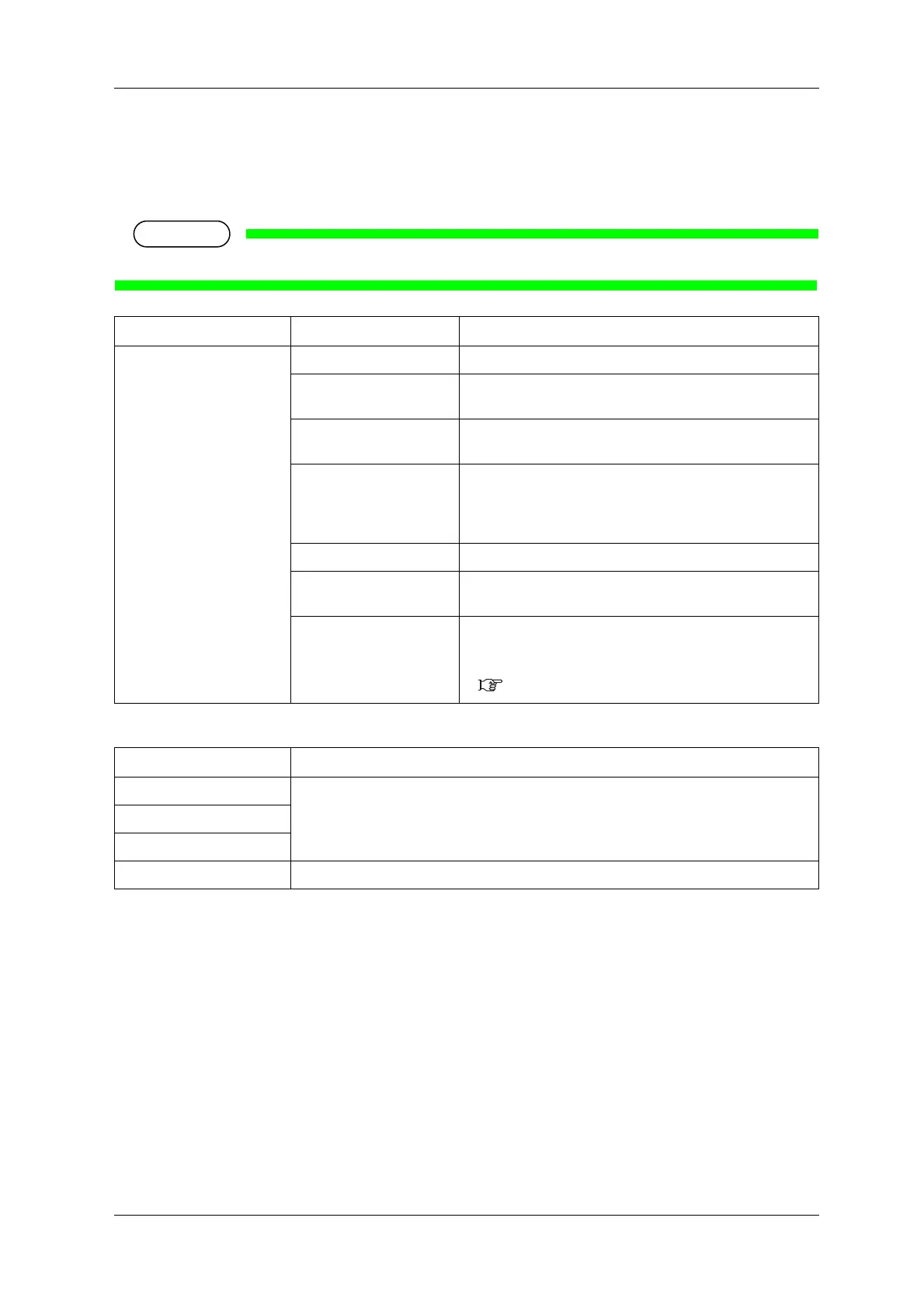
Sets up the Effect menu.
Set up this menu when you want to improve print quality by adjusting the set Print Mode.
• The print quality may not be improved depending on the printing condition.
*1 The default value of the effect differs depending on the selected print mode as shown below.
Setup item Setting Description
Effect None The Effect function is not used.
Wave The printing joint will be the wave form.
The print quality may be improved than “None”.
Fine & Fuzz The printing joint will shade off as the wave form.
Perform the printing at slower speed than “Wave”.
Fine & Fog *1 The printing joint will shade off.
Set up this menu to improve horizontal banding with “Fine &
Fuzz”.
Perform the printing at a slower speed than “Fine & Fuzz”.
i-Weave EX Edges between each pass are barely noticeable and seamless.
i-Screen *1 Edges between each pass are barely noticeable and more
seamless.
—
• [Enter] key: saves the setting and shifts to the previous menu.
• [Cancel] key: cancels the setting and shifts to the previous
menu.
5.1 Setup menu
Print Mode Effect Default Value
High Quality i-Screen
Quality
Production
High Speed Fine&Fog



 To Next Page