Tray 2 (500 sheets)
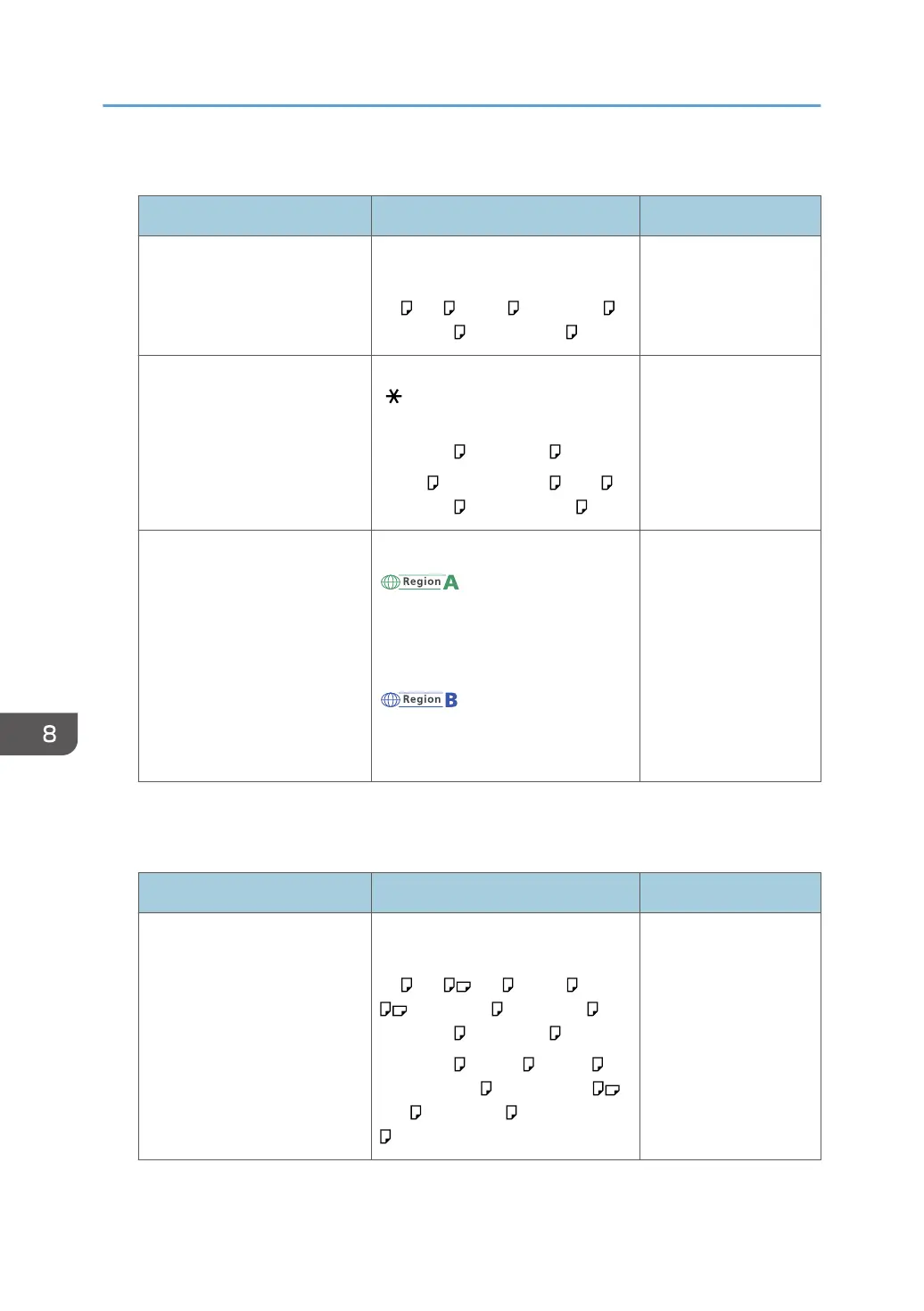
Paper type and weight Paper size Paper capacity
56-220 g/m
2
(15 lb. Bond–
80 lb. Cover)
Thin Paper–Thick Paper 2
Select the paper size using the
paper size dial on the tray:
A4 , A5 , B5 JIS , 8
1
/
2
× 14 ,
8
1
/
2
× 11 , 5
1
/
2
× 8
1
/
2
500 sheets
*1
56-220 g/m
2
(15 lb. Bond–
80 lb. Cover)
Thin Paper–Thick Paper 2
Set the paper size dial on the tray to
" ", and select the paper size with
the control panel:
8
1
/
2
× 13 , 8
1
/
4
× 13 ,
8 × 13 , 7
1
/
4
× 10
1
/
2
, 16K ,
8
1
/
2
× 12 , 8
1
/
2
× 13
2
/
5
500 sheets
*1
56-220 g/m
2
(15 lb. Bond–
80 lb. Cover)
Thin Paper–Thick Paper 2
Custom size:
(mainly Europe and
Asia)
Vertical: 210.0–356.0 mm
Horizontal: 139.7–216.0 mm
(mainly North America)
Vertical: 8.27–14.00 inches
Horizontal: 5.50–8.50 inches
500 sheets
*1
*1
1 sheet for label paper (adhesive labels)
Bypass tray
Paper type and weight Paper size Paper capacity
56-220 g/m
2
(15 lb. Bond–
80 lb. Cover)
Thin Paper–Thick Paper 2
Select the paper size with the
control panel
*1
:
A4 , A5 , A6 , B5 JIS , B6 JIS
, 8
1
/
2
× 14 , 8
1
/
2
× 13 ,
8
1
/
2
× 11 , 8
1
/
4
× 14 ,
8
1
/
4
× 13 , 8 × 13 , 8 × 10 ,
7
1
/
4
× 10
1
/
2
, 5
1
/
2
× 8
1
/
2
,
16K , 8
1
/
2
× 12 , 8
1
/
2
× 13
2
/
5
100 sheets
*2
8. Adding Paper and Toner
126



 To Next Page
 Loading...