2-30
2 Copy
ComColor Series User’s Guide 09
2
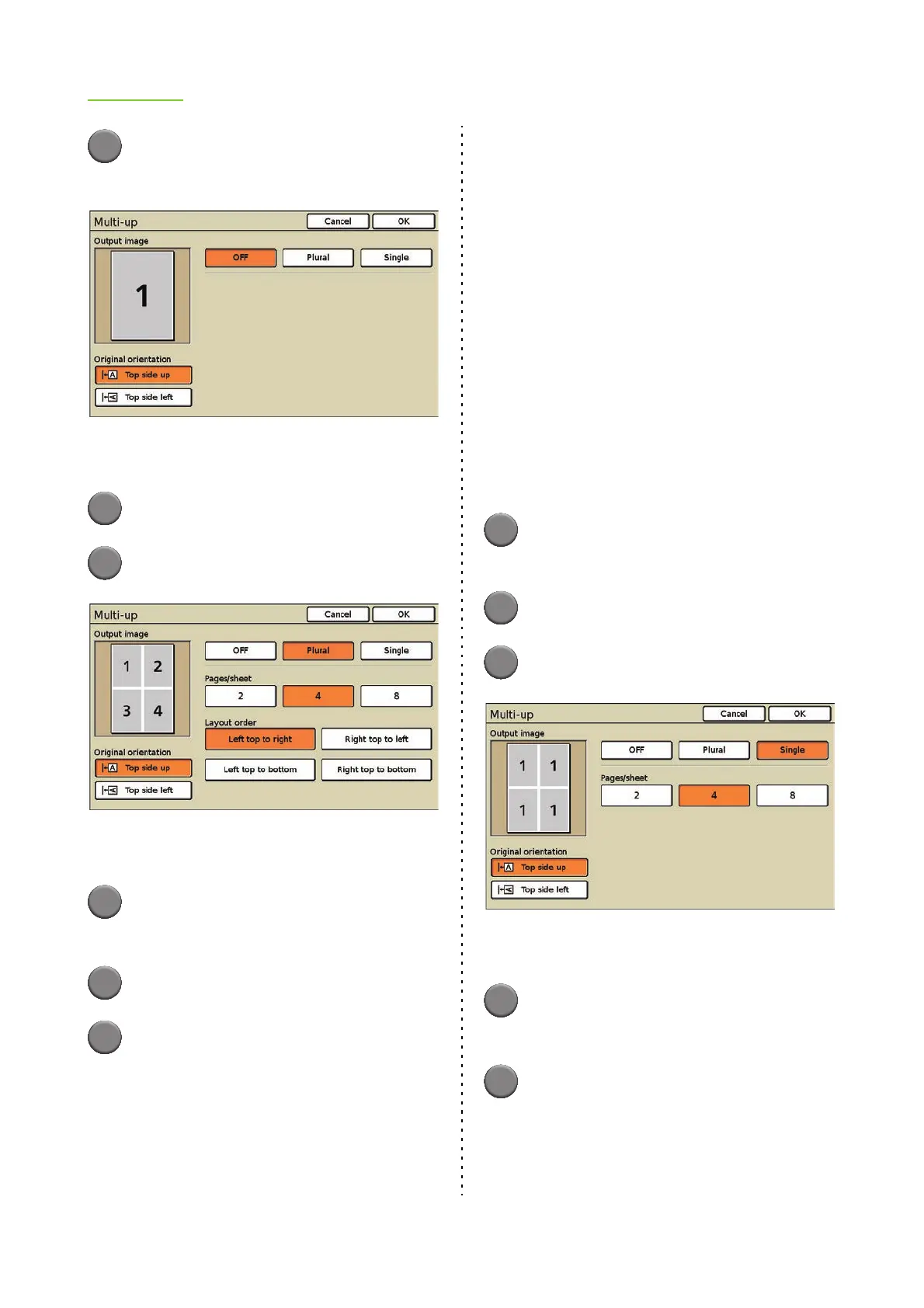
Press [Multi-up].
The [Multi-up] screen is displayed.
[Output image] displays an output image that
reflects the settings.
3
Select the original orientation.
4
Press [Plural].
[Output image] displays an output image that
reflects the settings.
5
Select the number of pages per
sheet.
6
Select the layout order.
7
Press [OK].
The settings are confirmed and the previous
screen is displayed.
● Setting Multi-up (Single)
This imposes multiple copies of the same original
onto one sheet.
■ Original orientation
[Top side up]
Select this option when loading originals in an
orientation from which they can be read normally.
[Top side left]
Select this option when loading originals so that the
top of the original is aligned with the left edge.
■ Pages/sheet
Select the number of pages per sheet.
[2], [4], [8]
1
Display the [Multi-up] screen.
Follow Steps 1 and 2 in "Setting Multi-up".
2
Select the original orientation.
3
Press [Single].
[Output image] displays an output image that
reflects the settings.
4
Select the number of pages per
sheet.
5
Press [OK].
The settings are confirmed and the previous
screen is displayed.













 To Next Page