2-17
Direct Access/Selections entry
2
ComColor Series User’s Guide 09
Direct Access entry
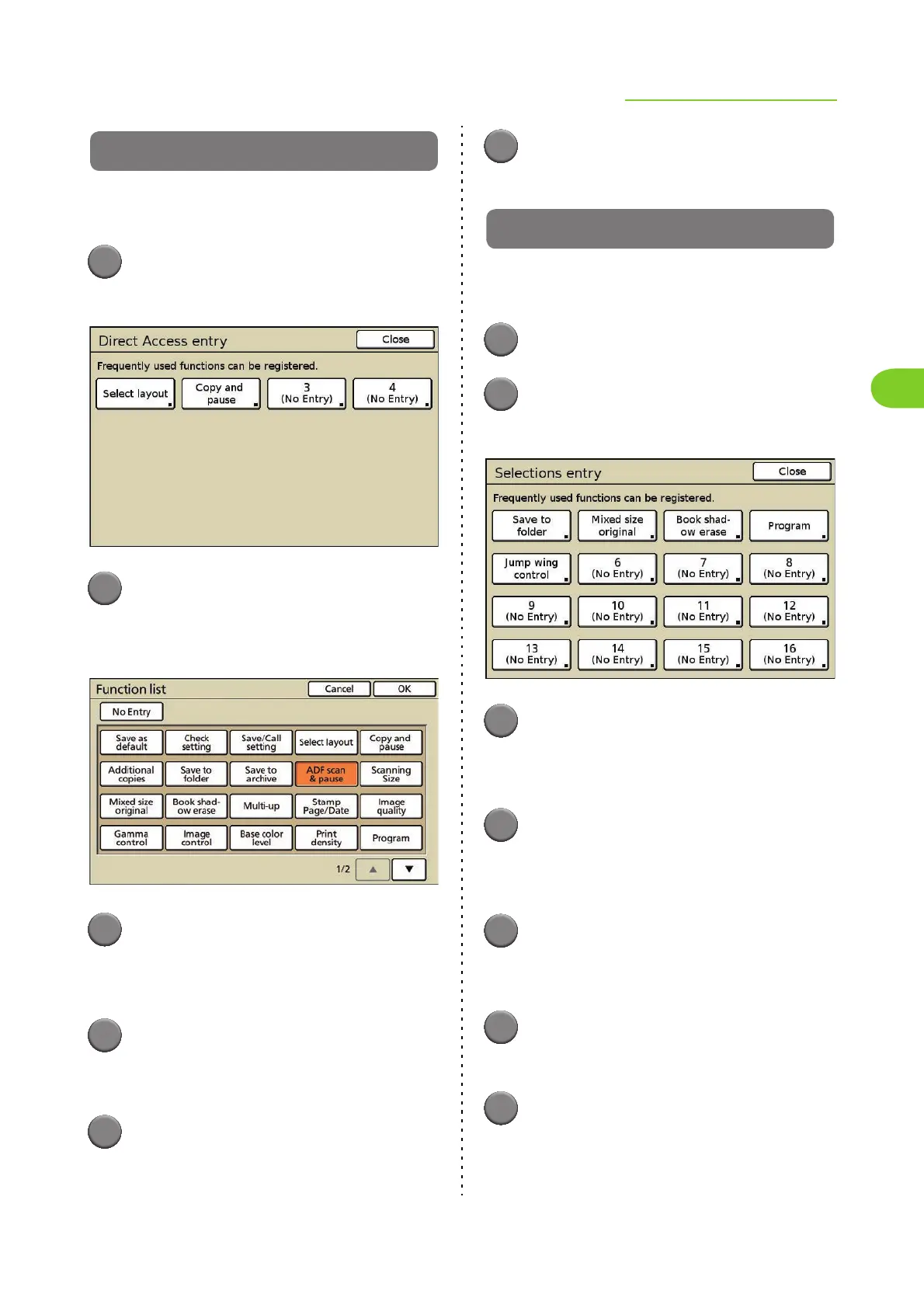
Up to 4 frequently used functions can be registered
to the direct access area of the [Basic] screen.
1
Press [Entry].
The [Direct Access entry] screen is displayed.
2
Press a button to register (or
change) a function.
The [Function list] screen is displayed.
3
Press the button of the function
you want to register.
• To cancel registration, press [No Entry].
4
Press [OK].
The settings are confirmed and the [Direct Access
entry] screen is displayed.
5
Repeat Steps 2 to 4 to register
additional functions as needed.
6
Press [Close].
The previous screen is displayed.
Selections entry
Up to 16 frequently used functions can be
registered to the [Selections] screen.
1
Press [Selections].
2
Press [Entry].
The [Selections entry] screen is displayed.
3
Press a button to register (or
change) a function.
The [Function list] screen is displayed.
4
Press the button of the function
you want to register.
• To cancel registration, press [No Entry].
5
Press [OK].
The settings are confirmed and the [Selections
entry] screen is displayed.
6
Repeat Steps 3 to 5 to register
additional functions as needed.
7
Press [Close].
The previous screen is displayed.













 To Next Page