2-7
Overview of Copy Operations
2
ComColor Series User’s Guide 09
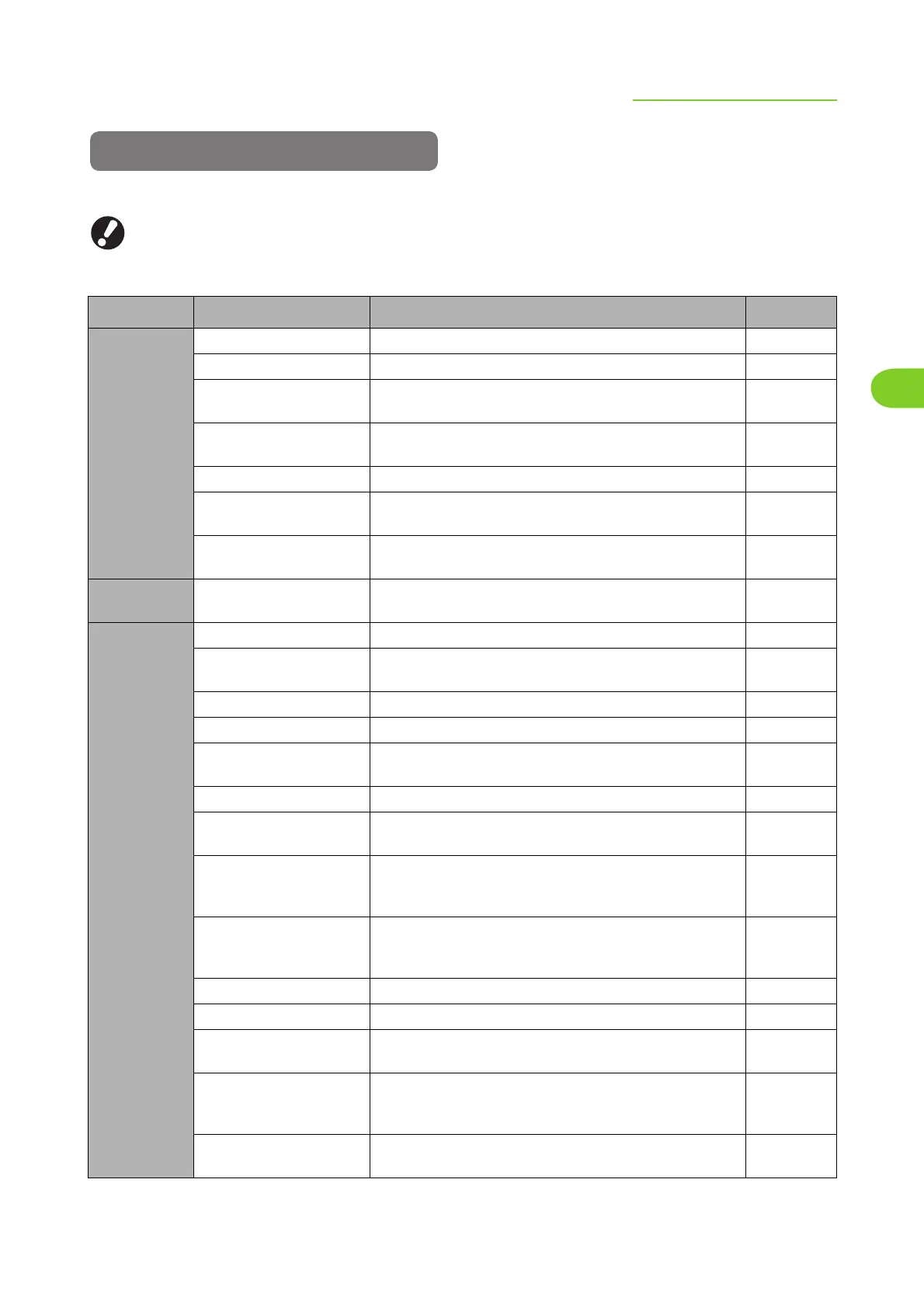
List of Settings
The following is a list of copy mode settings.
● The settings displayed on the screen vary depending on the selected item and how the administrator has
configured the settings.
● An option setting is displayed only when optional equipment required for that setting has been connected.
Setting Description See
[Basic]
Color mode Select color or monochrome printing. p. 2-9
Reproduction size Use this to reduce or enlarge the copied image. p. 2-10
Feed tray Change the feed tray, paper type, and feed control
settings according to the paper to be copied.
p. 2-10
Original Select the original type to perform the appropriate
image processing and print the scanned data.
p. 2-13
Scanning level Adjust the scanning density of originals. p. 2-14
Duplex/Simplex
Specify the sides of the original to be read and the sides of
the paper to be printed on.
p. 2-14
Direct Access entry
*
1
Up to 4 frequently used functions can be registered to
the direct access area.
p. 2-17
[Selections]
Selections entry
*
1
Up to 16 frequently used functions can be registered to
the selections screen.
p. 2-17
[Functions]
Save as default
*
1
Register the current settings as the default values. p. 2-18
Check setting Confirm the current settings and print the settings
information.
p. 2-18
Save/Call setting Up to 10 frequently used settings can be registered. p. 2-19
Select layout
Set various finishing settings by selecting an output image.
p. 2-22
Copy and pause
To check the printing result when copying a large number
of copies, the machine stops after printing one set.
p. 2-23
Additional copies
*
1
Print one or more copies of previously copied original data.
p. 2-24
Save to folder
*
1
Save scanned originals as data to the machine. You
can retrieve the data and print it when needed.
p. 2-24
Save to archive
*
4
Save scanned originals as data to an external controller.
You can retrieve the data and print it when needed. (When
using the optional ComColorExpress IS1000C/IS950C)
p. 2-25
ADF scan & pause Copy all originals together, even when copying a large
quantity of originals that cannot be loaded at one time
in the ADF.
p. 2-26
Scanning size Specify the scanning size of the original. p. 2-27
Mixed size original
*
2
*
3
Specify this option when the original has multiple sizes. p. 2-28
Book shadow erase Erase shadows that appear in the center of copies
when an open book is copied.
p. 2-28
Multi-up Specify Multi-up(Plural) (arranges continuous pages on
one sheet) and Multi-up(Single) (arranges multiple
copies of one page on one sheet) copying.
p. 2-29
Stamp Page/Date Stamp the page number, date, etc. on the header or
footer.
p. 2-31













 To Next Page