7
ComColor Series User’s Guide 09
Part Names and Functions
Main Unit and Optional Scanner
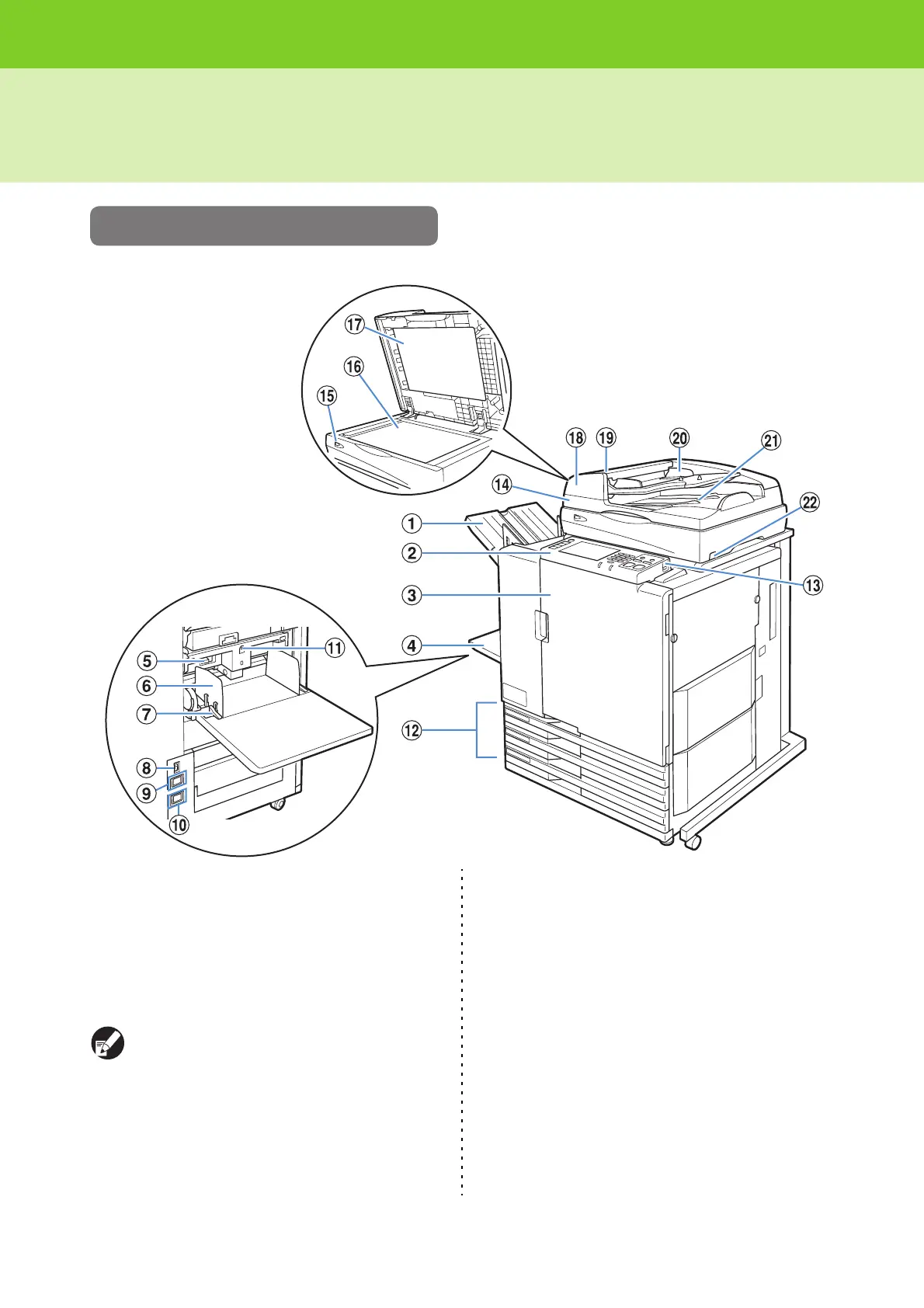
<The ComColor 9150 is shown in this illustration.>
a Face Down Tray
The printouts are output face-down.
b Operation Panel
Use to perform operations or settings.
c Front Cover
Open when paper is jammed or when replacing an ink
cartridge.
Normally (when there are no problems such as
paper jams), this cannot be opened. When you
want to open it, turn the [Front door release] to
ON.
d Standard Tray
Load special paper (thick paper, envelopes, etc.) here.
Plain paper can also be loaded in the standard tray.
e Paper Feed Pressure Adjustment Lever
Use to adjust the paper feed pressure to suit the paper
type in the standard tray.
f Standard Tray Paper Guide
Use to prevent paper in the standard tray from becoming
misaligned.
g Paper Feed Guide Lever
Use to slide or fix the standard tray paper guide. Levers
are located on both sides of the standard tray paper
guide, in two positions.













 To Next Page