18
ComColor Series User’s Guide 09
● How to Log In
● When using an optional IC card reader, you
can log in by holding the IC card over the card
reader.
● When using external system link, you must
select the billing account when you log in to the
copy mode. Specify the account on the [Billing
account] screen.
● When using multiple external servers (LDAP
servers) to perform authentication, you can
specify the login domain.
To specify the domain when you log in, ask
your administrator.
1
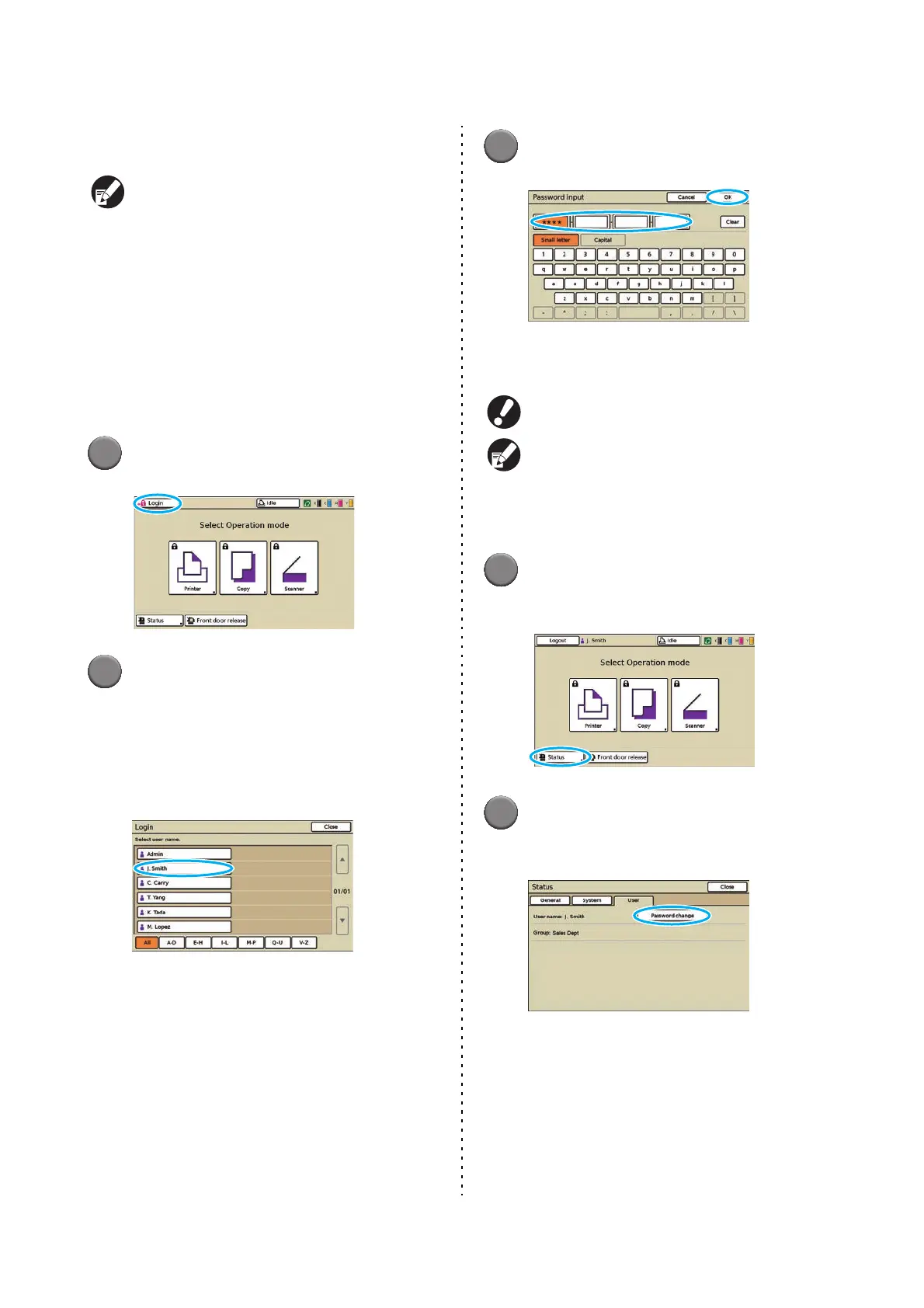
Press [Login].
2
On the [Login] screen, select your
name.
To find your name, press [S] or [T] at right to
scroll through names, or press the index buttons
on the bottom of the screen to display their
corresponding names.
After you select your name, the [Password input]
screen is displayed.
3
Enter the password and press [OK].
The screen for the mode you have logged in is
displayed.
After finishing operations, be sure to press [Logout].
Ask your administrator if you cannot find your
name, or if you have forgotten the password.
● Changing Login Passwords
1
Once you are logged in, press
[Status] on the mode screen.
2
On the [User] screen, press
[Password change].













 To Next Page