2-3
Overview of Copy Operations
2
ComColor Series User’s Guide 09
● 1 Loading Originals
For information on the types of originals that can be
loaded, see "Originals" in the "Safety Information".
■ In the ADF
1
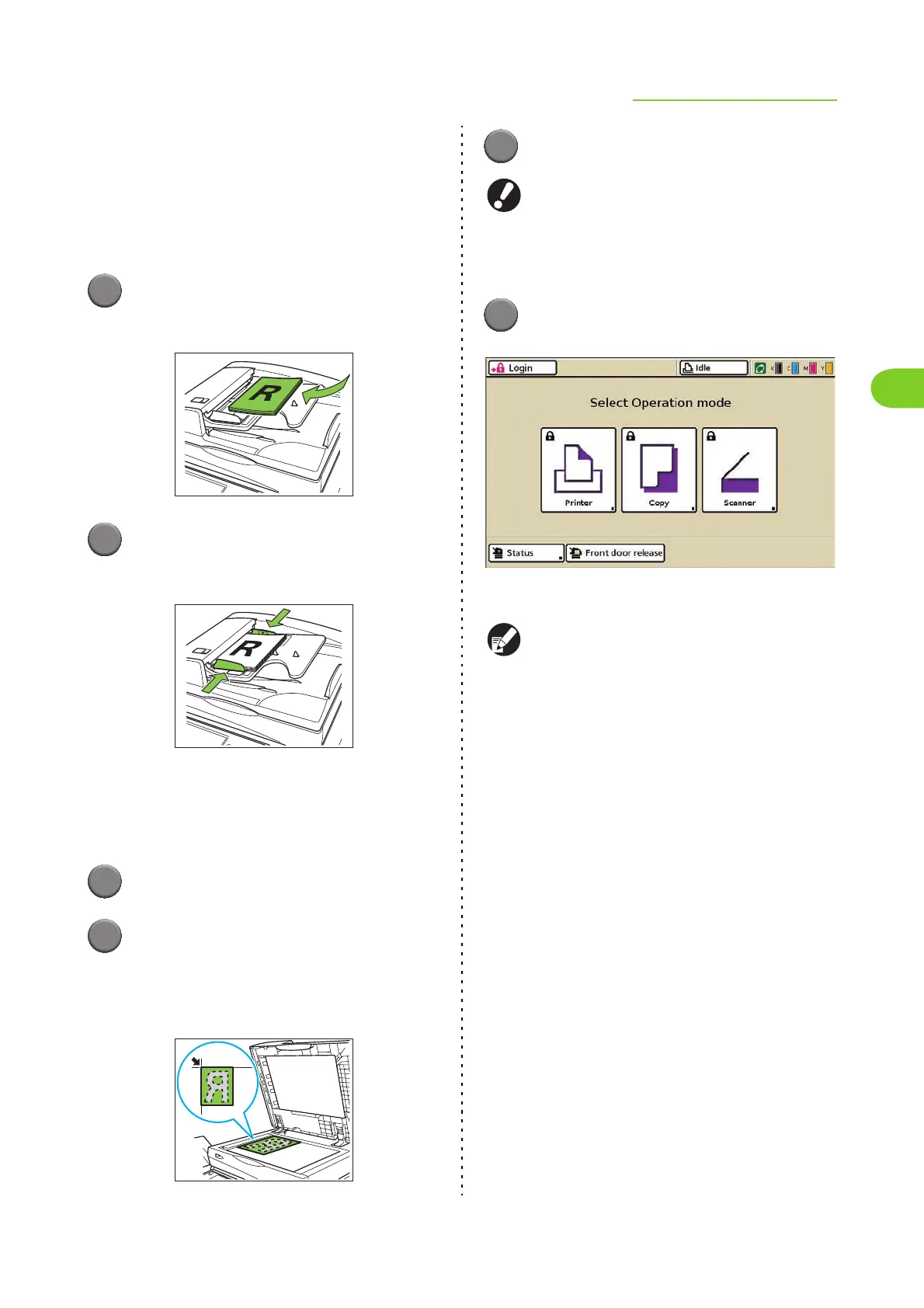
Load the original in the ADF.
Align the originals and place them face up.
2
Slide the original guides to match
the width of the originals.
■ On the Platen Glass
Open the original cover and load the original on the
glass surface.
1
Open the original cover.
2
Load the original.
Load the original face down on the glass. Align
the corner of the original with the upper-left corner
of the glass.
3
Close the original cover.
Open and close the original cover gently.
● 2 Selecting Copy Mode
1
Press [Copy] on the mode screen.
The copy mode screen is displayed.
● Press the MODE key to display the mode
screen.
● You may have to log in before the copy mode
screen is displayed. (p. 17 "Logging In")
● Buttons for modes that the current user is not
authorized to use are grayed out.
● When using an optional IC card reader, you
can log in by holding the IC card over the card
reader.
● The displayed mode buttons vary depending
on the optional equipment connected.
● When using external system link, you must
select the billing account when you log in to the
copy mode. Specify the account on the [Billing
account] screen.













 To Next Page