2-12
2 Copy
ComColor Series User’s Guide 09
2
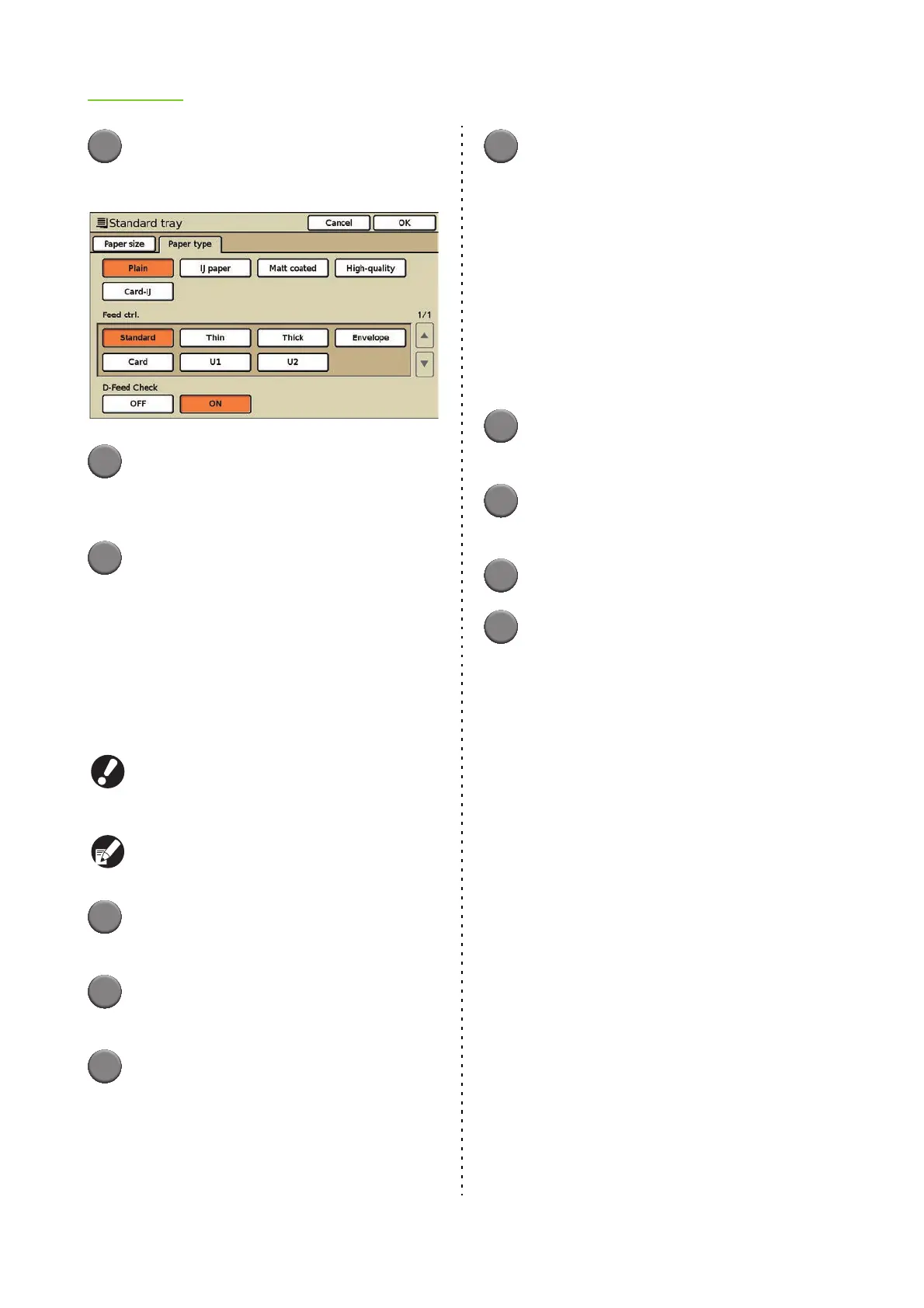
Press [Paper type].
The [Paper type] screen is displayed.
3
Select the paper type.
When the paper thickness changes, go to Step 3
in "Feed ctrl.".
4
Press [OK].
The settings are confirmed and the previous
screen is displayed.
■ Feed ctrl.
The timing for paper feeding is adjusted to suit the
paper thickness. Select from the following.
[Standard], [Thin], [Thick], [Envelope], [Card]
When you have selected [Envelope] for the
standard tray, duplex printing cannot be performed
from the standard tray.
The displayed settings vary depending on the
selected feed tray.
1
Display the [Paper size] screen.
Follow Steps 1 to 3 in "Changing the Feed Tray Setting".
2
Press [Paper type].
The [Paper type] screen is displayed.
3
Select the paper feed setting.
When using special paper, you can specify the
adjustment values U1 to U5 in advance and add
settings. For more information, consult your
dealer (or authorized service representative).
4
Press [OK].
The settings are confirmed and the previous
screen is displayed.
■ D-Feed Check
Select whether to detect the feeding of multiple sheets
of paper. Normally, select [ON]. This function uses
light permeability to detect multiple sheets of paper, so
when using paper printed on the back or paper with a
dark base color or envelopes, select [OFF].
[ON], [OFF]
1
Display the [Paper size] screen.
Follow Steps 1 to 3 in "Changing the Feed Tray Setting".
2
Press [Paper type].
The [Paper type] screen is displayed.
3
Press [ON] for D-Feed Check.
4
Press [OK].
The settings are confirmed and the previous
screen is displayed.













 To Next Page