8 | Functions and settings
Page 48 of 104 CIRUS
®
UPT-6400 VERSION 1 | EN-US
Return to standard
screen
The system returns to the standard screen if no button is pressed for 30sec. This
does not apply when the temperature controller is in AUTOCAL or ALARM position.
101
<1 s
>2 s
>2 s
201
<1 s
>2 s
>2 s
>2 s
>2 s
>2 s
301
<1 s
401
<1 s
501
<1 s
601
<1 s
<1 s
<1 s
<1 s
<1 s
<1 s
<1 s
<1 s
<1 s
<1 s
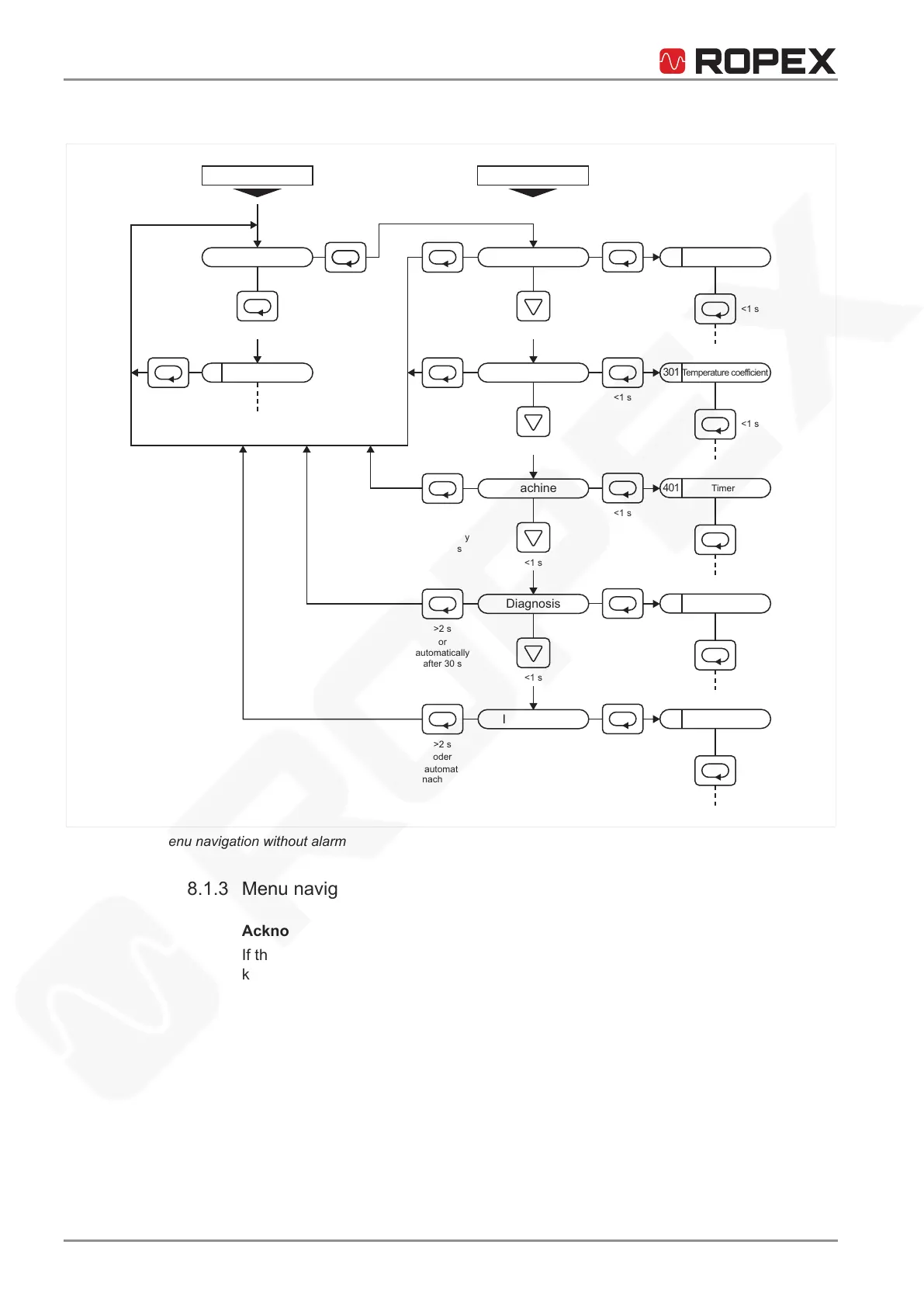
Settings Configuration
Standard screen
Sealing temperatur
or
automatically
after 30 s
Operation
Language
Heating element
or
automatically
after 30 s
or
automatically
after 30 s
Machine
Diagnosis
or
automatically
after 30 s
or
automatically
after 30 s
Information
oder
automat.
nach 30 s
Temperature coefficient
Timer
Setpoint reached
Cycle counter
Illustration12: Menu navigation without alarm
8.1.3 Menu navigation in the event of an alarm
Acknowledge error
If the event of an alarm, the temperature controller goes to the Alarm menu. To ac-
knowledge an error, proceed as follows:
Press Reset.
A list of the errors that can be acknowledged by pressing Reset can be found in
System monitoring and alarm output.
ð The temperature controller returns to the standard screen after acknowledg-
ment.
Change to AUTOCAL
In the menu item AUTOCAL, some errors can be remedied with the AUTOCAL func-
tion. To change to the menu item AUTOCAL, proceed as follows:
1. Press Menu briefly (< 2sec) to move to th menu item AUTOCAL (menu item 107).






 To Next Page