8 | Functions and settings
Page 68 of 104 CIRUS
®
UPT-6400 VERSION 1 | EN-US
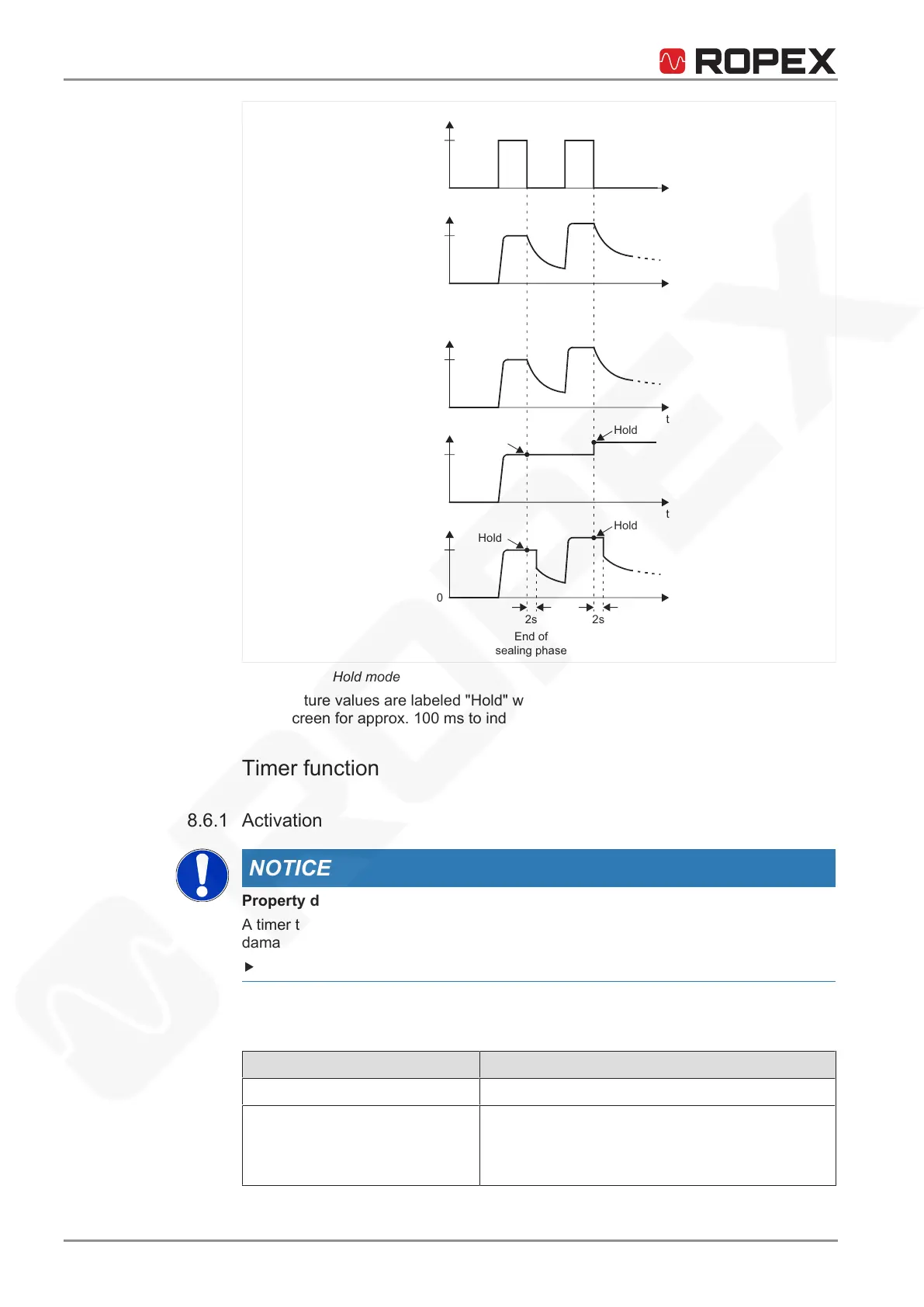
Actual
START
signal
1
temperature
T
t
t
0
0
Hold off
T
t
0
Actual display
Hold on
T
t
0
T
Hold 2 s
t
0
Hold
Hold
Hold
Hold
2s 2s
End of
sealing phase
Illustration23: Hold mode
Temperature values are labeled "Hold" when displayed in hold mode. "Hold" appears
in the screen for approx. 100ms to indicate that the hold value has been updated.
8.6 Timer function
8.6.1 Activation
NOTICE
Property damage caused by incorrect parameterization
A timer that is not parameterized correctly can cause disruptions in operation and
damage to equipment.
Essential settings may be made only by qualified electricians.
Activate the timer in the Machine menu, menu number401.
The following settings are possible:
Setting Description
OFF (default) Timer is off.
ON Timer is on. The internal course of time starts
when the START signal is activated. Timing ends
when the parameterized cooling phase is canceled
or when the RESET signal is activated.






 To Next Page