8 | Functions and settings
Page 70 of 104 CIRUS
®
UPT-6400 VERSION 1 | EN-US
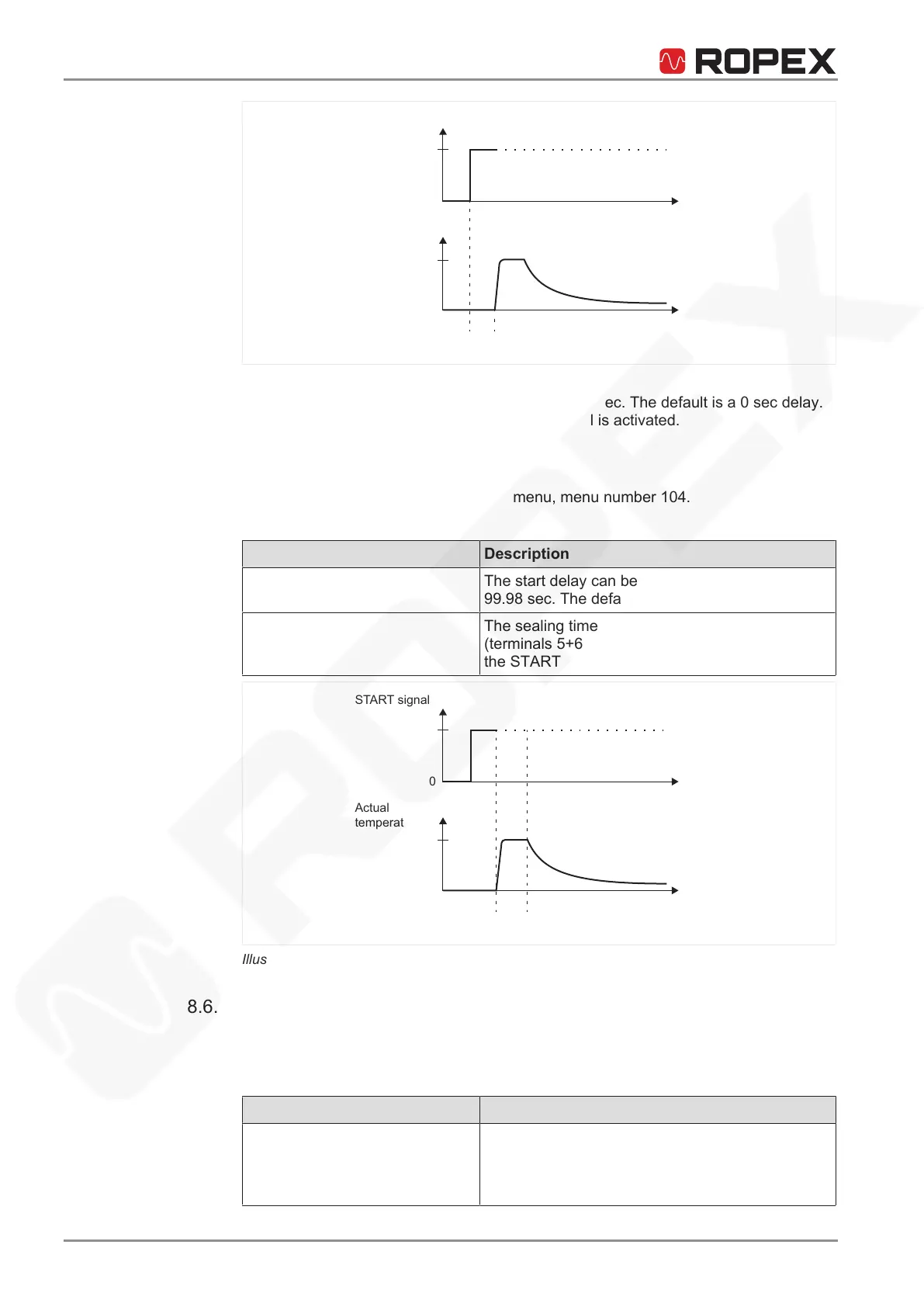
Actual
temperature
ST
ART signal
T
t
t
0
0
t
1
t = Setting start delay
1
Illustration25: Start delay
The start delay can be set within the range 0…9.98 sec. The default is a 0sec delay.
Heating begins immediately after the START signal is activated.
8.6.3 Setting sealing time
Enter the sealing time in the Settingsmenu, menu number104.
The following settings are possible:
Setting Description
0...99.98 sec The start delay can be set within the range 0…
99.98 sec. The default is 0.1sec.
External The sealing time is controlled by the START signal
(terminals5+6). Sealing continues for as long as
the START signal is active.
Actual
temperature
ST
ART signal
T
t
t
0
0
t
2
t = Heating phase
2
Illustration26: Setting sealing time
8.6.4 Setting cooling mode
Various processes related to the cooling phase can be specified in the Machine
menu, menu number402 on the temperature controller.
The following settings are possible:
Setting Description
Absolute (default) Cooling ends when the actual temperature of the
heating element has fallen to a specified tempera-
ture value. The cooling temperature can be set in
the Settings menu, menu number105.






 To Next Page