Functions and settings | 8
VERSION 1 | EN-US CIRUS
®
UPT-6400 Page 77 of 104
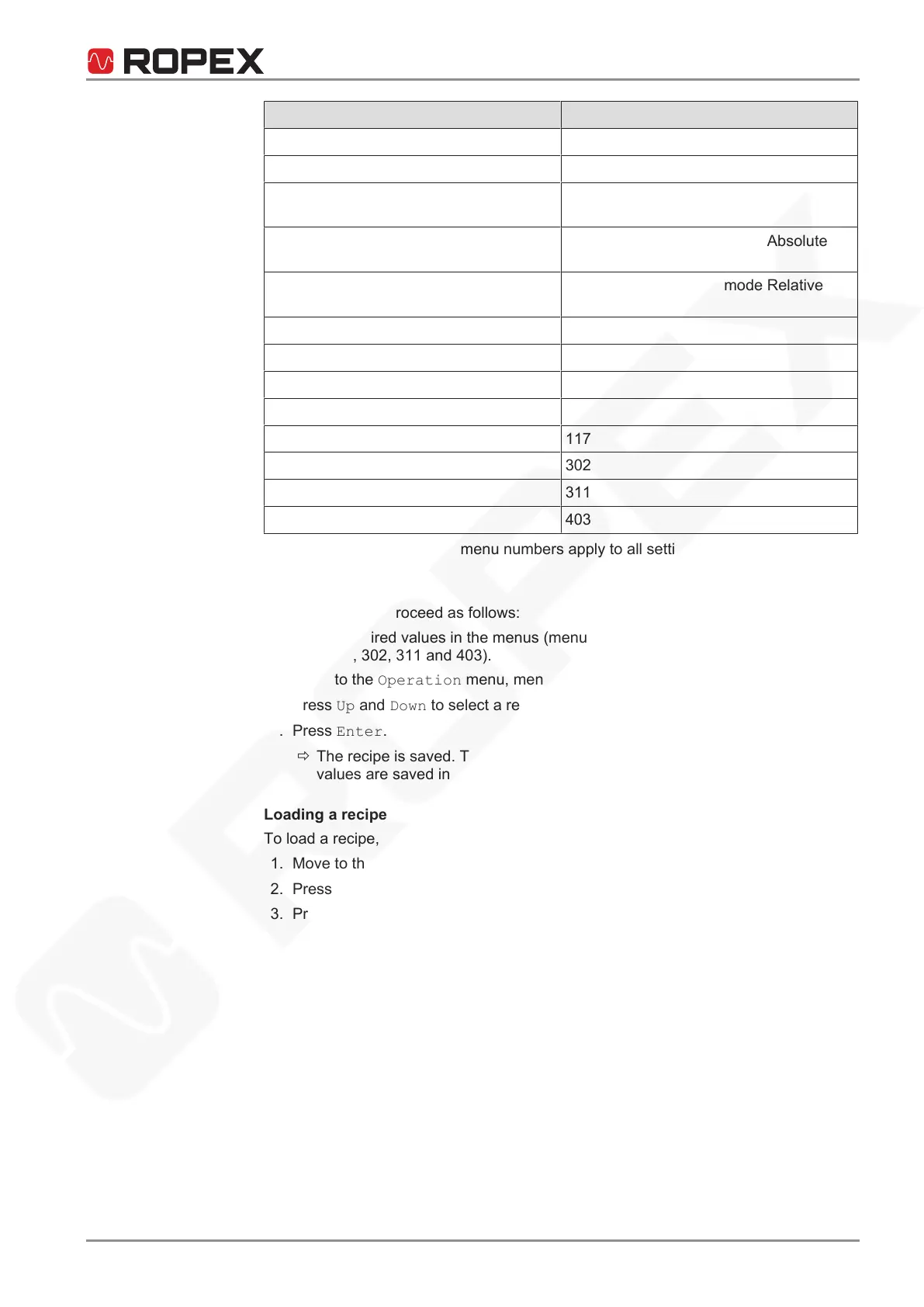
Menu item Menu number
Sealing temperature 101
Sealing time 104
Cooling time 105; applied in cooling mode Time (menu
number402)
Cooling temperature – absolute 105; applied in cooling mode Absolute
(menu number402)
Cooling temperature – relative 105; applied in cooling mode Relative
(menu number402)
AUTOCAL temperature 107
Correction factor 110
Temperature of release pulse 115
Release pulse delay 116
Duration of release pulse 117
Temperature coefficient 302
Calibration channel 311
Start delay 403
The values set in the known menu numbers apply to all settings not listed here.
Saving a recipe
To save a recipe, proceed as follows:
1. Set the desired values in the menus (menu number101, 104, 105, 107, 110, 115,
116, 117, 302, 311 and 403).
2. Move to the Operation menu, menu number212 (Save recipe).
3. Press Up and Down to select a recipe number (1...9).
4. Press Enter.
ð The recipe is saved. The confirmation appears on the screen for 2 sec. The
values are saved in the recipe.
Loading a recipe
To load a recipe, proceed as follows:
1. Move to the Settings menu, menu number112 (Load recipe).
2. Press Up and Down to select a recipe number (1...9).
3. Press Enter.
ð The recipe is loaded. The confirmation appears on the screen for 2 sec. The
values contained in the recipe are restored.
Recipe mode
Recipe mode makes it possible to use only saved recipes for configuration of the tem-
perature controller. The values in the menu numbers101, 104, 105, 110, 115, 116 and
117 cannot be adjusted outside of the menu. These menus are faded out in the menu
navigation. For example, the sealing temperature cannot be set in recipe mode. It can
be changed only by loading a recipe.
Recipe mode ensures that the correct settings are used for products to be manufac-
tured.
To activate recipe mode, proceed as follows:
1. Move to the Operation menu, menu number214 (Recipe mode).


 To Next Page
 Loading...