9
Reference Manual
00809-0100-4108, Rev CA
Configuration
March 2017
Configuration
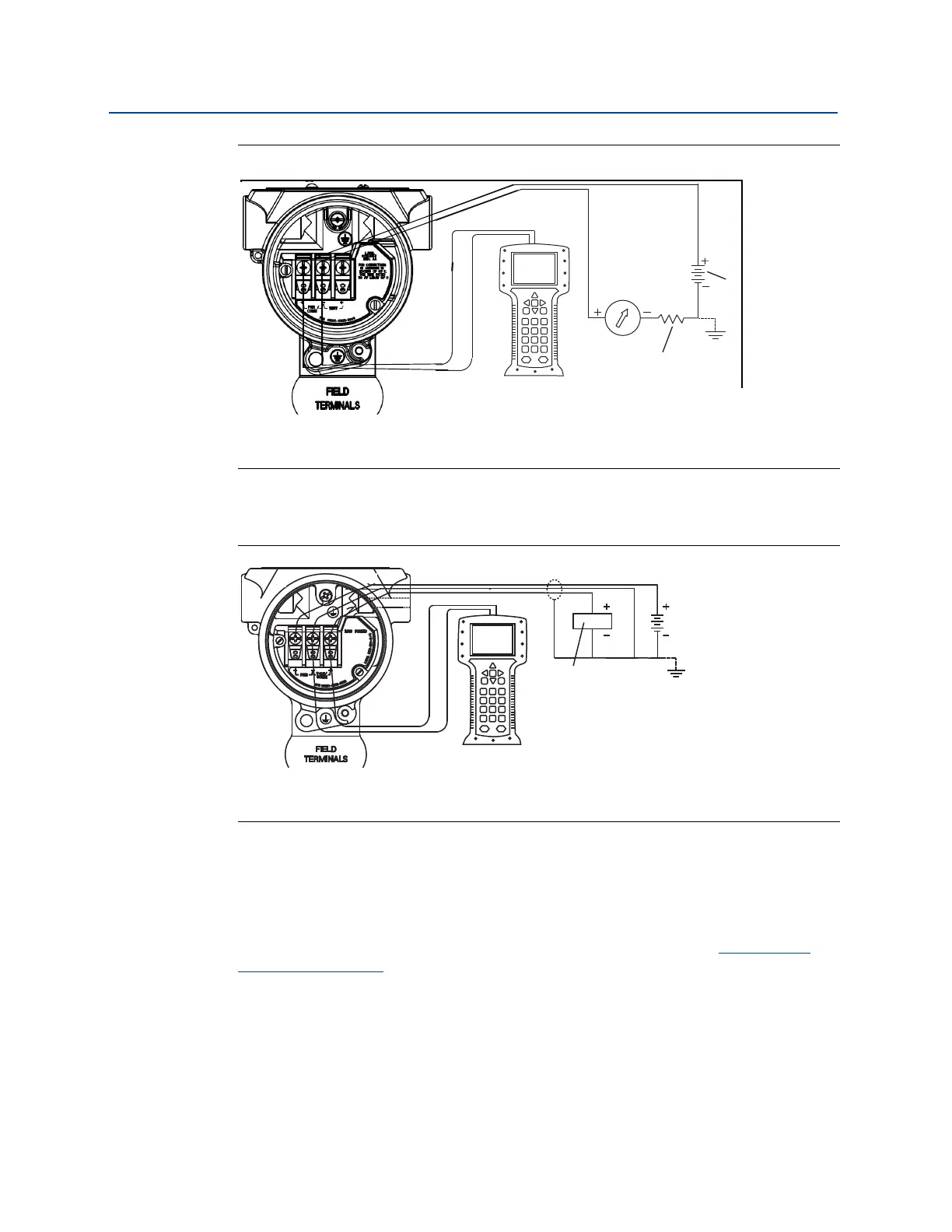
Figure 2-4. Wiring the Transmitter (4–20 mA HART)
A. Vdc supply
B. R
L
≥ 250 (necessary for HART communication only)
2.6.2 Configuration tools
Figure 2-5. Wiring the Transmitter (1–5 Vdc Low Power)
A. DC power supply
B. Voltmeter
Configuring with a Field Communicator
There are two interfaces available with the Field Communicator: Traditional and Dashboard
interfaces. All steps using a Field Communicator will be described using Dashboard
interfaces. HART shows the Device Dashboard interface. As stated in System readiness , it is
critical that the latest DD’s are loaded into the Field Communicator. Visit Emerson.com
or
FieldCommGroup.org
to download latest DD library.
Field Communicator menu trees and Fast Keys are available in Appendix C: Field
Communicator menu trees and Fast Keys.
A
B















 To Next Page