Date Code 20010731 Serial Port Communications and Commands 8-17
SEL-352-1, -2 Instruction Manual
CAL (Calibration Access Level)
Access Level 2
The CALIBRATION command is used to enter the calibration access level in the relay. Normal
relay operation does not require access to this level. The only user command that may be
necessary to use from this level is the R_S command, which resets factory default settings. Do
not access this level unless instructed by the factory or using the R_S command. The relay is
calibrated at the factory and will not need field calibration. Contact the factory if you suspect the
relay is not calibrated.
CEVE (Compressed Event)
Access Level 1
The SEL-5601 Analytic Assistant software is available for graphical analysis of event reports.
The CEVE command is a compressed (no formatting) version of the EVE command. Use the
CEVE command to download events for the SEL-5601 Analytic Assistant. Refer to
Appendix E: Compressed ASCII Commands for a complete description of the command.
CLO (Close)
Access Level B
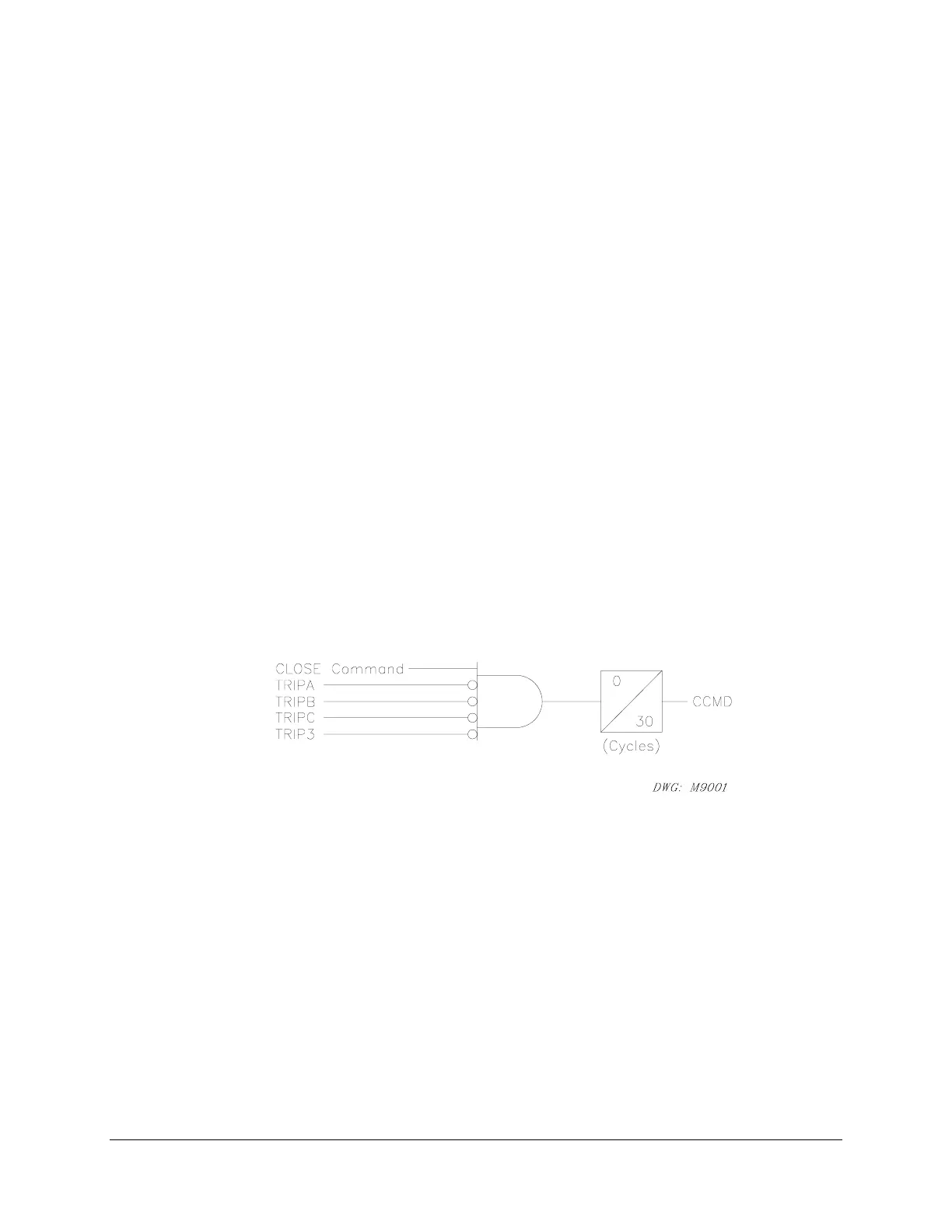
The CLOSE command asserts the CCMD bit if TRIPA, TRIPB, TRIPC, and TRIP3 are not all
asserted. The CCMD bit remains asserted for 30 cycles, then the relay checks the status of the
52A input assignments to determine if the breaker is closed.
Figure 8.3: CCMD Relay Word Bit
If the breaker closes successfully based on the 52A indication at the end of the 30 cycles, the
relay responds with “Breaker CLOSED.” If the breaker does not close based on the 52A
indication at the end of the 30 cycles, the relay responds with “Breaker OPEN.”
The CCMD bit typically is used as part of the MCLOSE input assignment. If the CLO
command is issued, the relay responds as if it had received a manual close input.
To close the circuit breaker with this command, type CLOSE <ENTER>. The prompting
message “Close Breaker (Y/N) ?” is displayed. Then “Are you sure (Y/N)?” Typing N
<ENTER> after either of the above prompts aborts the closing operation with the message
“Command Aborted.”
If the main board jumper JMP6B is not in place, the relay responds: “Aborted: Breaker Jumper
Not in Place.”



 To Next Page