2-20 Installation Date Code 20010731
SEL-352-1, -2 Instruction Manual
Second ALARM Contact Jumper
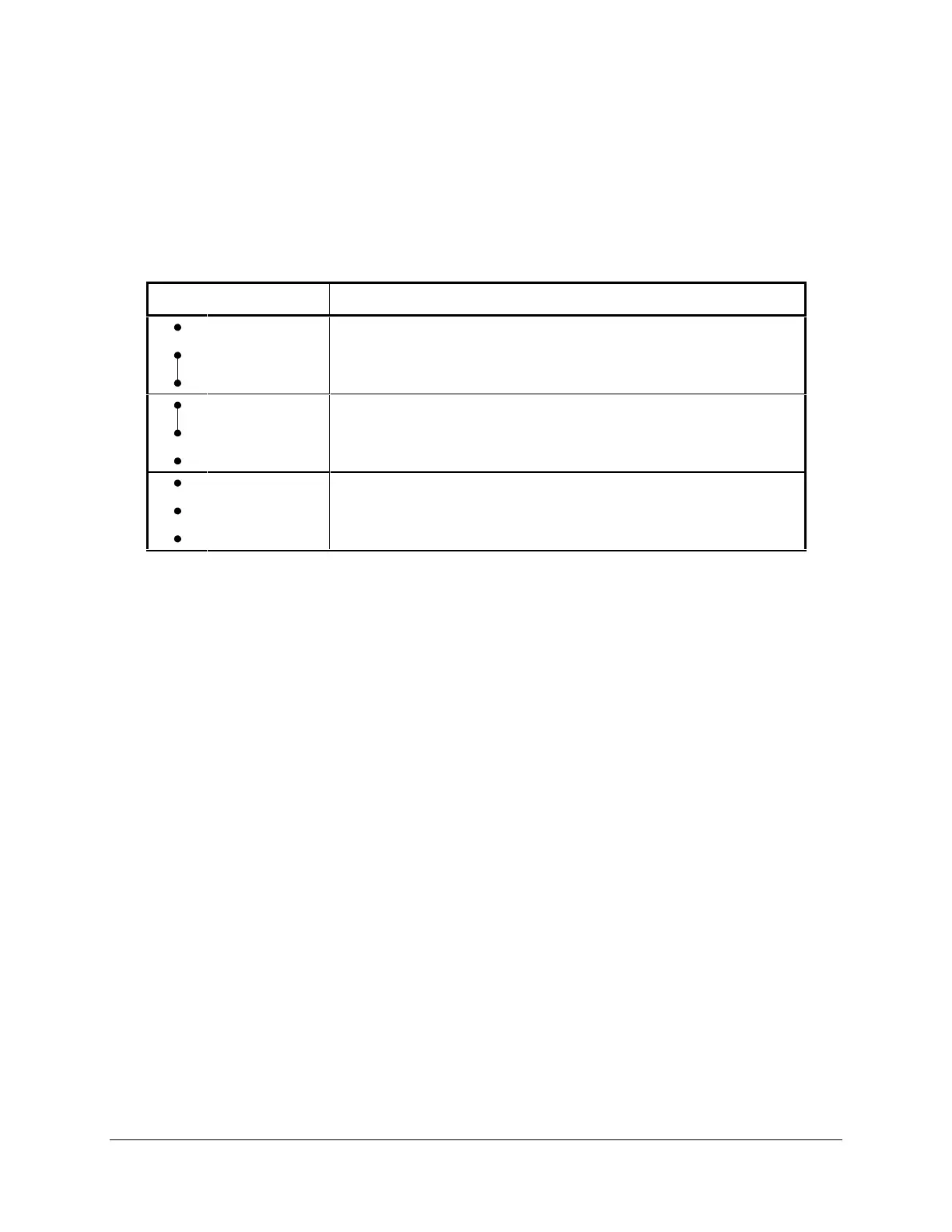
Note the locations of main board jumper JMP23 and output contact OUT107 in Figure 2.16, and
refer to Table 2.2 to understand the relationship between the jumper and output contact. The
jumper JMP23 controls the operation of output contact OUT107. JMP23 provides the option of
a second alarm output contact by changing the signal that drives output contact OUT107.
Table 2.2: SEL-352 Relay Second ALARM Contact Jumper Position
JMP23 Position Output Contact OUT107 Operation
Bottom
(Pins 1 & 2)
Second Alarm output contact (operated by alarm logic/circuitry).
Relay Word bit OUT107 has no effect on output contact OUT107
when jumper JMP23 is in this position.
Top
(Pins 2 & 3)
Regular output contact OUT107 (operated by Relay Word bit
OUT107). Jumper JMP23 comes in this position in a standard
relay shipment.
Neither Disable output contact OUT107. If JMP23 is not installed, output
contact OUT107 is not functional and will remain in its
de-energized state.
If jumper JMP23 is installed on the two bottom pins and both output contacts OUT107 and
ALARM are the same output contact type (a or b), they will be in the same state (closed or
open). If jumper JMP23 is installed on the two bottom pins and output contacts OUT107 and
ALARM are different output contact types (one is an “a” and one is a “b”), they will be in
opposite states (one is closed and one is open).
Password and Breaker Jumpers
Refer to Figure 2.16 and note the password and breaker jumpers identified as JMP6. To change
these jumpers, remove the relay front panel and main board according to the steps outlined
previously in Accessing the Relay Circuit Boards.
Put password jumper JMP6A (left-most jumper) in place to disable serial port and front-panel
password protection. With the jumper removed, password security is enabled. View or set the
passwords with the PASSWORD command (see Section 8: Serial Port Communications and
Commands).
Put breaker jumper JMP6B in place to enable the serial port commands OPEN, CLOSE, and
PULSE. The relay ignores these commands while you remove JMP6B. Use these commands
primarily to assert output contacts for circuit breaker control or testing purposes (see Section 8:
Serial Port Communications and Commands).
Do not install jumpers in position JMP6C or JMP6D. If a jumper is in position JMP6D and you
lose dc power to the relay, the relay will power up in SELBoot when power is restored. The
front panel will show “SELBoot” and then a warning to remove the jumper when you attempt
serial port communication.



 To Next Page