Date Code 20010731 Serial Port Communications and Commands 8-39
SEL-352-1, -2 Instruction Manual
STA (Status Report)
Access Level 1
The STATUS command displays a report of the self-test diagnostics. The relay automatically
executes the STATUS command whenever the self-test software enters a warning or failure
state. You may repeat the STA command by appending a number as a repeat count parameter.
Type STA 4<ENTER> to view the status information four times.
If a warning or failure state occurs, the next time the STA command is issued, the warning state
is reported. If a warning or failure occurs, it will not be cleared until relay power is cycled and
the problem is fixed. Saving relay settings performs a warm boot of relay logic. This may clear
some warnings, but do not ignore the warning; contact the factory.
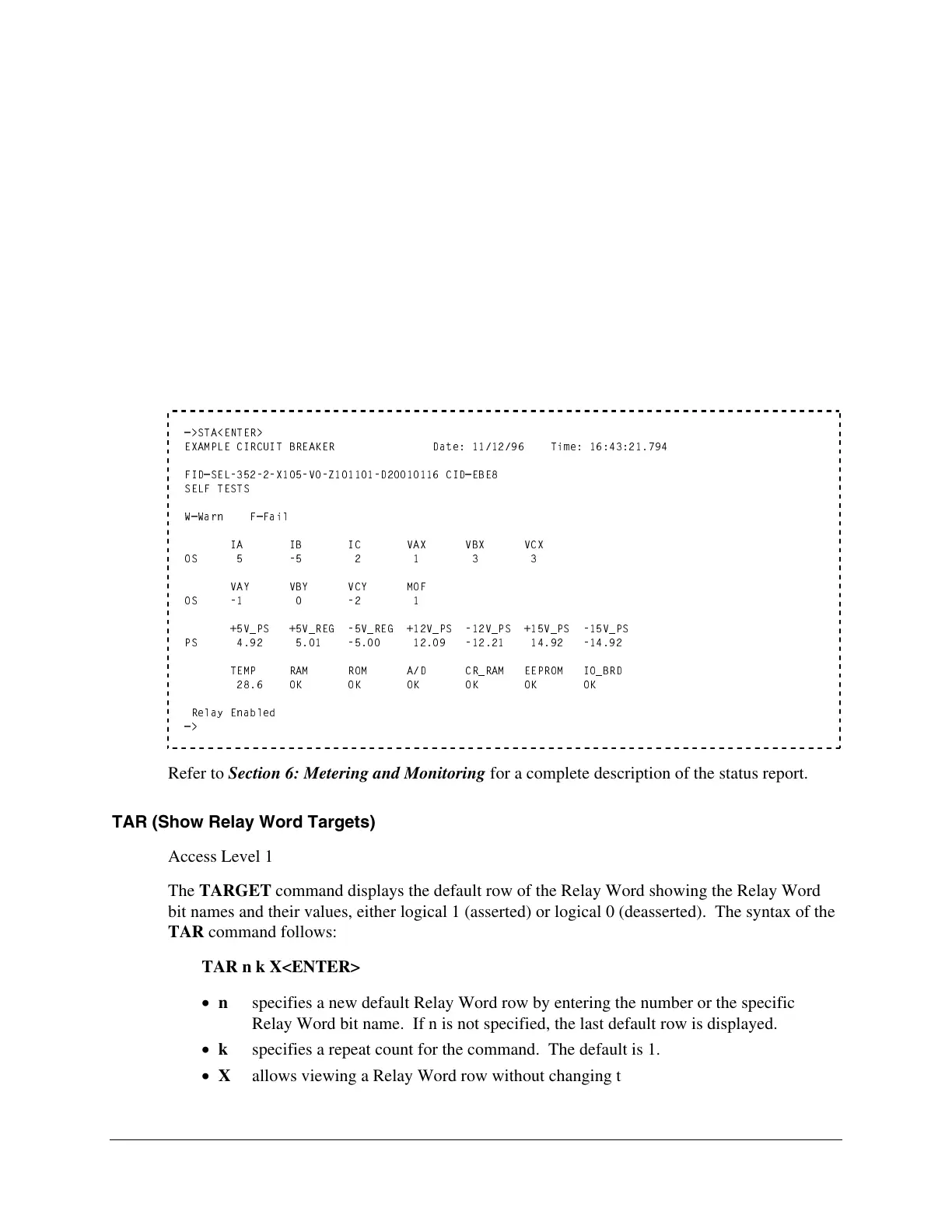
The STATUS report format appears below:
=>STA<ENTER>
EXAMPLE CIRCUIT BREAKER Date: 11/12/96 Time: 16:43:21.794
FID=SEL-352-2-X105-V0-Z101101-D20010116 CID=EBE8
SELF TESTS
W=Warn F=Fail
IA IB IC VAX VBX VCX
OS 5 -5 2 1 3 3
VAY VBY VCY MOF
OS -1 0 -2 1
+5V_PS +5V_REG -5V_REG +12V_PS -12V_PS +15V_PS -15V_PS
PS 4.92 5.01 -5.00 12.09 -12.21 14.92 -14.92
TEMP RAM ROM A/D CR_RAM EEPROM IO_BRD
28.6 OK OK OK OK OK OK
Relay Enabled
=>
Refer to Section 6: Metering and Monitoring for a complete description of the status report.
TAR (Show Relay Word Targets)
Access Level 1
The TARGET command displays the default row of the Relay Word showing the Relay Word
bit names and their values, either logical 1 (asserted) or logical 0 (deasserted). The syntax of the
TAR command follows:
TAR n k X<ENTER>
n specifies a new default Relay Word row by entering the number or the specific
Relay Word bit name. If n is not specified, the last default row is displayed.
k specifies a repeat count for the command. The default is 1.
X allows viewing a Relay Word row without changing the default row.


 To Next Page