Date Code 20010731 Front-Panel Interface 9-7
SEL-352-1, -2 Instruction Manual
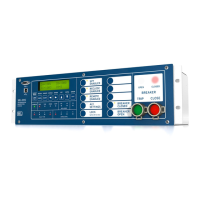
If you choose <SELECT> again, the group variable changes to the group selected. The group
variable is only used to change the active setting group if SS1 and SS2 are not asserted or not
assigned.
The <GROUP> button performs the GRO serial port command.
CANCEL
The <CANCEL> button returns the display to the previous menu. Use the <CANCEL> button
to go back after issuing a <SELECT>. If there is no previous menu, the default display is
shown. If the <CANCEL> button is pushed while in the default metering display mode, the
relay interprets the button as the <METER> button.
SELECT
The <SELECT> button is used within dialogues to select a menu choice. Once the choice is
identified with the arrow buttons, use the <SELECT> button to select that choice. Under the
group variable change, you are prompted “Are You Sure?” to change the setting group variable.
The <SELECT> button accepts the change.
Arrows
The arrow buttons are used throughout the front-panel displays for scrolling through lists of
items, identifying menu choices by moving the cursor, and scrolling to the left or right for more
information.
EXIT
If you push the <EXIT> button at any time within one of the dialogues, the procedure is
interrupted, and the display reverts to the default metering display.
Table 9.1: Front-Panel Button Serial Port Equivalents
Button Similar Serial Port Commands
TARGET RESET
TAR R
METER
MET
EVENTS
HIS, SER, BRE
STATUS
STA
OTHER
DAT, TIM, QUI
SET
SET, SET P, SHO, SHO P, PAS
CNTRL
OPE, CLO (default)
GROUP
GRO



 To Next Page