11-10 Testing and Troubleshooting Date Code 20010731
SEL-352-1, -2 Instruction Manual
Step 16.
Purpose: Verify the 87H element pickup, the 50LDA element pickup, and the
flashover detection logic.
Method: 1. Verify the 87H, 50LD, and FFpu settings by typing SHO 87H
<ENTER>, SHO 50LD <ENTER> and SHO FFpu <ENTER>.
<CTRL X> cancels the scrolling after each command.
2. Remove the parallel connection of the X and Y voltage inputs to the
relay. These are shown in Figure 11.3 and Figure 11.4 as dotted lines.
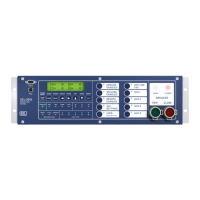
3. Set the target LEDs to display the high set differential voltage
condition by typing TARGET F 87H <ENTER>. The front-panel
LEDs should now follow Row 7 of the Relay Word where 87H is
listed.
4. Increase A-phase voltage until the 87H LED illuminates. This should
occur when the voltage reaches the 87H setting. Leave the voltage 10
V higher than this level.
5. Set the target LEDs to display the load condition overcurrent element
by typing TAR F 50LD <ENTER>. The front-panel LEDs should
now follow Row 8 of the Relay Word where 50LD is listed.
6. Increase A-phase current until the 50LD LED illuminates without
flashing. This should occur when the current reaches the 50LD
setting. Now remove the current from the relay, but leave the current
source at two times this level.
7. Set the target LEDs to display the output contacts by typing TAR F
OUT101 <ENTER>. The front-panel LEDs should now follow Row
73 of the Relay Word where OUT101 is listed.
8. From Access Level 2, set up the Sequential Events Recorder by typing
SET R SER1 <ENTER>. Enter 87H <SPACE> 86BFT <ENTER>.
Type END <ENTER>, and save the settings.
9. Simulate a flashover condition. When a flashover occurs, the voltage
across a breaker collapses and current flows. To simulate a flashover
condition, turn off the voltage and apply the current at the same time.
You have a 5-cycle window for these two conditions to occur, and the
current must remain for the FFpu timer setting.
10. Output contact 101 should close at this time, and OUT101 LED should
illuminate. The relay default settings have OUT101=86BFT, and the
flashover protection output FOBF is part of the M86T equation, which
sets the 86BFT element.
Step 17.
Purpose: Examine the Sequential Events Records.
Method: Type SER <ENTER>. The relay displays up to 512 SERs. The last few
SERs correspond to your most recent test. The SER time stamps each
assertion or deassertion of the elements you programmed in the SER1


 To Next Page