14
Camera Buttons
Hereisabriefdescriptionforeachofthe8pushbuttons
Button Description
Power PushthePowerbuttontoturnthepoweron/off.
Shutter Pushtocaptureanimage(half-pushtosetandlockfocus).
Menu Pushtoenterorexitmenu/submenu.
Modedial
Thereare8recordingmodescanbeset.Onceturningthemodedial,itentersthe
selectedmodeimmediatelyeveninPlaybackmodeorduringmovierecording.
Playback PushtoenablePlaybackmodeorreturnRecordmode.
Movie Pushtostart/stoprecordingvideo.
Wireless
PushtoenterAutoSendMenuandQuickSendNavigation.
UsingtheWirelessfunction”onpage76formoredetails.
OK Pushtoconrmmenuselection.
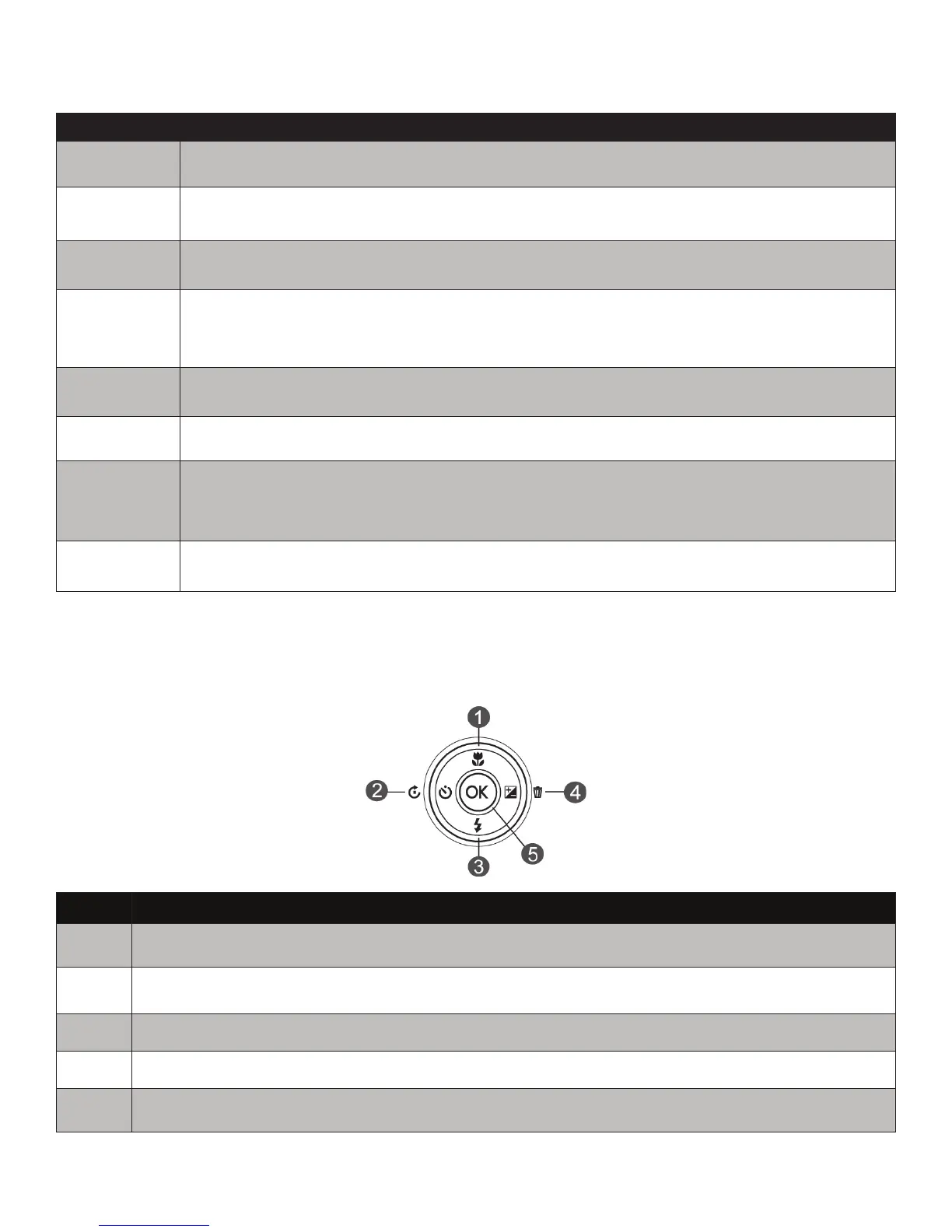
Navigation Control
The4-way Navigation ControlandtheOKbuttonallowyoutoaccessthevariousmenusavailable
fromtheOnScreenDisplay(OSD).
No. Description
1 Focus/Upbutton
2 Self-timer/Leftbutton(RotatebuttoninPlayback)
3 Flash/Downbutton
4 EV/Rightbutton(DeletebuttoninPlayback
5 OKButton



 To Next Page