21
UsingtheLCDmonitor
TheLCDmonitorshowsimportantinformationaboutcamerasettingsaswellasalivepreviewfor
composingyourpictures.ThedisplayontheLCDmonitoriscalledtheOnScreenDisplayorOSD.
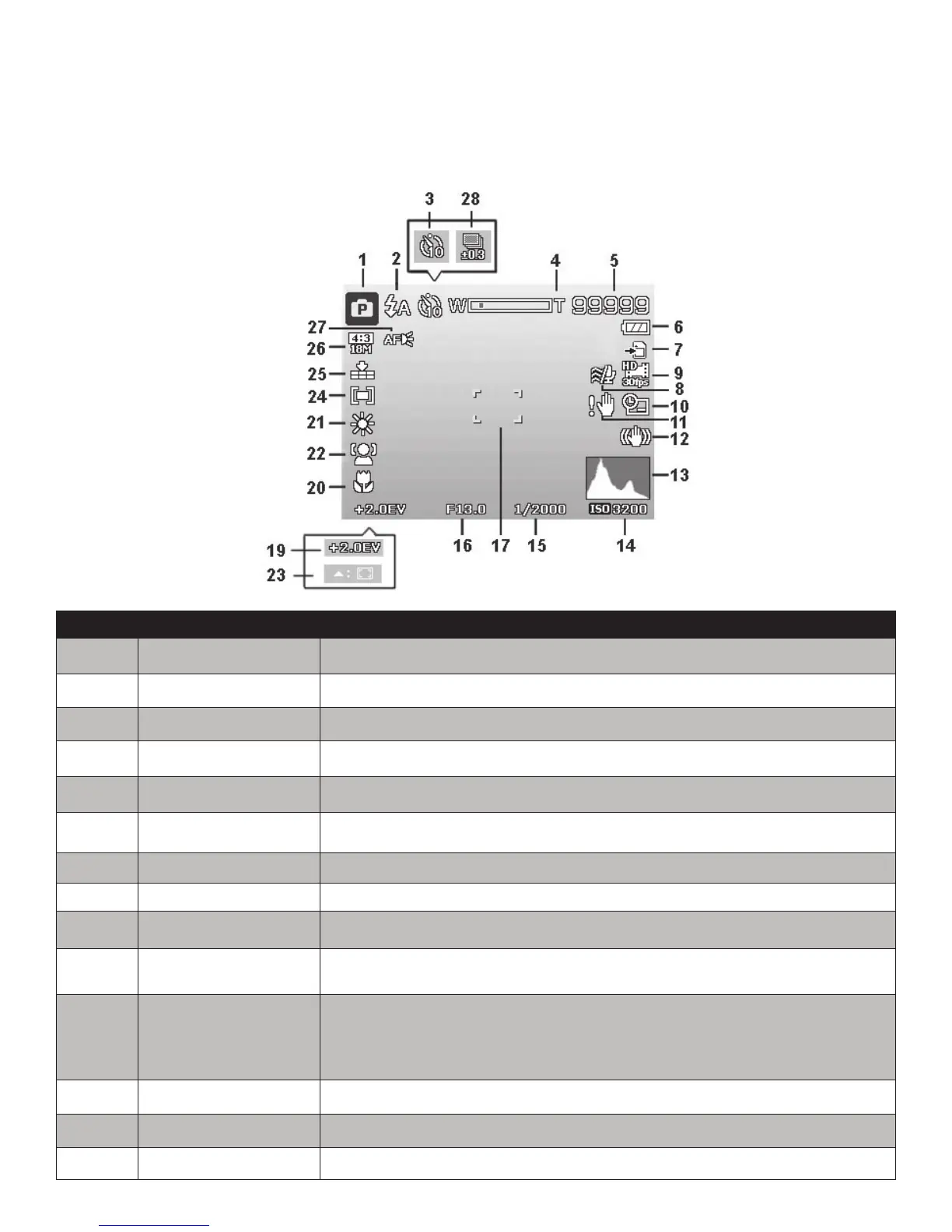
LCD Monitor Layout - Record Mode Screen
No. Item Description
1 RecordMode Indicatesthecurrentshootingmode.
2 Flash Indicatesashsetting.
3 Self-timer IndicatesSelf-timersetting.
4 Zoomindicator Displayszoom.
5 Shotsremaining Indicatestheremainingshotsavailable.
6 Battery Indicatesbatterylevel.
7 Storagemedia Indicatescurrentstoragemediainuse.
8 WindCut Reduceswindnoiseduringmovierecording.
9 Moviesize Indicatesvideoresolution.
10 Datestamp Indicatesdatestampisenabled.
11 Shakewarning
Indicatesthelowlightcondition,whichmaycausethepicturetobe
blurred.Iftheshakewarningiconappears,itisrecommendedto
enabletheFlashoruseatripodtostabilizethecamera.
12 Stabilizer Indicatesvideostabilizerfunctionisenabled.
13 Histogram GraphicdisplayofBrightness.
14 ISO DisplaysISOsetting.



 To Next Page